Proofpoint Essentials Integration for Elastic
| Version | 0.1.0
|
| Subscription level What's this? |
Basic |
| Developed by What's this? |
Elastic |
| Ingestion method(s) | API |
| Minimum Kibana version(s) | 9.0.0 8.18.0 |
To use beta integrations, go to the Integrations page in Kibana, scroll down, and toggle on the Display beta integrations option.
The Proofpoint Essentials integration with Elastic enables the collection of threats for monitoring and analysis. This valuable data can be leveraged within Elastic to analyze potential threat signals, including spam, phishing, business email compromise (BEC), imposter emails, ransomware, and malware.
This integration utilizes the Proofpoint Essentials Threat API to collect threat events.
The Proofpoint Essentials integration uses the REST API. It uses the /v2/siem/all to collect threat events.
The threat data stream uses the /v2/siem/all endpoint to gather all threats starting from the configured initial interval. Subsequently, it fetches the recent threats available at each specified interval.
The gathered threat data is subsequently routed into individual data streams, each corresponding to a specific threat type.
The Proofpoint Essentials integration collects threat events of the following types:
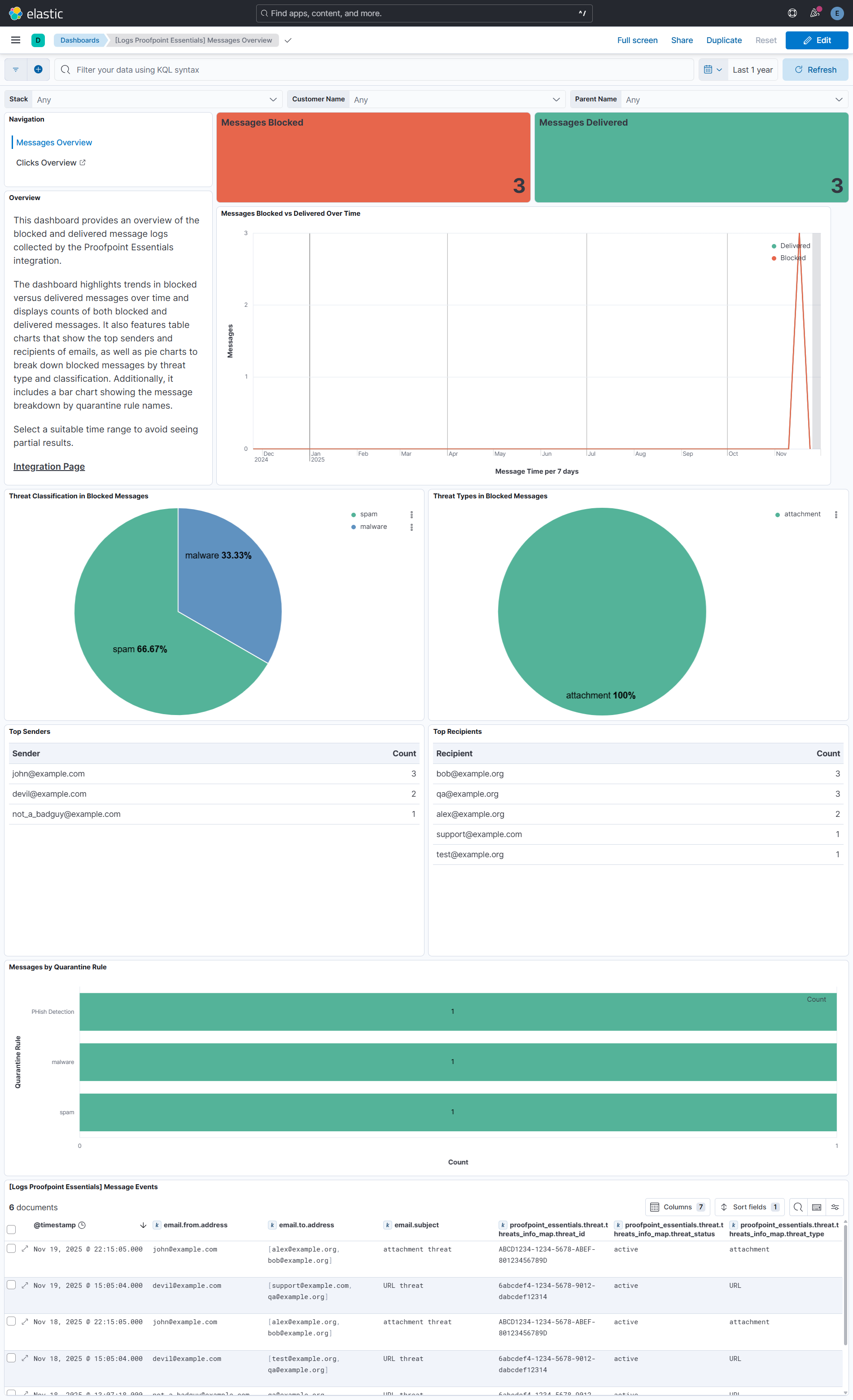
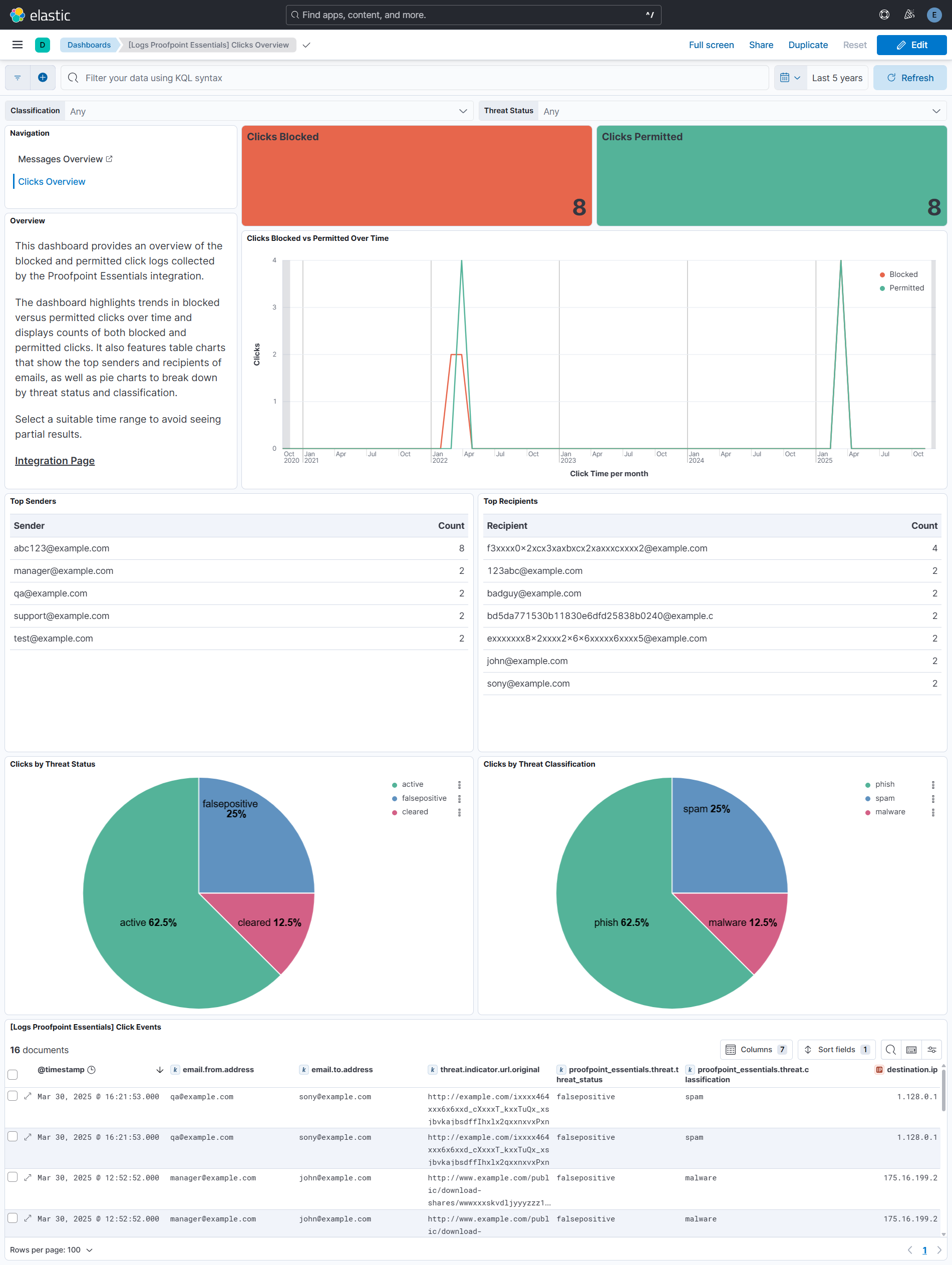
clicks_blocked: events for clicks on malicious URLs blocked by URL Defense.clicks_permitted: events for clicks on malicious URLs permitted by URL Defense.message_blocked: events for blocked messages that contain threats recognized by URL Defense or Attachment Defense.message_delivered: events for delivered messages that contain threats recognized by URL Defense or Attachment Defense.
Integrating Proofpoint Essentials with Elastic SIEM enriches your security operations with targeted email threat intelligence. It enables the detection, investigation, and analysis of phishing, malware, and other email-based threats by leveraging detailed data on clicks and message events.
- Navigate to
- Go to Account Management > Integrations, then select the Integration Keys tab.
- Add a New Key
- Click Add Integration Key in the upper right-hand corner.
- Enter Key Details
- Provide a description to help identify the purpose of the key.
- In the Access Type dropdown, select SIEM Threat Events
- Set Scope
- If you are part of an organisation, the Scope field will be locked to My Organisation Only.
- If you are a partner, you can choose between:
- My Organisation Only
- My Organisation and All Child Organisations
- Create and Save Credentials
- After clicking Create, you’ll receive API Key and API Key Secret.
- Activation Time
- The key may take up to 30 minutes to become active.
For more details, check Documentation.
Elastic Agent must be installed. For more details, check the Elastic Agent installation instructions. You can install only one Elastic Agent per host.
Elastic Agent is required to stream data from the syslog or log file receiver and ship the data to Elastic, where the events will then be processed via the integration's ingest pipelines.
Agentless deployments are only supported in Elastic Serverless and Elastic Cloud environments. Agentless deployments provide a means to ingest data while avoiding the orchestration, management, and maintenance needs associated with standard ingest infrastructure. Using an agentless deployment makes manual agent deployment unnecessary, allowing you to focus on your data instead of the agent that collects it.
For more information, refer to Agentless integrations and Agentless integrations FAQ
In the top search bar in Kibana, search for Integrations.
In the search bar, type Proofpoint Essentials.
Select the Proofpoint Essentials integration from the search results.
Select Add Proofpoint Essentials to add the integration.
Enable and configure only the collection methods which you will use.
To Collect Proofpoint Essentials logs via API, you'll need to:
- Configure URL, API Key, and API Key Secret.
- Adjust the integration configuration parameters if required, including the Interval, Collect Customer Data, Collect Own Data, Preserve original event etc. to enable data collection.
Select Save and continue to save the integration.
- In the top search bar in Kibana, search for Dashboards.
- In the search bar, type Proofpoint Essentials.
- Select a dashboard for the dataset you are collecting, and verify the dashboard information is populated.
For help with Elastic ingest tools, check Common problems.
For more information on architectures that can be used for scaling this integration, check the Ingest Architectures documentation.
Exported fields
| Field | Description | Type |
|---|---|---|
| @timestamp | Date/time when the event originated. This is the date/time extracted from the event, typically representing when the event was generated by the source. If the event source has no original timestamp, this value is typically populated by the first time the event was received by the pipeline. Required field for all events. | date |
| data_stream.dataset | The field can contain anything that makes sense to signify the source of the data. Examples include nginx.access, prometheus, endpoint etc. For data streams that otherwise fit, but that do not have dataset set we use the value "generic" for the dataset value. event.dataset should have the same value as data_stream.dataset. Beyond the Elasticsearch data stream naming criteria noted above, the dataset value has additional restrictions: * Must not contain - * No longer than 100 characters |
constant_keyword |
| data_stream.namespace | A user defined namespace. Namespaces are useful to allow grouping of data. Many users already organize their indices this way, and the data stream naming scheme now provides this best practice as a default. Many users will populate this field with default. If no value is used, it falls back to default. Beyond the Elasticsearch index naming criteria noted above, namespace value has the additional restrictions: * Must not contain - * No longer than 100 characters |
constant_keyword |
| data_stream.type | An overarching type for the data stream. Currently allowed values are "logs" and "metrics". We expect to also add "traces" and "synthetics" in the near future. | constant_keyword |
| event.dataset | Name of the dataset. If an event source publishes more than one type of log or events (e.g. access log, error log), the dataset is used to specify which one the event comes from. It's recommended but not required to start the dataset name with the module name, followed by a dot, then the dataset name. | constant_keyword |
| event.module | Name of the module this data is coming from. If your monitoring agent supports the concept of modules or plugins to process events of a given source (e.g. Apache logs), event.module should contain the name of this module. |
constant_keyword |
| input.type | Type of filebeat input. | keyword |
| log.offset | Log offset. | long |
| observer.vendor | Vendor name of the observer. | constant_keyword |
| proofpoint_essentials.threat.cc_addresses | A list of email addresses contained within the CC: header, excluding friendly names. | keyword |
| proofpoint_essentials.threat.classification | The threat category of the malicious URL. | keyword |
| proofpoint_essentials.threat.click_ip | The external IP address of the user who clicked on the link. If the user is behind a firewall performing network address translation, the IP address of the firewall will be shown. | ip |
| proofpoint_essentials.threat.click_time | The time the user clicked on the URL. | date |
| proofpoint_essentials.threat.completely_rewritten | The rewrite status of the message. | keyword |
| proofpoint_essentials.threat.customer_eid | The customer's entity ID. | keyword |
| proofpoint_essentials.threat.customer_name | The customer's name, as configured in Essentials. | keyword |
| proofpoint_essentials.threat.event_type | keyword | |
| proofpoint_essentials.threat.from_address | The email address contained in the From: header, excluding friendly name. | keyword |
| proofpoint_essentials.threat.guid | The ID of the message within PPS. It can be used to identify the message in PPS and is guaranteed to be unique. | keyword |
| proofpoint_essentials.threat.header_from | The full content of the From: header, including any friendly name. | keyword |
| proofpoint_essentials.threat.header_reply_to | If present, the full content of the Reply-To: header, including any friendly names. | keyword |
| proofpoint_essentials.threat.id | The unique id of the click. | keyword |
| proofpoint_essentials.threat.impostor_score | The impostor score of the message. Higher scores indicate higher certainty. | long |
| proofpoint_essentials.threat.malware_score | The malware score of the message. Higher scores indicate higher certainty. | long |
| proofpoint_essentials.threat.message_details_url | A permalink to the messages' details page. | keyword |
| proofpoint_essentials.threat.message_id | Message-ID extracted from the headers of the email message. It can be used to look up the associated message in PPS and is not unique. | keyword |
| proofpoint_essentials.threat.message_parts.content_type | The true, detected Content-Type of the message_part. This may differ from the o_content_type value. | keyword |
| proofpoint_essentials.threat.message_parts.disposition | If the value is "inline", the message_part is a message body. If the value is "attached", the message_part is an attachment. | keyword |
| proofpoint_essentials.threat.message_parts.filename | The filename of the message_part. | keyword |
| proofpoint_essentials.threat.message_parts.md5 | The MD5 hash of the message_part contents. | keyword |
| proofpoint_essentials.threat.message_parts.o_content_type | The declared Content-Type of the message_part. | keyword |
| proofpoint_essentials.threat.message_parts.sandbox_status | The verdict returned by the sandbox during the scanning process. | keyword |
| proofpoint_essentials.threat.message_parts.sha256 | The SHA256 hash of the message_part contents. | keyword |
| proofpoint_essentials.threat.message_size | The size in bytes of the message, including headers and attachments. | long |
| proofpoint_essentials.threat.message_time | When the message was delivered to the user or quarantined by PPS. | date |
| proofpoint_essentials.threat.parent_eid | The parent's EID. | keyword |
| proofpoint_essentials.threat.parent_name | The parent's name, as configured in Essentials. | keyword |
| proofpoint_essentials.threat.phish_score | The phish score of the message. Higher scores indicate higher certainty. | long |
| proofpoint_essentials.threat.quarantine_rule | The name of the rule which quarantined the message. This appears only for messages_blocked events. | keyword |
| proofpoint_essentials.threat.recipient | An array containing the email addresses of the SMTP (envelope) recipients. | keyword |
| proofpoint_essentials.threat.reply_to_address | The email address contained in the Reply-To: header, excluding friendly name. | keyword |
| proofpoint_essentials.threat.sender | The email address of the SMTP (envelope) sender. The user-part is hashed. The domain-part is cleartext. | keyword |
| proofpoint_essentials.threat.sender_ip | The IP address of the sender. | ip |
| proofpoint_essentials.threat.spam_score | The spam score of the message. Higher scores indicate higher certainty. | long |
| proofpoint_essentials.threat.stack_name | The name of the Essentials stack which processed the message. | keyword |
| proofpoint_essentials.threat.subject | The subject line of the message, if available. | keyword |
| proofpoint_essentials.threat.threat_id | The unique identifier associated with this threat. It can be used to query the forensics and campaign endpoints. | keyword |
| proofpoint_essentials.threat.threat_status | The current state of the threat. | keyword |
| proofpoint_essentials.threat.threat_time | Proofpoint identified the URL as a threat at this time. | date |
| proofpoint_essentials.threat.threats_info_map.actors | An array of structures which contain details about the actors associated with a threat. | nested |
| proofpoint_essentials.threat.threats_info_map.classification | The category of threat found in the message. | keyword |
| proofpoint_essentials.threat.threats_info_map.detection_type | keyword | |
| proofpoint_essentials.threat.threats_info_map.threat | The artifact which was condemned by Proofpoint. The malicious URL, hash of the attachment threat, or email address of the impostor sender. | keyword |
| proofpoint_essentials.threat.threats_info_map.threat_id | The unique identifier associated with this threat. It can be used to query the forensics and campaign endpoints. | keyword |
| proofpoint_essentials.threat.threats_info_map.threat_status | The current state of the threat. | keyword |
| proofpoint_essentials.threat.threats_info_map.threat_time | Proofpoint assigned the threat_status at this time. | date |
| proofpoint_essentials.threat.threats_info_map.threat_type | Whether the threat was an attachment, URL, or message type. | keyword |
| proofpoint_essentials.threat.to_addresses | A list of email addresses contained within the To: header, excluding friendly names. | keyword |
| proofpoint_essentials.threat.url | The malicious URL which was clicked. | keyword |
| proofpoint_essentials.threat.user_agent | The User-Agent header from the clicker's HTTP request. | keyword |
| proofpoint_essentials.threat.xmailer | The content of the X-Mailer: header, if present. | keyword |
Exported fields
| Field | Description | Type |
|---|---|---|
| @timestamp | Date/time when the event originated. This is the date/time extracted from the event, typically representing when the event was generated by the source. If the event source has no original timestamp, this value is typically populated by the first time the event was received by the pipeline. Required field for all events. | date |
| data_stream.dataset | The field can contain anything that makes sense to signify the source of the data. Examples include nginx.access, prometheus, endpoint etc. For data streams that otherwise fit, but that do not have dataset set we use the value "generic" for the dataset value. event.dataset should have the same value as data_stream.dataset. Beyond the Elasticsearch data stream naming criteria noted above, the dataset value has additional restrictions: * Must not contain - * No longer than 100 characters |
constant_keyword |
| data_stream.namespace | A user defined namespace. Namespaces are useful to allow grouping of data. Many users already organize their indices this way, and the data stream naming scheme now provides this best practice as a default. Many users will populate this field with default. If no value is used, it falls back to default. Beyond the Elasticsearch index naming criteria noted above, namespace value has the additional restrictions: * Must not contain - * No longer than 100 characters |
constant_keyword |
| data_stream.type | An overarching type for the data stream. Currently allowed values are "logs" and "metrics". We expect to also add "traces" and "synthetics" in the near future. | constant_keyword |
| event.dataset | Name of the dataset. If an event source publishes more than one type of log or events (e.g. access log, error log), the dataset is used to specify which one the event comes from. It's recommended but not required to start the dataset name with the module name, followed by a dot, then the dataset name. | constant_keyword |
| event.module | Name of the module this data is coming from. If your monitoring agent supports the concept of modules or plugins to process events of a given source (e.g. Apache logs), event.module should contain the name of this module. |
constant_keyword |
| input.type | Type of filebeat input. | keyword |
| log.offset | Log offset. | long |
| observer.vendor | Vendor name of the observer. | constant_keyword |
| proofpoint_essentials.threat.cc_addresses | A list of email addresses contained within the CC: header, excluding friendly names. | keyword |
| proofpoint_essentials.threat.classification | The threat category of the malicious URL. | keyword |
| proofpoint_essentials.threat.click_ip | The external IP address of the user who clicked on the link. If the user is behind a firewall performing network address translation, the IP address of the firewall will be shown. | ip |
| proofpoint_essentials.threat.click_time | The time the user clicked on the URL. | date |
| proofpoint_essentials.threat.completely_rewritten | The rewrite status of the message. | keyword |
| proofpoint_essentials.threat.customer_eid | The customer's entity ID. | keyword |
| proofpoint_essentials.threat.customer_name | The customer's name, as configured in Essentials. | keyword |
| proofpoint_essentials.threat.event_type | keyword | |
| proofpoint_essentials.threat.from_address | The email address contained in the From: header, excluding friendly name. | keyword |
| proofpoint_essentials.threat.guid | The ID of the message within PPS. It can be used to identify the message in PPS and is guaranteed to be unique. | keyword |
| proofpoint_essentials.threat.header_from | The full content of the From: header, including any friendly name. | keyword |
| proofpoint_essentials.threat.header_reply_to | If present, the full content of the Reply-To: header, including any friendly names. | keyword |
| proofpoint_essentials.threat.id | The unique id of the click. | keyword |
| proofpoint_essentials.threat.impostor_score | The impostor score of the message. Higher scores indicate higher certainty. | long |
| proofpoint_essentials.threat.malware_score | The malware score of the message. Higher scores indicate higher certainty. | long |
| proofpoint_essentials.threat.message_details_url | A permalink to the messages' details page. | keyword |
| proofpoint_essentials.threat.message_id | Message-ID extracted from the headers of the email message. It can be used to look up the associated message in PPS and is not unique. | keyword |
| proofpoint_essentials.threat.message_parts.content_type | The true, detected Content-Type of the message_part. This may differ from the o_content_type value. | keyword |
| proofpoint_essentials.threat.message_parts.disposition | If the value is "inline", the message_part is a message body. If the value is "attached", the message_part is an attachment. | keyword |
| proofpoint_essentials.threat.message_parts.filename | The filename of the message_part. | keyword |
| proofpoint_essentials.threat.message_parts.md5 | The MD5 hash of the message_part contents. | keyword |
| proofpoint_essentials.threat.message_parts.o_content_type | The declared Content-Type of the message_part. | keyword |
| proofpoint_essentials.threat.message_parts.sandbox_status | The verdict returned by the sandbox during the scanning process. | keyword |
| proofpoint_essentials.threat.message_parts.sha256 | The SHA256 hash of the message_part contents. | keyword |
| proofpoint_essentials.threat.message_size | The size in bytes of the message, including headers and attachments. | long |
| proofpoint_essentials.threat.message_time | When the message was delivered to the user or quarantined by PPS. | date |
| proofpoint_essentials.threat.parent_eid | The parent's EID. | keyword |
| proofpoint_essentials.threat.parent_name | The parent's name, as configured in Essentials. | keyword |
| proofpoint_essentials.threat.phish_score | The phish score of the message. Higher scores indicate higher certainty. | long |
| proofpoint_essentials.threat.quarantine_rule | The name of the rule which quarantined the message. This appears only for messages_blocked events. | keyword |
| proofpoint_essentials.threat.recipient | An array containing the email addresses of the SMTP (envelope) recipients. | keyword |
| proofpoint_essentials.threat.reply_to_address | The email address contained in the Reply-To: header, excluding friendly name. | keyword |
| proofpoint_essentials.threat.sender | The email address of the SMTP (envelope) sender. The user-part is hashed. The domain-part is cleartext. | keyword |
| proofpoint_essentials.threat.sender_ip | The IP address of the sender. | ip |
| proofpoint_essentials.threat.spam_score | The spam score of the message. Higher scores indicate higher certainty. | long |
| proofpoint_essentials.threat.stack_name | The name of the Essentials stack which processed the message. | keyword |
| proofpoint_essentials.threat.subject | The subject line of the message, if available. | keyword |
| proofpoint_essentials.threat.threat_id | The unique identifier associated with this threat. It can be used to query the forensics and campaign endpoints. | keyword |
| proofpoint_essentials.threat.threat_status | The current state of the threat. | keyword |
| proofpoint_essentials.threat.threat_time | Proofpoint identified the URL as a threat at this time. | date |
| proofpoint_essentials.threat.threats_info_map.actors | An array of structures which contain details about the actors associated with a threat. | nested |
| proofpoint_essentials.threat.threats_info_map.classification | The category of threat found in the message. | keyword |
| proofpoint_essentials.threat.threats_info_map.detection_type | keyword | |
| proofpoint_essentials.threat.threats_info_map.threat | The artifact which was condemned by Proofpoint. The malicious URL, hash of the attachment threat, or email address of the impostor sender. | keyword |
| proofpoint_essentials.threat.threats_info_map.threat_id | The unique identifier associated with this threat. It can be used to query the forensics and campaign endpoints. | keyword |
| proofpoint_essentials.threat.threats_info_map.threat_status | The current state of the threat. | keyword |
| proofpoint_essentials.threat.threats_info_map.threat_time | Proofpoint assigned the threat_status at this time. | date |
| proofpoint_essentials.threat.threats_info_map.threat_type | Whether the threat was an attachment, URL, or message type. | keyword |
| proofpoint_essentials.threat.to_addresses | A list of email addresses contained within the To: header, excluding friendly names. | keyword |
| proofpoint_essentials.threat.url | The malicious URL which was clicked. | keyword |
| proofpoint_essentials.threat.user_agent | The User-Agent header from the clicker's HTTP request. | keyword |
| proofpoint_essentials.threat.xmailer | The content of the X-Mailer: header, if present. | keyword |
Exported fields
| Field | Description | Type |
|---|---|---|
| @timestamp | Date/time when the event originated. This is the date/time extracted from the event, typically representing when the event was generated by the source. If the event source has no original timestamp, this value is typically populated by the first time the event was received by the pipeline. Required field for all events. | date |
| data_stream.dataset | The field can contain anything that makes sense to signify the source of the data. Examples include nginx.access, prometheus, endpoint etc. For data streams that otherwise fit, but that do not have dataset set we use the value "generic" for the dataset value. event.dataset should have the same value as data_stream.dataset. Beyond the Elasticsearch data stream naming criteria noted above, the dataset value has additional restrictions: * Must not contain - * No longer than 100 characters |
constant_keyword |
| data_stream.namespace | A user defined namespace. Namespaces are useful to allow grouping of data. Many users already organize their indices this way, and the data stream naming scheme now provides this best practice as a default. Many users will populate this field with default. If no value is used, it falls back to default. Beyond the Elasticsearch index naming criteria noted above, namespace value has the additional restrictions: * Must not contain - * No longer than 100 characters |
constant_keyword |
| data_stream.type | An overarching type for the data stream. Currently allowed values are "logs" and "metrics". We expect to also add "traces" and "synthetics" in the near future. | constant_keyword |
| event.dataset | Name of the dataset. If an event source publishes more than one type of log or events (e.g. access log, error log), the dataset is used to specify which one the event comes from. It's recommended but not required to start the dataset name with the module name, followed by a dot, then the dataset name. | constant_keyword |
| event.module | Name of the module this data is coming from. If your monitoring agent supports the concept of modules or plugins to process events of a given source (e.g. Apache logs), event.module should contain the name of this module. |
constant_keyword |
| input.type | Type of filebeat input. | keyword |
| log.offset | Log offset. | long |
| observer.vendor | Vendor name of the observer. | constant_keyword |
| proofpoint_essentials.threat.cc_addresses | A list of email addresses contained within the CC: header, excluding friendly names. | keyword |
| proofpoint_essentials.threat.classification | The threat category of the malicious URL. | keyword |
| proofpoint_essentials.threat.click_ip | The external IP address of the user who clicked on the link. If the user is behind a firewall performing network address translation, the IP address of the firewall will be shown. | ip |
| proofpoint_essentials.threat.click_time | The time the user clicked on the URL. | date |
| proofpoint_essentials.threat.completely_rewritten | The rewrite status of the message. | keyword |
| proofpoint_essentials.threat.customer_eid | The customer's entity ID. | keyword |
| proofpoint_essentials.threat.customer_name | The customer's name, as configured in Essentials. | keyword |
| proofpoint_essentials.threat.event_type | keyword | |
| proofpoint_essentials.threat.from_address | The email address contained in the From: header, excluding friendly name. | keyword |
| proofpoint_essentials.threat.guid | The ID of the message within PPS. It can be used to identify the message in PPS and is guaranteed to be unique. | keyword |
| proofpoint_essentials.threat.header_from | The full content of the From: header, including any friendly name. | keyword |
| proofpoint_essentials.threat.header_reply_to | If present, the full content of the Reply-To: header, including any friendly names. | keyword |
| proofpoint_essentials.threat.id | The unique id of the click. | keyword |
| proofpoint_essentials.threat.impostor_score | The impostor score of the message. Higher scores indicate higher certainty. | long |
| proofpoint_essentials.threat.malware_score | The malware score of the message. Higher scores indicate higher certainty. | long |
| proofpoint_essentials.threat.message_details_url | A permalink to the messages' details page. | keyword |
| proofpoint_essentials.threat.message_id | Message-ID extracted from the headers of the email message. It can be used to look up the associated message in PPS and is not unique. | keyword |
| proofpoint_essentials.threat.message_parts.content_type | The true, detected Content-Type of the message_part. This may differ from the o_content_type value. | keyword |
| proofpoint_essentials.threat.message_parts.disposition | If the value is "inline", the message_part is a message body. If the value is "attached", the message_part is an attachment. | keyword |
| proofpoint_essentials.threat.message_parts.filename | The filename of the message_part. | keyword |
| proofpoint_essentials.threat.message_parts.md5 | The MD5 hash of the message_part contents. | keyword |
| proofpoint_essentials.threat.message_parts.o_content_type | The declared Content-Type of the message_part. | keyword |
| proofpoint_essentials.threat.message_parts.sandbox_status | The verdict returned by the sandbox during the scanning process. | keyword |
| proofpoint_essentials.threat.message_parts.sha256 | The SHA256 hash of the message_part contents. | keyword |
| proofpoint_essentials.threat.message_size | The size in bytes of the message, including headers and attachments. | long |
| proofpoint_essentials.threat.message_time | When the message was delivered to the user or quarantined by PPS. | date |
| proofpoint_essentials.threat.parent_eid | The parent's EID. | keyword |
| proofpoint_essentials.threat.parent_name | The parent's name, as configured in Essentials. | keyword |
| proofpoint_essentials.threat.phish_score | The phish score of the message. Higher scores indicate higher certainty. | long |
| proofpoint_essentials.threat.quarantine_rule | The name of the rule which quarantined the message. This appears only for messages_blocked events. | keyword |
| proofpoint_essentials.threat.recipient | An array containing the email addresses of the SMTP (envelope) recipients. | keyword |
| proofpoint_essentials.threat.reply_to_address | The email address contained in the Reply-To: header, excluding friendly name. | keyword |
| proofpoint_essentials.threat.sender | The email address of the SMTP (envelope) sender. The user-part is hashed. The domain-part is cleartext. | keyword |
| proofpoint_essentials.threat.sender_ip | The IP address of the sender. | ip |
| proofpoint_essentials.threat.spam_score | The spam score of the message. Higher scores indicate higher certainty. | long |
| proofpoint_essentials.threat.stack_name | The name of the Essentials stack which processed the message. | keyword |
| proofpoint_essentials.threat.subject | The subject line of the message, if available. | keyword |
| proofpoint_essentials.threat.threat_id | The unique identifier associated with this threat. It can be used to query the forensics and campaign endpoints. | keyword |
| proofpoint_essentials.threat.threat_status | The current state of the threat. | keyword |
| proofpoint_essentials.threat.threat_time | Proofpoint identified the URL as a threat at this time. | date |
| proofpoint_essentials.threat.threats_info_map.actors | An array of structures which contain details about the actors associated with a threat. | nested |
| proofpoint_essentials.threat.threats_info_map.classification | The category of threat found in the message. | keyword |
| proofpoint_essentials.threat.threats_info_map.detection_type | keyword | |
| proofpoint_essentials.threat.threats_info_map.threat | The artifact which was condemned by Proofpoint. The malicious URL, hash of the attachment threat, or email address of the impostor sender. | keyword |
| proofpoint_essentials.threat.threats_info_map.threat_id | The unique identifier associated with this threat. It can be used to query the forensics and campaign endpoints. | keyword |
| proofpoint_essentials.threat.threats_info_map.threat_status | The current state of the threat. | keyword |
| proofpoint_essentials.threat.threats_info_map.threat_time | Proofpoint assigned the threat_status at this time. | date |
| proofpoint_essentials.threat.threats_info_map.threat_type | Whether the threat was an attachment, URL, or message type. | keyword |
| proofpoint_essentials.threat.to_addresses | A list of email addresses contained within the To: header, excluding friendly names. | keyword |
| proofpoint_essentials.threat.url | The malicious URL which was clicked. | keyword |
| proofpoint_essentials.threat.user_agent | The User-Agent header from the clicker's HTTP request. | keyword |
| proofpoint_essentials.threat.xmailer | The content of the X-Mailer: header, if present. | keyword |
Exported fields
| Field | Description | Type |
|---|---|---|
| @timestamp | Date/time when the event originated. This is the date/time extracted from the event, typically representing when the event was generated by the source. If the event source has no original timestamp, this value is typically populated by the first time the event was received by the pipeline. Required field for all events. | date |
| data_stream.dataset | The field can contain anything that makes sense to signify the source of the data. Examples include nginx.access, prometheus, endpoint etc. For data streams that otherwise fit, but that do not have dataset set we use the value "generic" for the dataset value. event.dataset should have the same value as data_stream.dataset. Beyond the Elasticsearch data stream naming criteria noted above, the dataset value has additional restrictions: * Must not contain - * No longer than 100 characters |
constant_keyword |
| data_stream.namespace | A user defined namespace. Namespaces are useful to allow grouping of data. Many users already organize their indices this way, and the data stream naming scheme now provides this best practice as a default. Many users will populate this field with default. If no value is used, it falls back to default. Beyond the Elasticsearch index naming criteria noted above, namespace value has the additional restrictions: * Must not contain - * No longer than 100 characters |
constant_keyword |
| data_stream.type | An overarching type for the data stream. Currently allowed values are "logs" and "metrics". We expect to also add "traces" and "synthetics" in the near future. | constant_keyword |
| event.dataset | Name of the dataset. If an event source publishes more than one type of log or events (e.g. access log, error log), the dataset is used to specify which one the event comes from. It's recommended but not required to start the dataset name with the module name, followed by a dot, then the dataset name. | constant_keyword |
| event.module | Name of the module this data is coming from. If your monitoring agent supports the concept of modules or plugins to process events of a given source (e.g. Apache logs), event.module should contain the name of this module. |
constant_keyword |
| input.type | Type of filebeat input. | keyword |
| log.offset | Log offset. | long |
| observer.vendor | Vendor name of the observer. | constant_keyword |
| proofpoint_essentials.threat.cc_addresses | A list of email addresses contained within the CC: header, excluding friendly names. | keyword |
| proofpoint_essentials.threat.classification | The threat category of the malicious URL. | keyword |
| proofpoint_essentials.threat.click_ip | The external IP address of the user who clicked on the link. If the user is behind a firewall performing network address translation, the IP address of the firewall will be shown. | ip |
| proofpoint_essentials.threat.click_time | The time the user clicked on the URL. | date |
| proofpoint_essentials.threat.completely_rewritten | The rewrite status of the message. | keyword |
| proofpoint_essentials.threat.customer_eid | The customer's entity ID. | keyword |
| proofpoint_essentials.threat.customer_name | The customer's name, as configured in Essentials. | keyword |
| proofpoint_essentials.threat.event_type | keyword | |
| proofpoint_essentials.threat.from_address | The email address contained in the From: header, excluding friendly name. | keyword |
| proofpoint_essentials.threat.guid | The ID of the message within PPS. It can be used to identify the message in PPS and is guaranteed to be unique. | keyword |
| proofpoint_essentials.threat.header_from | The full content of the From: header, including any friendly name. | keyword |
| proofpoint_essentials.threat.header_reply_to | If present, the full content of the Reply-To: header, including any friendly names. | keyword |
| proofpoint_essentials.threat.id | The unique id of the click. | keyword |
| proofpoint_essentials.threat.impostor_score | The impostor score of the message. Higher scores indicate higher certainty. | long |
| proofpoint_essentials.threat.malware_score | The malware score of the message. Higher scores indicate higher certainty. | long |
| proofpoint_essentials.threat.message_details_url | A permalink to the messages' details page. | keyword |
| proofpoint_essentials.threat.message_id | Message-ID extracted from the headers of the email message. It can be used to look up the associated message in PPS and is not unique. | keyword |
| proofpoint_essentials.threat.message_parts.content_type | The true, detected Content-Type of the message_part. This may differ from the o_content_type value. | keyword |
| proofpoint_essentials.threat.message_parts.disposition | If the value is "inline", the message_part is a message body. If the value is "attached", the message_part is an attachment. | keyword |
| proofpoint_essentials.threat.message_parts.filename | The filename of the message_part. | keyword |
| proofpoint_essentials.threat.message_parts.md5 | The MD5 hash of the message_part contents. | keyword |
| proofpoint_essentials.threat.message_parts.o_content_type | The declared Content-Type of the message_part. | keyword |
| proofpoint_essentials.threat.message_parts.sandbox_status | The verdict returned by the sandbox during the scanning process. | keyword |
| proofpoint_essentials.threat.message_parts.sha256 | The SHA256 hash of the message_part contents. | keyword |
| proofpoint_essentials.threat.message_size | The size in bytes of the message, including headers and attachments. | long |
| proofpoint_essentials.threat.message_time | When the message was delivered to the user or quarantined by PPS. | date |
| proofpoint_essentials.threat.parent_eid | The parent's EID. | keyword |
| proofpoint_essentials.threat.parent_name | The parent's name, as configured in Essentials. | keyword |
| proofpoint_essentials.threat.phish_score | The phish score of the message. Higher scores indicate higher certainty. | long |
| proofpoint_essentials.threat.quarantine_rule | The name of the rule which quarantined the message. This appears only for messages_blocked events. | keyword |
| proofpoint_essentials.threat.recipient | An array containing the email addresses of the SMTP (envelope) recipients. | keyword |
| proofpoint_essentials.threat.reply_to_address | The email address contained in the Reply-To: header, excluding friendly name. | keyword |
| proofpoint_essentials.threat.sender | The email address of the SMTP (envelope) sender. The user-part is hashed. The domain-part is cleartext. | keyword |
| proofpoint_essentials.threat.sender_ip | The IP address of the sender. | ip |
| proofpoint_essentials.threat.spam_score | The spam score of the message. Higher scores indicate higher certainty. | long |
| proofpoint_essentials.threat.stack_name | The name of the Essentials stack which processed the message. | keyword |
| proofpoint_essentials.threat.subject | The subject line of the message, if available. | keyword |
| proofpoint_essentials.threat.threat_id | The unique identifier associated with this threat. It can be used to query the forensics and campaign endpoints. | keyword |
| proofpoint_essentials.threat.threat_status | The current state of the threat. | keyword |
| proofpoint_essentials.threat.threat_time | Proofpoint identified the URL as a threat at this time. | date |
| proofpoint_essentials.threat.threats_info_map.actors | An array of structures which contain details about the actors associated with a threat. | nested |
| proofpoint_essentials.threat.threats_info_map.classification | The category of threat found in the message. | keyword |
| proofpoint_essentials.threat.threats_info_map.detection_type | keyword | |
| proofpoint_essentials.threat.threats_info_map.threat | The artifact which was condemned by Proofpoint. The malicious URL, hash of the attachment threat, or email address of the impostor sender. | keyword |
| proofpoint_essentials.threat.threats_info_map.threat_id | The unique identifier associated with this threat. It can be used to query the forensics and campaign endpoints. | keyword |
| proofpoint_essentials.threat.threats_info_map.threat_status | The current state of the threat. | keyword |
| proofpoint_essentials.threat.threats_info_map.threat_time | Proofpoint assigned the threat_status at this time. | date |
| proofpoint_essentials.threat.threats_info_map.threat_type | Whether the threat was an attachment, URL, or message type. | keyword |
| proofpoint_essentials.threat.to_addresses | A list of email addresses contained within the To: header, excluding friendly names. | keyword |
| proofpoint_essentials.threat.url | The malicious URL which was clicked. | keyword |
| proofpoint_essentials.threat.user_agent | The User-Agent header from the clicker's HTTP request. | keyword |
| proofpoint_essentials.threat.xmailer | The content of the X-Mailer: header, if present. | keyword |
These inputs are used in this integration:
This integration uses the following APIs:
This integration includes one or more Kibana dashboards that visualizes the data collected by the integration. The screenshots below illustrate how the ingested data is displayed.
Changelog
| Version | Details | Minimum Kibana version |
|---|---|---|
| 0.1.0 | Enhancement (View pull request) Initial release. |
— |