Amazon Bedrock AgentCore
| Version | 0.7.0
|
| Subscription level What's this? |
Basic |
| Developed by What's this? |
Elastic |
| Ingestion method(s) | API, AWS CloudWatch, AWS S3 |
| Minimum Kibana version(s) | 9.2.1 8.19.0 |
To use beta integrations, go to the Integrations page in Kibana, scroll down, and toggle on the Display beta integrations option.
Amazon Bedrock AgentCore is a fully-managed platform that empowers you to build, deploy and operate intelligent agents using any framework or foundation model, while eliminating the burden of managing agent infrastructure. It is composed of modular capabilities such as Runtime, Gateway, Memory, Identity, Observability, Code Interpreter, and Browser Tool—enabling you to focus on crafting the agent workflows that interact with your systems and data.
The Amazon Bedrock AgentCore integration enables seamless monitoring of your intelligent agents by collecting comprehensive runtime metrics and observability data. This integration provides visibility into agent execution activity, performance metrics, resource utilization, error rates, and operational insights essential for maintaining optimal agent performance.
Extra AWS charges on API requests will be generated by this integration. Check API Requests for more details.
This integration is compatible with Amazon Bedrock AgentCore CloudWatch metrics and supports the AWS/Bedrock-AgentCore namespace for comprehensive observability data collection.
The Amazon Bedrock AgentCore integration collects runtime metrics and observability data from your intelligent agents.
Data streams:
metrics: Collects Amazon Bedrock AgentCore runtime metrics including invocations, sessions, latency, performance indicators, error rates, throttling metrics, token counts, target execution metrics, and authorization metrics from the following AgentCore components: Agent runtime, Gateway, Memory, Identity, Browser Tool and Code Interpreter.
You need Elasticsearch for storing and searching your data and Kibana for visualizing and managing it. You can use our hosted Elasticsearch Service on Elastic Cloud, which is recommended, or self-manage the Elastic Stack on your own hardware.
Before using any Amazon Bedrock AgentCore integration you will need:
- AWS Credentials to connect with your AWS account.
- AWS Permissions to make sure the user you're using to connect has permission to share the relevant data.
For more details about these requirements, check the AWS integration documentation.
- Elastic Agent must be installed. For detailed guidance, follow these instructions.
- You can install only one Elastic Agent per host.
- Elastic Agent is required to collect metrics from CloudWatch and ship the data to Elastic, where the events will then be processed through the integration's ingest pipelines.
Some datasets in this integration require the ARN of the CloudWatch log group where your AgentCore logs are stored. You can find it by:
- Opening CloudWatch in the AWS Console
- Going to Logs > Log groups
- Selecting the log group used by your AgentCore deployment
- Copying the Log group ARN shown
You can then use this ARN when configuring any log-based dataset.
To use the Amazon Bedrock AgentCore metrics, ensure your agents are deployed and running. The integration will automatically collect metrics from the AWS/Bedrock-AgentCore CloudWatch namespace. For enhanced observability, enable detailed monitoring and logging for your AgentCore resources.
For more details about enabling observability for AgentCore, check the Amazon Bedrock AgentCore Observability Guide.
Amazon Bedrock AgentCore runtime metrics provide comprehensive visibility into your agent execution and performance. The integration collects the following categories of metrics:
These metrics enable several use cases, such as:
- Monitoring agent performance and response times
- Tracking resource consumption for cost optimization
- Identifying and troubleshooting error patterns
- Analyzing agent usage patterns and scaling requirements
- Monitoring authorization and access control effectiveness
Dimensions:
The metrics include the following dimensions for enhanced filtering and analysis:
Operation: The operation name performed by the agentResource: The Amazon Resource Name (ARN) of the agent resourceAgentId: The unique identifier of the agentEndpointName: The name of the agent endpointSessionId: The session identifier for agent invocations
Example
{
    "@timestamp": "2025-11-11T18:25:00.000Z",
    "agent": {
        "ephemeral_id": "76c9ae9c-f0bd-4b82-8157-161deacb8d15",
        "id": "f3b14aaf-60db-49eb-b0aa-5b15ac26df85",
        "name": "elastic-agent-64028",
        "type": "metricbeat",
        "version": "8.19.0"
    },
    "aws": {
        "bedrock_agentcore": {
            "metrics": {
                "ResourceAccessTokenFetchSuccess": {
                    "sum": 1
                },
                "WorkloadAccessTokenFetchSuccess": {
                    "sum": 1
                }
            }
        },
        "cloudwatch": {
            "namespace": "AWS/Bedrock-AgentCore"
        }
    },
    "cloud": {
        "account": {
            "id": "121212121212",
            "name": "MonitoringAccount"
        },
        "provider": "aws",
        "region": "us-east-1"
    },
    "data_stream": {
        "dataset": "aws_bedrock_agentcore.metrics",
        "namespace": "41789",
        "type": "metrics"
    },
    "ecs": {
        "version": "8.0.0"
    },
    "elastic_agent": {
        "id": "f3b14aaf-60db-49eb-b0aa-5b15ac26df85",
        "snapshot": false,
        "version": "8.19.0"
    },
    "event": {
        "agent_id_status": "verified",
        "dataset": "aws_bedrock_agentcore.metrics",
        "duration": 11849440086,
        "ingested": "2025-11-11T18:32:13Z",
        "module": "aws"
    },
    "host": {
        "architecture": "x86_64",
        "containerized": false,
        "hostname": "elastic-agent-64028",
        "ip": [
            "172.19.0.7",
            "172.31.0.2"
        ],
        "mac": [
            "82-28-2D-42-E6-26",
            "AA-84-46-63-32-4C"
        ],
        "name": "elastic-agent-64028",
        "os": {
            "family": "",
            "kernel": "6.14.0-1006-gcp",
            "name": "Wolfi",
            "platform": "wolfi",
            "type": "linux",
            "version": "20230201"
        }
    },
    "metricset": {
        "name": "cloudwatch",
        "period": 300000
    },
    "service": {
        "type": "aws"
    }
}
Exported fields
| Field | Description | Type | Unit | Metric Type |
|---|---|---|---|---|
| @timestamp | Event timestamp. | date | ||
| agent.id | Unique identifier of this agent (if one exists). Example: For Beats this would be beat.id. | keyword | ||
| aws.bedrock_agentcore.agent_name | The name of the agent runtime. | keyword | ||
| aws.bedrock_agentcore.endpoint_name | The endpoint name of the agent runtime. | keyword | ||
| aws.bedrock_agentcore.metrics.ApiKeyFetchFailures.sum | Total number of failed API key fetch operations from credential providers. | long | gauge | |
| aws.bedrock_agentcore.metrics.ApiKeyFetchSuccess.sum | Total number of successful API key fetch operations from credential providers. | long | gauge | |
| aws.bedrock_agentcore.metrics.ApiKeyFetchThrottles.sum | Total number of throttled API key fetch operations from credential providers. | long | gauge | |
| aws.bedrock_agentcore.metrics.CallCount.sum | Total number of calls made to Identity Service operations. | long | gauge | |
| aws.bedrock_agentcore.metrics.CreationCount.sum | Total number of resources created. | long | gauge | |
| aws.bedrock_agentcore.metrics.Duration.avg | Average duration of agent execution for each request. | double | ms | gauge |
| aws.bedrock_agentcore.metrics.Errors.sum | Total number of errors encountered during agent execution. | long | gauge | |
| aws.bedrock_agentcore.metrics.InboundAuthorizationFailure.sum | Total number of inbound authorization failures. | long | gauge | |
| aws.bedrock_agentcore.metrics.InboundAuthorizationSuccess.sum | Total number of successful inbound authorizations. | long | gauge | |
| aws.bedrock_agentcore.metrics.Invocations.sum | Total number of requests made to the Data Plane API. | long | gauge | |
| aws.bedrock_agentcore.metrics.Latency.avg | Average time elapsed between receiving the request and sending the final response token. | double | ms | gauge |
| aws.bedrock_agentcore.metrics.ResourceAccessTokenFetchFailures.sum | Total number of failures in fetching resource access tokens. | long | gauge | |
| aws.bedrock_agentcore.metrics.ResourceAccessTokenFetchSuccess.sum | Total number of successful fetches of resource access tokens. | long | gauge | |
| aws.bedrock_agentcore.metrics.ResourceAccessTokenFetchThrottles.sum | Total number of throttled OAuth2 token fetch operations from credential providers. | long | gauge | |
| aws.bedrock_agentcore.metrics.Sessions.sum | Total number of agent sessions initiated. | long | gauge | |
| aws.bedrock_agentcore.metrics.SystemErrors.sum | Total number of server-side errors indicating infrastructure or service issues. | long | gauge | |
| aws.bedrock_agentcore.metrics.TakeOverCount.sum | Total number of user taking over control. | long | gauge | |
| aws.bedrock_agentcore.metrics.TakeOverReleaseCount.sum | Total number of user releasing control. | long | gauge | |
| aws.bedrock_agentcore.metrics.TakerOverDuration.avg | Average duration of user takeover control. | double | ms | gauge |
| aws.bedrock_agentcore.metrics.TargetExecutionTime.avg | Average execution time for each target type. | double | ms | gauge |
| aws.bedrock_agentcore.metrics.TargetType_LAMBDA.sum | Total number of invocations targeting AWS Lambda. | long | gauge | |
| aws.bedrock_agentcore.metrics.TargetType_MCP.sum | Total number of invocations targeting MCP (Model Context Protocol). | long | gauge | |
| aws.bedrock_agentcore.metrics.ThrottleCount.sum | Total number of throttled calls for Identity Service operations. | long | gauge | |
| aws.bedrock_agentcore.metrics.Throttles.sum | Total number of requests throttled due to exceeding allowed TPS or quota limits. | long | gauge | |
| aws.bedrock_agentcore.metrics.TokenCount.sum | Total number of tokens processed during agent execution. | long | gauge | |
| aws.bedrock_agentcore.metrics.UserErrors.sum | Total number of client-side errors resulting from invalid requests. | long | gauge | |
| aws.bedrock_agentcore.metrics.WorkloadAccessTokenFetchFailures.sum | Total number of failures in fetching workload access tokens. | long | gauge | |
| aws.bedrock_agentcore.metrics.WorkloadAccessTokenFetchSuccess.sum | Total number of successful fetches of workload access tokens. | long | gauge | |
| aws.bedrock_agentcore.metrics.WorkloadAccessTokenFetchThrottles.sum | Total number of throttled workload access token fetch operations. | long | gauge | |
| aws.cloudwatch.namespace | The namespace specified when query cloudwatch api. | keyword | ||
| aws.dimensions.* | Metric dimensions. | keyword | ||
| cloud.account.id | The cloud account or organization id used to identify different entities in a multi-tenant environment. Examples: AWS account id, Google Cloud ORG Id, or other unique identifier. | keyword | ||
| cloud.region | Region in which this host, resource, or service is located. | keyword | ||
| data_stream.dataset | Data stream dataset. | constant_keyword | ||
| data_stream.namespace | Data stream namespace. | constant_keyword | ||
| data_stream.type | Data stream type. | constant_keyword | ||
| event.module | Name of the module this data is coming from. If your monitoring agent supports the concept of modules or plugins to process events of a given source (e.g. Apache logs), event.module should contain the name of this module. |
constant_keyword |
Alert rule templates provide pre-defined configurations for creating alert rules in Kibana.
For more information, refer to the Elastic documentation.
Alert rule templates require Elastic Stack version 9.2.0 or later.
The following alert rule templates are available:
[AWS Bedrock AgentCore] Agent runtime high latency
[AWS Bedrock AgentCore] Agent runtime system errors
[AWS Bedrock AgentCore] Agent runtime user errors
[AWS Bedrock AgentCore] Browser errors
[AWS Bedrock AgentCore] Browser session throttles
[AWS Bedrock AgentCore] Code interpreter errors
[AWS Bedrock AgentCore] Code interpreter high latency
[AWS Bedrock AgentCore] Code interpreter throttles
[AWS Bedrock AgentCore] Gateway errors
[AWS Bedrock AgentCore] Gateway high latency
[AWS Bedrock AgentCore] Gateway throttles
[AWS Bedrock AgentCore] Identity throttles
[AWS Bedrock AgentCore] Identity token fetch failures
[AWS Bedrock AgentCore] Memory errors
[AWS Bedrock AgentCore] Memory high latency
Amazon Bedrock AgentCore runtime application logs provide detailed insights into agent execution, decision-making processes, and operational events. The integration collects comprehensive log data from your intelligent agents to help you understand agent behavior and troubleshoot issues.
For more details about enabling logs for AgentCore, check the Amazon Bedrock AgentCore Observability Guide.
Example
{
    "agent": {
        "name": "docker-fleet-agent",
        "id": "8f26c9ae-e204-484b-aef5-38a8988e0a62",
        "type": "filebeat",
        "ephemeral_id": "d5a1fd3e-1411-4730-8b9a-e237d8000186",
        "version": "8.19.0"
    },
    "log": {
        "file": {
            "path": "arn:aws:logs:us-east-1:627286350132:log-group:/aws/vendedlogs/bedrock-agentcore/runtime/APPLICATION_LOGS/claudeserver-CdBoW2FLP0/BedrockAgentCoreRuntime_ApplicationLogs"
        }
    },
    "elastic_agent": {
        "id": "8f26c9ae-e204-484b-aef5-38a8988e0a62",
        "version": "8.19.0",
        "snapshot": false
    },
    "tags": [
        "forwarded"
    ],
    "cloud": {
        "provider": "aws",
        "service": {
            "name": "bedrock-agentcore"
        },
        "region": "us-east-1",
        "account": {
            "id": "627286350134"
        }
    },
    "input": {
        "type": "aws-cloudwatch"
    },
    "trace": {
        "id": "6909cc3835755ae933e4c5fc38d249a2"
    },
    "@timestamp": "2025-11-04T09:49:45.198Z",
    "ecs": {
        "version": "8.11.0"
    },
    "data_stream": {
        "namespace": "default",
        "type": "logs",
        "dataset": "aws_bedrock_agentcore.runtime_application_logs"
    },
    "service": {
        "name": "customersupport.DEFAULT"
    },
    "event": {
        "agent_id_status": "verified",
        "ingested": "2025-11-17T12:27:05Z",
        "id": "39299483435865920498526836744670895669942873429125169152",
        "dataset": "aws_bedrock_agentcore.runtime_application_logs",
        "outcome": "success"
    },
    "aws": {
        "bedrock_agentcore": {
            "conversation_id": "76d5c1a5-df2d-4299-b536-9f0302e344ab",
            "operation_name": "invoke_agent",
            "provider_name": "aws_bedrock_agentcore",
            "agent_name": "customersupport",
            "endpoint_name": "DEFAULT",
            "request_payload": {
                "actor_id": "DEFAULT",
                "prompt": "Summarize my previous conversation"
            },
            "operation": "InvokeAgentRuntime",
            "request_id": "083603b2-7b75-46ba-bf61-45c562764b68",
            "resource_arn": "arn:aws:bedrock-agentcore:us-east-1:627286350133:runtime/customersupport-3OutfrDDJ3",
            "service_name": "AgentCoreCodeRuntime",
            "session_id": "76d5c1a5-df2d-4299-b536-9f0302e344cb",
            "severity_number": 9
        }
    },
    "log": {
        "level": "INFO"
    },
    "span": {
        "id": "015d756c7d9bf372"
    }
}
Exported fields
| Field | Description | Type |
|---|---|---|
| @timestamp | Date/time when the event originated. This is the date/time extracted from the event, typically representing when the event was generated by the source. If the event source has no original timestamp, this value is typically populated by the first time the event was received by the pipeline. Required field for all events. | date |
| aws.bedrock_agentcore.agent_name | The name of the Bedrock agent. | keyword |
| aws.bedrock_agentcore.conversation_id | Unique identifier for the conversation or session. | keyword |
| aws.bedrock_agentcore.endpoint_name | The endpoint identifier. | keyword |
| aws.bedrock_agentcore.operation | Name of the AgentCore operation executed. | keyword |
| aws.bedrock_agentcore.operation_name | Name of the GenAI operation performed. | keyword |
| aws.bedrock_agentcore.prompt | User prompt text captured by the event. | text |
| aws.bedrock_agentcore.prompt_hash | Hash of the user prompt for deduplication and correlation. | keyword |
| aws.bedrock_agentcore.provider_name | Name of the AI provider or platform. | keyword |
| aws.bedrock_agentcore.request_id | ID of the processed request. | keyword |
| aws.bedrock_agentcore.request_payload.actor_id | Actor initiating the request. | keyword |
| aws.bedrock_agentcore.request_payload.prompt | Prompt extracted from payload when it is a string. | text |
| aws.bedrock_agentcore.request_payload_object | Request payload when it is an object, array, or map. | flattened |
| aws.bedrock_agentcore.resource_arn | Amazon Resource Name (ARN) of the AgentCore runtime resource. | keyword |
| aws.bedrock_agentcore.response_payload_object | Response payload from the agent. | flattened |
| aws.bedrock_agentcore.service_name | Service handling the operation. | keyword |
| aws.bedrock_agentcore.session_id | Unique identifier for the AgentCore runtime session. | keyword |
| aws.bedrock_agentcore.severity_number | Numeric severity level associated with the event. | integer |
| aws.cloudwatch.message | CloudWatch log message. | text |
| cloud.image.id | Image ID for the cloud instance. | keyword |
| data_stream.dataset | The field can contain anything that makes sense to signify the source of the data. Examples include nginx.access, prometheus, endpoint etc. For data streams that otherwise fit, but that do not have dataset set we use the value "generic" for the dataset value. event.dataset should have the same value as data_stream.dataset. Beyond the Elasticsearch data stream naming criteria noted above, the dataset value has additional restrictions: * Must not contain - * No longer than 100 characters |
constant_keyword |
| data_stream.namespace | A user defined namespace. Namespaces are useful to allow grouping of data. Many users already organize their indices this way, and the data stream naming scheme now provides this best practice as a default. Many users will populate this field with default. If no value is used, it falls back to default. Beyond the Elasticsearch index naming criteria noted above, namespace value has the additional restrictions: * Must not contain - * No longer than 100 characters |
constant_keyword |
| data_stream.type | An overarching type for the data stream. Currently allowed values are "logs" and "metrics". We expect to also add "traces" and "synthetics" in the near future. | constant_keyword |
| event.dataset | Event dataset | constant_keyword |
| event.module | Name of the module this data is coming from. If your monitoring agent supports the concept of modules or plugins to process events of a given source (e.g. Apache logs), event.module should contain the name of this module. |
constant_keyword |
| host.containerized | If the host is a container. | boolean |
| host.os.build | OS build information. | keyword |
| host.os.codename | OS codename, if any. | keyword |
| input.type | Type of Filebeat input. | keyword |
| log.offset | Log offset | long |
Amazon Bedrock AgentCore Memory application logs provide detailed insights into memory operations, including data storage, retrieval, and updates performed by your agents. These logs help you monitor memory usage, track changes to stored knowledge, and troubleshoot issues related to agent memory management.
For more details about enabling logs for AgentCore Memory, see the Amazon Bedrock AgentCore Observability Guide.
Example
{
    "agent": {
        "name": "docker-fleet-agent",
        "id": "8f26c9ae-e204-484b-aef5-38a8988e0a62",
        "type": "filebeat",
        "ephemeral_id": "d5a1fd3e-1411-4730-8b9a-e237d8000186",
        "version": "8.19.0"
    },
    "log": {
        "file": {
            "path": "arn:aws:logs:us-east-1:627286350134:log-group:/aws/vendedlogs/bedrock-agentcore/memory/APPLICATION_LOGS/customersupport-6m9oh7DmyF/BedrockAgentCoreMemory_ApplicationLogs"
        }
    },
    "elastic_agent": {
        "id": "8f26c9ae-e204-484b-aef5-38a8988e0a62",
        "version": "8.19.0",
        "snapshot": false
    },
    "tags": [
        "forwarded"
    ],
    "cloud": {
        "provider": "aws",
        "service": {
            "name": "bedrock-agentcore"
        },
        "region": "us-east-1"
    },
    "input": {
        "type": "aws-cloudwatch"
    },
    "@timestamp": "2025-12-16T12:28:08.936Z",
    "ecs": {
        "version": "8.11.0"
    },
    "data_stream": {
        "namespace": "default",
        "type": "logs",
        "dataset": "aws_bedrock_agentcore.memory_application_logs"
    },
    "service": {
        "name": "customersupport-6m9oh7DmyF"
    },
    "event": {
        "agent_id_status": "verified",
        "ingested": "2025-12-16T12:30:05Z",
        "id": "39299483435865920498526836744670895669942873429125169152",
        "dataset": "aws_bedrock_agentcore.memory_application_logs",
        "outcome": "success"
    },
    "aws": {
        "bedrock_agentcore": {
            "memory": {
                "memory_name": "customersupport-6m9oh7DmyF",
                "operation_name": "invoke_memory",
                "provider_name": "aws_bedrock_agentcore",
                "request_id": "162e2360-3881-41d9-a206-8a292f21a87e",
                "memory_strategy_id": "user_preferences-32au3r57WS",
                "namespace": "support/user/DEFAULT/preferences",
                "actor_id": "DEFAULT",
                "session_id": "9f5fcbb9-1db8-4dee-8410-cdf11abfe21d",
                "conversation_id": "9f5fcbb9-1db8-4dee-8410-cdf11abfe21d",
                "resource_arn": "arn:aws:bedrock-agentcore:us-east-1:627286350134:memory/customersupport-6m9oh7DmyF",
                "severity_number": 9,
                "payload_object": {
                    "log": "Starting to process Preference strategies.",
                    "requestId": "162e2360-3881-41d9-a206-8a292f21a87e",
                    "isError": false,
                    "currentConversations": [
                        {
                            "role": "USER",
                            "content": {
                                "text": "1 10:00 am\n2. Yes"
                            }
                        },
                        {
                            "role": "ASSISTANT",
                            "content": {
                                "text": "Thank you for confirming your preferences."
                            }
                        }
                    ]
                }
            }
        }
    },
    "log": {
        "level": "INFO"
    }
}
Exported fields
| Field | Description | Type |
|---|---|---|
| @timestamp | Date/time when the event originated. This is the date/time extracted from the event, typically representing when the event was generated by the source. If the event source has no original timestamp, this value is typically populated by the first time the event was received by the pipeline. Required field for all events. | date |
| aws.bedrock_agentcore.memory.actor_id | Identifier of the actor performing the operation. | keyword |
| aws.bedrock_agentcore.memory.conversation_id | Unique identifier for the conversation or session. | keyword |
| aws.bedrock_agentcore.memory.memory_name | The name of the Bedrock AgentCore memory resource. | keyword |
| aws.bedrock_agentcore.memory.memory_strategy | Type of memory strategy extracted from memory_strategy_id (e.g., conversation_history). | keyword |
| aws.bedrock_agentcore.memory.memory_strategy_id | Identifier for the memory strategy being used. | keyword |
| aws.bedrock_agentcore.memory.namespace | Namespace path for the memory operation. | keyword |
| aws.bedrock_agentcore.memory.operation_name | Name of the GenAI operation performed. | keyword |
| aws.bedrock_agentcore.memory.payload_object | The body object containing log details, error status, conversations, and other dynamic fields. | flattened |
| aws.bedrock_agentcore.memory.provider_name | Name of the AI provider or platform. | keyword |
| aws.bedrock_agentcore.memory.request_id | ID of the processed request. | keyword |
| aws.bedrock_agentcore.memory.resource_arn | Amazon Resource Name (ARN) of the AgentCore memory resource. | keyword |
| aws.bedrock_agentcore.memory.session_id | Unique identifier for the session. | keyword |
| aws.bedrock_agentcore.memory.severity_number | Numeric severity level associated with the event. | integer |
| aws.cloudwatch.message | CloudWatch log message. | text |
| cloud.image.id | Image ID for the cloud instance. | keyword |
| data_stream.dataset | The field can contain anything that makes sense to signify the source of the data. Examples include nginx.access, prometheus, endpoint etc. For data streams that otherwise fit, but that do not have dataset set we use the value "generic" for the dataset value. event.dataset should have the same value as data_stream.dataset. Beyond the Elasticsearch data stream naming criteria noted above, the dataset value has additional restrictions: * Must not contain - * No longer than 100 characters |
constant_keyword |
| data_stream.namespace | A user defined namespace. Namespaces are useful to allow grouping of data. Many users already organize their indices this way, and the data stream naming scheme now provides this best practice as a default. Many users will populate this field with default. If no value is used, it falls back to default. Beyond the Elasticsearch index naming criteria noted above, namespace value has the additional restrictions: * Must not contain - * No longer than 100 characters |
constant_keyword |
| data_stream.type | An overarching type for the data stream. Currently allowed values are "logs" and "metrics". We expect to also add "traces" and "synthetics" in the near future. | constant_keyword |
| event.dataset | Event dataset | constant_keyword |
| event.module | Name of the module this data is coming from. If your monitoring agent supports the concept of modules or plugins to process events of a given source (e.g. Apache logs), event.module should contain the name of this module. |
constant_keyword |
| host.containerized | If the host is a container. | boolean |
| host.os.build | OS build information. | keyword |
| host.os.codename | OS codename, if any. | keyword |
| input.type | Type of Filebeat input. | keyword |
| log.offset | Log offset | long |
Amazon Bedrock AgentCore Gateway application logs provide detailed insights into API requests, message routing, and interaction between agents and external systems. These logs help you monitor gateway operations, troubleshoot connectivity issues, and understand the flow of agent communications.
For more details about enabling logs for the AgentCore Gateway, see the Amazon Bedrock AgentCore Observability Guide.
Example
{
    "agent": {
        "name": "docker-fleet-agent",
        "id": "8f26c9ae-e204-484b-aef5-38a8988e0a62",
        "type": "filebeat",
        "ephemeral_id": "d5a1fd3e-1411-4730-8b9a-e237d8000186",
        "version": "8.19.0"
    },
    "log": {
        "file": {
            "path": "arn:aws:logs:us-east-1:627286350134:log-group:/aws/vendedlogs/bedrock-agentcore/gateway/APPLICATION_LOGS/customersupport-gw-jwccmpq8xm/BedrockAgentCoreGateway_ApplicationLogs"
        },
        "level": "INFO"
    },
    "elastic_agent": {
        "id": "8f26c9ae-e204-484b-aef5-38a8988e0a62",
        "version": "8.19.0",
        "snapshot": false
    },
    "tags": [
        "forwarded"
    ],
    "cloud": {
        "provider": "aws",
        "service": {
            "name": "bedrock-agentcore"
        },
        "region": "us-east-1",
        "account": {
            "id": "627286350134"
        }
    },
    "input": {
        "type": "aws-cloudwatch"
    },
    "trace": {
        "id": "5a33454040c3564fe3eb020073fe4ec9"
    },
    "@timestamp": "2025-12-16T12:24:48.892Z",
    "ecs": {
        "version": "8.11.0"
    },
    "data_stream": {
        "namespace": "default",
        "type": "logs",
        "dataset": "aws_bedrock_agentcore.gateway_application_logs"
    },
    "service": {
        "name": "customersupport-gw-jwccmpq8xm"
    },
    "event": {
        "agent_id_status": "verified",
        "ingested": "2025-12-16T12:30:05Z",
        "id": "39299483435865920498526836744670895669942873429125169152",
        "dataset": "aws_bedrock_agentcore.gateway_application_logs",
        "outcome": "success"
    },
    "aws": {
        "bedrock_agentcore": {
            "gateway": {
                "gateway_name": "customersupport-gw-jwccmpq8xm",
                "operation_name": "invoke_gateway",
                "provider_name": "aws_bedrock_agentcore",
                "request_id": "03901c2c-3343-4312-a7b3-333ce99c90e4",
                "resource_arn": "arn:aws:bedrock-agentcore:us-east-1:627286350134:gateway/customersupport-gw-jwccmpq8xm",
                "severity_number": 9,
                "payload_object": {
                    "isError": false,
                    "log": "Executing tool LambdaUsingSDK___check_warranty_status from target SYAKFOFFNO",
                    "id": "3"
                }
            }
        }
    },
    "span": {
        "id": "7b579e78e325c503"
    }
}
Exported fields
| Field | Description | Type |
|---|---|---|
| @timestamp | Date/time when the event originated. This is the date/time extracted from the event, typically representing when the event was generated by the source. If the event source has no original timestamp, this value is typically populated by the first time the event was received by the pipeline. Required field for all events. | date |
| aws.bedrock_agentcore.gateway.gateway_name | The name of the Bedrock AgentCore gateway. | keyword |
| aws.bedrock_agentcore.gateway.operation_name | Name of the GenAI operation performed. | keyword |
| aws.bedrock_agentcore.gateway.payload_object | The payload object containing log details, error status, and other dynamic fields. | flattened |
| aws.bedrock_agentcore.gateway.provider_name | Name of the AI provider or platform. | keyword |
| aws.bedrock_agentcore.gateway.request_id | ID of the processed request. | keyword |
| aws.bedrock_agentcore.gateway.resource_arn | Amazon Resource Name (ARN) of the AgentCore gateway resource. | keyword |
| aws.bedrock_agentcore.gateway.severity_number | Numeric severity level associated with the event. | integer |
| aws.bedrock_agentcore.gateway.target | Target system or resource identifier for the tool invocation. | keyword |
| aws.bedrock_agentcore.gateway.tool.name | Name of the tool operation being invoked by the gateway. | keyword |
| aws.cloudwatch.message | CloudWatch log message. | text |
| cloud.image.id | Image ID for the cloud instance. | keyword |
| data_stream.dataset | The field can contain anything that makes sense to signify the source of the data. Examples include nginx.access, prometheus, endpoint etc. For data streams that otherwise fit, but that do not have dataset set we use the value "generic" for the dataset value. event.dataset should have the same value as data_stream.dataset. Beyond the Elasticsearch data stream naming criteria noted above, the dataset value has additional restrictions: * Must not contain - * No longer than 100 characters |
constant_keyword |
| data_stream.namespace | A user defined namespace. Namespaces are useful to allow grouping of data. Many users already organize their indices this way, and the data stream naming scheme now provides this best practice as a default. Many users will populate this field with default. If no value is used, it falls back to default. Beyond the Elasticsearch index naming criteria noted above, namespace value has the additional restrictions: * Must not contain - * No longer than 100 characters |
constant_keyword |
| data_stream.type | An overarching type for the data stream. Currently allowed values are "logs" and "metrics". We expect to also add "traces" and "synthetics" in the near future. | constant_keyword |
| event.dataset | Event dataset | constant_keyword |
| event.module | Name of the module this data is coming from. If your monitoring agent supports the concept of modules or plugins to process events of a given source (e.g. Apache logs), event.module should contain the name of this module. |
constant_keyword |
| host.containerized | If the host is a container. | boolean |
| host.os.build | OS build information. | keyword |
| host.os.codename | OS codename, if any. | keyword |
| input.type | Type of Filebeat input. | keyword |
| log.offset | Log offset | long |
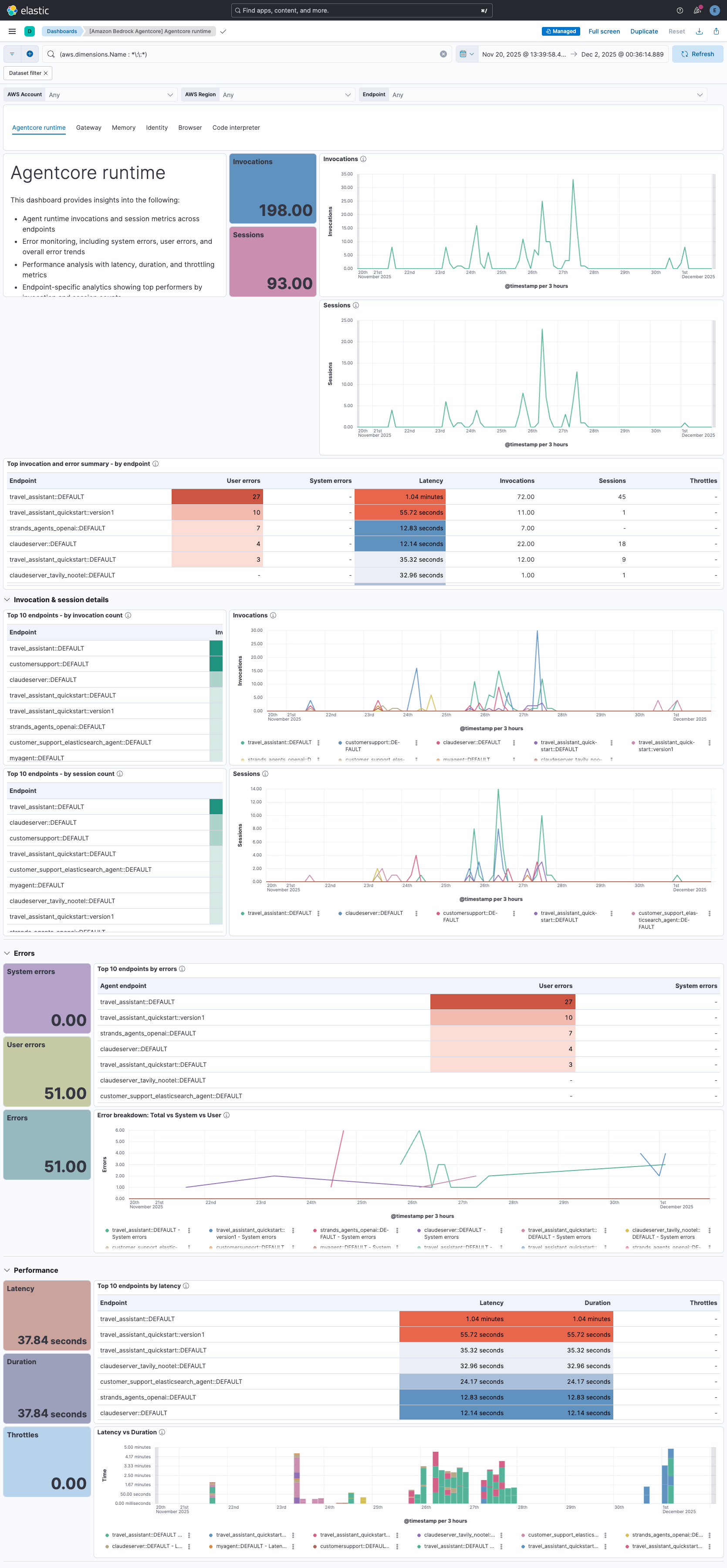
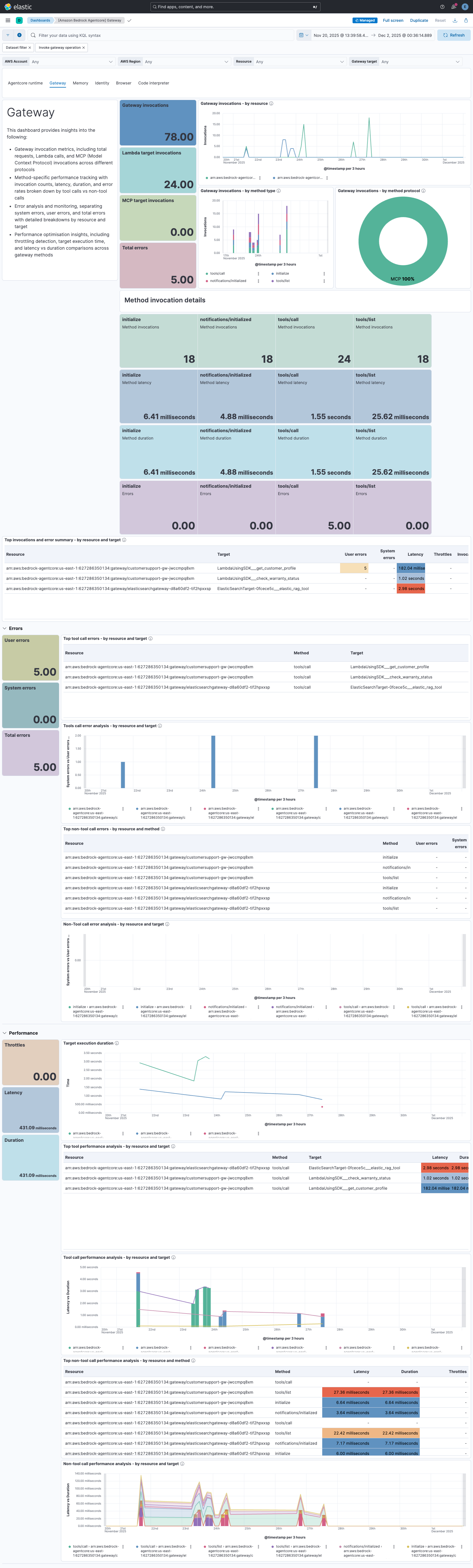
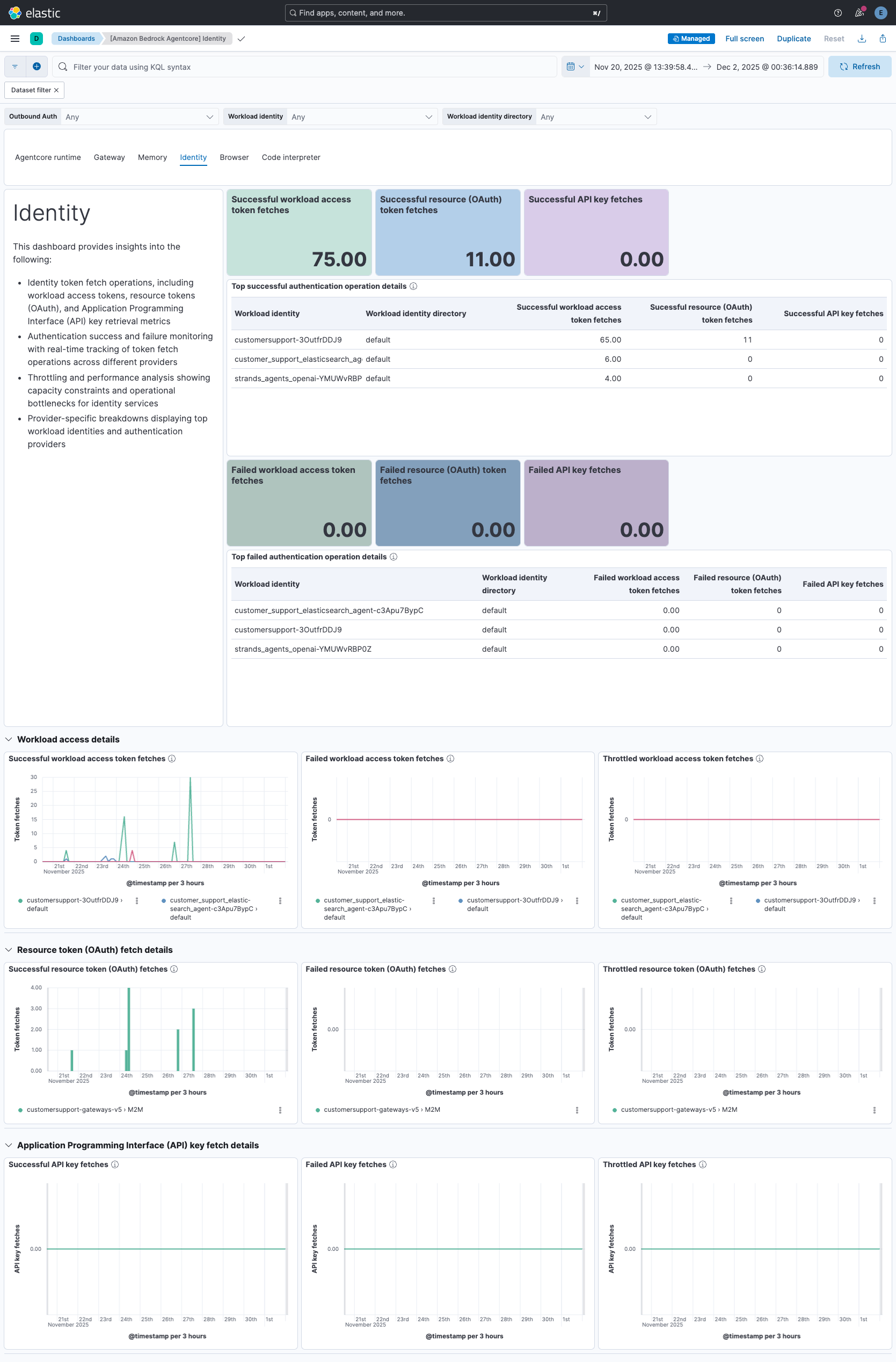
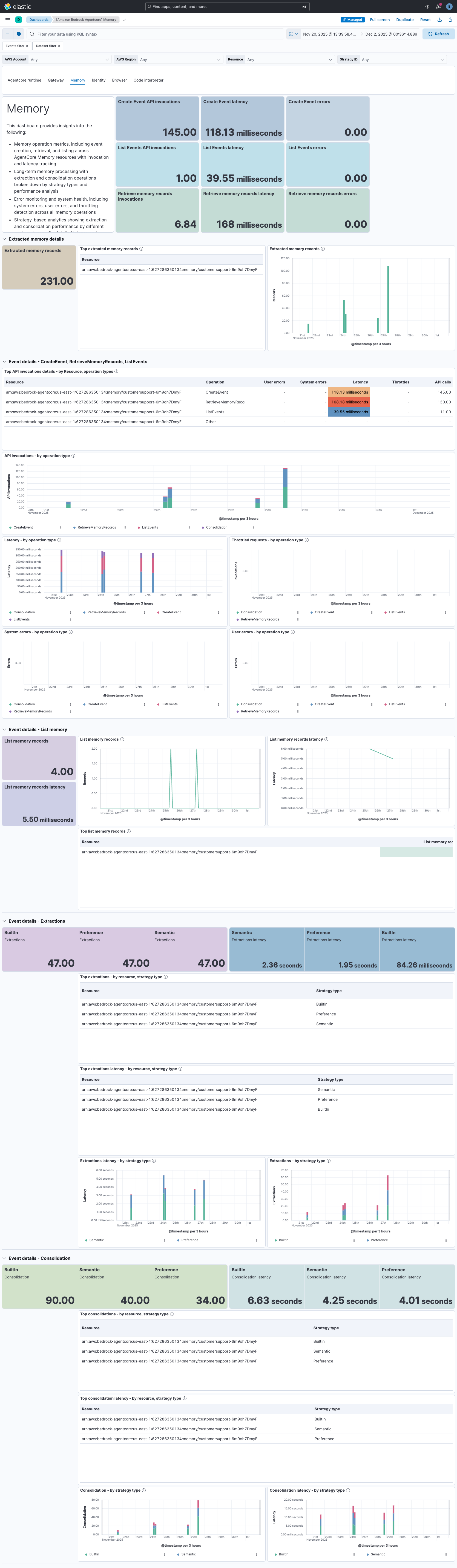
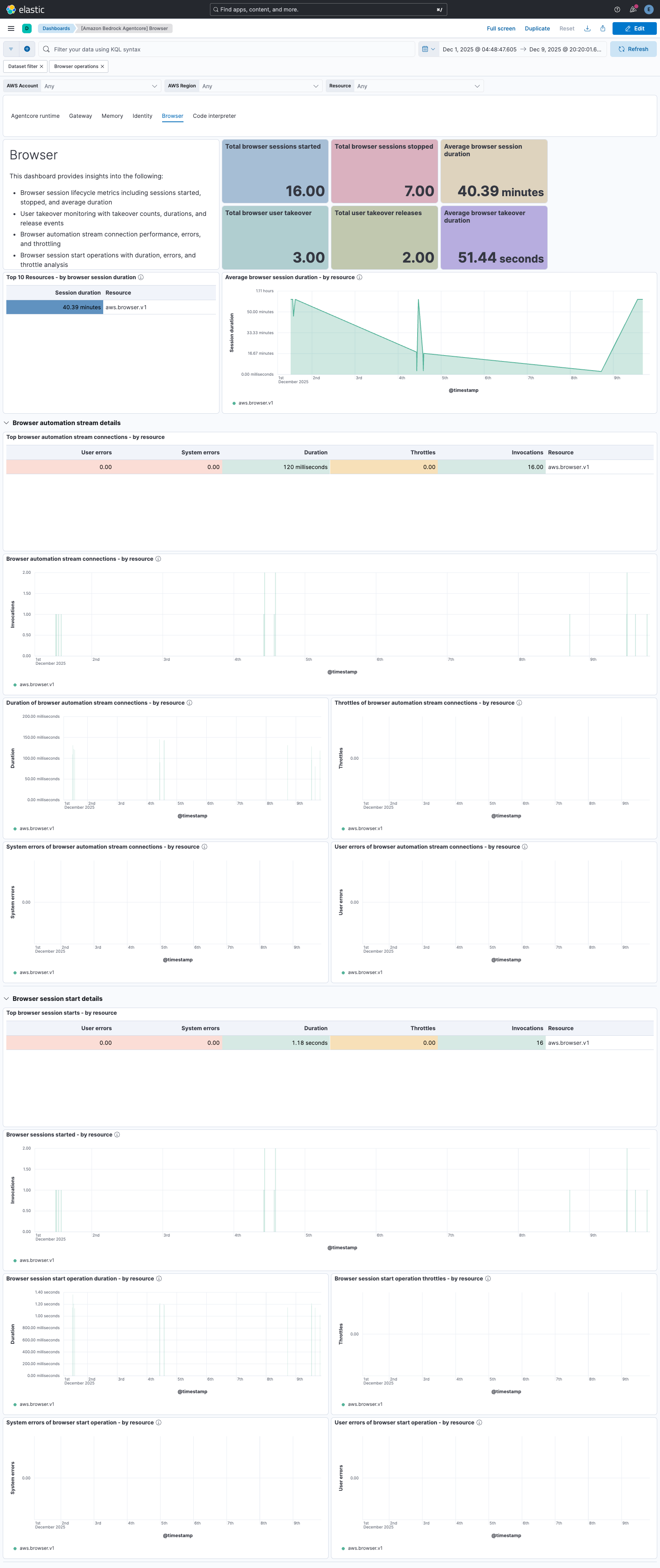
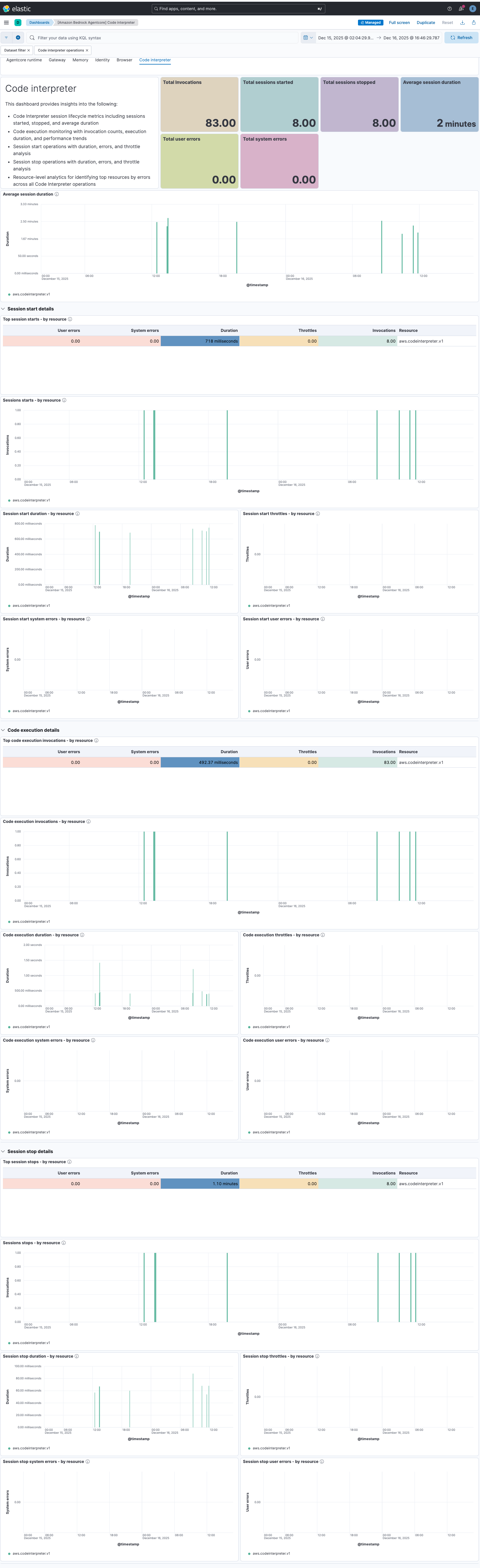
This integration includes one or more Kibana dashboards that visualizes the data collected by the integration. The screenshots below illustrate how the ingested data is displayed.
Changelog
| Version | Details | Minimum Kibana version |
|---|---|---|
| 0.7.0 | Enhancement (View pull request) Add gateway_application_logs logs data stream. |
— |
| 0.6.0 | Enhancement (View pull request) Add memory_application_logs logs data stream. |
— |
| 0.5.0 | Enhancement (View pull request) Add runtime_application_logs data stream. |
— |
| 0.4.0 | Enhancement (View pull request) Add alerting rule templates for the gateway, identity, memory, browser tool and code interpreter. |
— |
| 0.3.0 | Enhancement (View pull request) Update README with alerting rule templates. |
— |
| 0.2.0 | Enhancement (View pull request) Add browser tool, and code interpreter metrics with dashboards. |
— |
| 0.1.0 | Enhancement (View pull request) Add agent_name and endpoint_name fields extracted for InvokeAgentRuntime operations. |
— |
| 0.0.3 | Enhancement (View pull request) Add alerting rule template for the agent runtime |
— |
| 0.0.2 | Enhancement (View pull request) Dashboard improvements for AgentCore runtime, gateway, identity and memory metrics. |
— |
| 0.0.1 | Enhancement (View pull request) Initial draft of the package |
— |