pfSense Integration for Elastic
| Version | 1.25.0 (View all) |
| Subscription level What's this? |
Basic |
| Developed by What's this? |
Community |
| Ingestion method(s) | Network Protocol |
| Minimum Kibana version(s) | 9.0.0 8.11.0 |
The pfSense integration enables you to collect and parse logs from pfSense and OPNsense firewalls. By ingesting these logs into the Elastic Stack, you can monitor network traffic, analyze security events, and gain comprehensive visibility into your network's health and security. This integration supports log collection over syslog, making it easy to centralize firewall data for analysis and visualization.
This integration facilitates:
- Monitoring firewall accept/deny events.
- Analyzing VPN, DHCP, and DNS activity.
- Auditing system and authentication events.
- Visualizing network traffic through pre-built dashboards.
This integration is compatible with recent versions of pfSense and OPNsense. It requires Elastic Stack version 8.11.0 or higher.
The pfSense integration works by collecting logs sent from pfSense or OPNsense devices via the syslog protocol. An Elastic Agent is set up on a host designated as a syslog receiver. The firewall is then configured to forward its logs to this agent. The agent processes and forwards the data to your Elastic deployment, where it is parsed, indexed, and made available for analysis in Kibana. The integration supports both UDP and TCP for log transport.
This integration collects several types of logs from pfSense and OPNsense, providing a broad view of network and system activity. The supported log types include:
- Firewall: Logs detailing traffic allowed or blocked by firewall rules.
- Unbound: DNS resolver logs.
- DHCP Daemon: Logs related to DHCP lease assignments and requests.
- OpenVPN: Virtual Private Network connection and status logs.
- IPsec: IP security protocol logs for VPN tunnels.
- HAProxy: High-availability and load balancer logs.
- Squid: Web proxy access and system logs.
- PHP-FPM: Logs related to user authentication events in the web interface.
Logs that do not match these types will be dropped by the integration's ingest pipeline.
- A pfSense or OPNsense firewall with administrative access to configure log forwarding.
- Network connectivity between the firewall and the Elastic Agent host.
- An installed Elastic Agent to receive the syslog data.
Elastic Agent must be installed on a host that will receive the syslog data from your pfSense or OPNsense device. For detailed installation instructions, refer to the Elastic Agent installation guide. Only one Elastic Agent is needed per host.
- Log in to the pfSense web interface.
- Navigate to Status > System Logs, and then click the Settings tab.
- Scroll to the bottom and check the Enable Remote Logging box.
- In the Remote log servers field, enter the IP address and port of your Elastic Agent host (e.g.,
192.168.1.10:9001). - Under Remote Syslog Contents, you have two options:
- Syslog format (Recommended): Check the box for Syslog format. This format provides the firewall hostname and proper timezone information in the logs.
- BSD format: If you use the default BSD format, you must configure the Timezone Offset setting in the integration policy in Kibana to ensure timestamps are parsed correctly.
- Select the logs you wish to forward. To capture logs from packages like HAProxy or Squid, you must select the Everything option.
- Click Save.
For more details, refer to the official pfSense documentation.
- Log in to the OPNsense web interface.
- Navigate to System > Settings > Logging / Targets.
- Click the + (Add) icon to create a new logging target.
- Configure the settings as follows:
- Transport: Choose the desired transport protocol (UDP, TCP).
- Applications: Leave empty to send all logs, or select the specific applications you want to monitor.
- Hostname: Enter the IP address of the Elastic Agent host.
- Port: Enter the port number the agent is listening on.
- Certificate: (For TLS only) Select the appropriate client certificate.
- Description: Add a descriptive name, such as "Syslog to Elastic".
- Click Save.
- In Kibana, navigate to Management > Integrations.
- Search for "pfSense" and select the integration.
- Click Add pfSense.
- Configure the integration by selecting an input type and providing the necessary settings. The module is configured by default to use the
UDPinput on port9001.
This input collects logs over a UDP socket.
| Setting | Description |
|---|---|
| Syslog Host | The bind address for the UDP listener (e.g., 0.0.0.0 to listen on all interfaces). |
| Syslog Port | The UDP port to listen on (e.g., 9001). |
| Internal Networks | A list of your internal IP subnets. Supports CIDR notation and named ranges like private. |
| Timezone Offset | If using BSD format logs, set the timezone offset (e.g., -05:00 or EST) to correctly parse timestamps. Defaults to the agent's local timezone. |
| Preserve original event | If checked, a raw copy of the original log is stored in the event.original field. |
This input collects logs over a TCP socket.
| Setting | Description |
|---|---|
| Syslog Host | The bind address for the TCP listener (e.g., 0.0.0.0). |
| Syslog Port | The TCP port to listen on (e.g., 9001). |
| Internal Networks | A list of your internal IP subnets. |
| Timezone Offset | If using BSD format logs, set the timezone offset to correctly parse timestamps. |
| SSL Configuration | Configure SSL options for encrypted communication. See the SSL documentation for details. |
| Preserve original event | If checked, a raw copy of the original log is stored in the event.original field. |
After configuring the input, assign the integration to an agent policy and click Save and continue.
- First, verify on your pfSense or OPNsense device that logs are being actively sent to the configured Elastic Agent host.
- In Kibana, navigate to Discover.
- In the search bar, enter
data_stream.dataset: "pfsense.log"and check for incoming documents. - Verify that events are appearing with recent timestamps.
- Navigate to Dashboard and search for the pfSense dashboards to see if the visualizations are populated with data.
For help with Elastic ingest tools, check Common problems.
- No data is being collected:
- Verify network connectivity between the firewall and the Elastic Agent host.
- Ensure there are no firewalls or network ACLs blocking the syslog port.
- Confirm that the listening port in the integration policy matches the destination port on the firewall.
- Incorrect Timestamps:
- If using the default BSD log format from pfSense, ensure the Timezone Offset is correctly configured in the integration settings in Kibana. The recommended solution is to switch to the Syslog format on the pfSense device.
For more information on architectures that can be used for scaling this integration, check the Ingest Architectures documentation.
The log data stream collects and parses all supported log types from the pfSense or OPNsense firewall.
Exported fields
| Field | Description | Type |
|---|---|---|
| @timestamp | Date/time when the event originated. This is the date/time extracted from the event, typically representing when the event was generated by the source. If the event source has no original timestamp, this value is typically populated by the first time the event was received by the pipeline. Required field for all events. | date |
| client.address | Some event client addresses are defined ambiguously. The event will sometimes list an IP, a domain or a unix socket. You should always store the raw address in the .address field. Then it should be duplicated to .ip or .domain, depending on which one it is. |
keyword |
| client.as.number | Unique number allocated to the autonomous system. The autonomous system number (ASN) uniquely identifies each network on the Internet. | long |
| client.as.organization.name | Organization name. | keyword |
| client.as.organization.name.text | Multi-field of client.as.organization.name. |
match_only_text |
| client.bytes | Bytes sent from the client to the server. | long |
| client.domain | The domain name of the client system. This value may be a host name, a fully qualified domain name, or another host naming format. The value may derive from the original event or be added from enrichment. | keyword |
| client.geo.city_name | City name. | keyword |
| client.geo.continent_name | Name of the continent. | keyword |
| client.geo.country_iso_code | Country ISO code. | keyword |
| client.geo.country_name | Country name. | keyword |
| client.geo.location | Longitude and latitude. | geo_point |
| client.geo.region_iso_code | Region ISO code. | keyword |
| client.geo.region_name | Region name. | keyword |
| client.ip | IP address of the client (IPv4 or IPv6). | ip |
| client.mac | MAC address of the client. The notation format from RFC 7042 is suggested: Each octet (that is, 8-bit byte) is represented by two [uppercase] hexadecimal digits giving the value of the octet as an unsigned integer. Successive octets are separated by a hyphen. | keyword |
| client.port | Port of the client. | long |
| cloud.account.id | The cloud account or organization id used to identify different entities in a multi-tenant environment. Examples: AWS account id, Google Cloud ORG Id, or other unique identifier. | keyword |
| cloud.availability_zone | Availability zone in which this host is running. | keyword |
| cloud.image.id | Image ID for the cloud instance. | keyword |
| cloud.instance.id | Instance ID of the host machine. | keyword |
| cloud.instance.name | Instance name of the host machine. | keyword |
| cloud.machine.type | Machine type of the host machine. | keyword |
| cloud.project.id | Name of the project in Google Cloud. | keyword |
| cloud.provider | Name of the cloud provider. Example values are aws, azure, gcp, or digitalocean. | keyword |
| cloud.region | Region in which this host is running. | keyword |
| container.id | Unique container id. | keyword |
| container.image.name | Name of the image the container was built on. | keyword |
| container.labels | Image labels. | object |
| container.name | Container name. | keyword |
| data_stream.dataset | Data stream dataset. | constant_keyword |
| data_stream.namespace | Data stream namespace. | constant_keyword |
| data_stream.type | Data stream type. | constant_keyword |
| destination.address | Some event destination addresses are defined ambiguously. The event will sometimes list an IP, a domain or a unix socket. You should always store the raw address in the .address field. Then it should be duplicated to .ip or .domain, depending on which one it is. |
keyword |
| destination.as.number | Unique number allocated to the autonomous system. The autonomous system number (ASN) uniquely identifies each network on the Internet. | long |
| destination.as.organization.name | Organization name. | keyword |
| destination.as.organization.name.text | Multi-field of destination.as.organization.name. |
match_only_text |
| destination.bytes | Bytes sent from the destination to the source. | long |
| destination.geo.city_name | City name. | keyword |
| destination.geo.continent_name | Name of the continent. | keyword |
| destination.geo.country_iso_code | Country ISO code. | keyword |
| destination.geo.country_name | Country name. | keyword |
| destination.geo.location | Longitude and latitude. | geo_point |
| destination.geo.name | User-defined description of a location, at the level of granularity they care about. Could be the name of their data centers, the floor number, if this describes a local physical entity, city names. Not typically used in automated geolocation. | keyword |
| destination.geo.region_iso_code | Region ISO code. | keyword |
| destination.geo.region_name | Region name. | keyword |
| destination.ip | IP address of the destination (IPv4 or IPv6). | ip |
| destination.mac | MAC address of the destination. The notation format from RFC 7042 is suggested: Each octet (that is, 8-bit byte) is represented by two [uppercase] hexadecimal digits giving the value of the octet as an unsigned integer. Successive octets are separated by a hyphen. | keyword |
| destination.port | Port of the destination. | long |
| dns.question.class | The class of records being queried. | keyword |
| dns.question.name | The name being queried. If the name field contains non-printable characters (below 32 or above 126), those characters should be represented as escaped base 10 integers (\DDD). Back slashes and quotes should be escaped. Tabs, carriage returns, and line feeds should be converted to \t, \r, and \n respectively. | keyword |
| dns.question.registered_domain | The highest registered domain, stripped of the subdomain. For example, the registered domain for "foo.example.com" is "example.com". This value can be determined precisely with a list like the public suffix list (https://publicsuffix.org). Trying to approximate this by simply taking the last two labels will not work well for TLDs such as "co.uk". | keyword |
| dns.question.subdomain | The subdomain is all of the labels under the registered_domain. If the domain has multiple levels of subdomain, such as "sub2.sub1.example.com", the subdomain field should contain "sub2.sub1", with no trailing period. | keyword |
| dns.question.top_level_domain | The effective top level domain (eTLD), also known as the domain suffix, is the last part of the domain name. For example, the top level domain for example.com is "com". This value can be determined precisely with a list like the public suffix list (https://publicsuffix.org). Trying to approximate this by simply taking the last label will not work well for effective TLDs such as "co.uk". | keyword |
| dns.question.type | The type of record being queried. | keyword |
| dns.type | The type of DNS event captured, query or answer. If your source of DNS events only gives you DNS queries, you should only create dns events of type dns.type:query. If your source of DNS events gives you answers as well, you should create one event per query (optionally as soon as the query is seen). And a second event containing all query details as well as an array of answers. |
keyword |
| ecs.version | ECS version this event conforms to. ecs.version is a required field and must exist in all events. When querying across multiple indices -- which may conform to slightly different ECS versions -- this field lets integrations adjust to the schema version of the events. |
keyword |
| error.message | Error message. | match_only_text |
| event.action | The action captured by the event. This describes the information in the event. It is more specific than event.category. Examples are group-add, process-started, file-created. The value is normally defined by the implementer. |
keyword |
| event.category | This is one of four ECS Categorization Fields, and indicates the second level in the ECS category hierarchy. event.category represents the "big buckets" of ECS categories. For example, filtering on event.category:process yields all events relating to process activity. This field is closely related to event.type, which is used as a subcategory. This field is an array. This will allow proper categorization of some events that fall in multiple categories. |
keyword |
| event.dataset | Event dataset | constant_keyword |
| event.duration | Duration of the event in nanoseconds. If event.start and event.end are known this value should be the difference between the end and start time. |
long |
| event.id | Unique ID to describe the event. | keyword |
| event.ingested | Timestamp when an event arrived in the central data store. This is different from @timestamp, which is when the event originally occurred. It's also different from event.created, which is meant to capture the first time an agent saw the event. In normal conditions, assuming no tampering, the timestamps should chronologically look like this: @timestamp < event.created < event.ingested. |
date |
| event.kind | This is one of four ECS Categorization Fields, and indicates the highest level in the ECS category hierarchy. event.kind gives high-level information about what type of information the event contains, without being specific to the contents of the event. For example, values of this field distinguish alert events from metric events. The value of this field can be used to inform how these kinds of events should be handled. They may warrant different retention, different access control, it may also help understand whether the data is coming in at a regular interval or not. |
keyword |
| event.module | Event module | constant_keyword |
| event.original | Raw text message of entire event. Used to demonstrate log integrity or where the full log message (before splitting it up in multiple parts) may be required, e.g. for reindex. This field is not indexed and doc_values are disabled. It cannot be searched, but it can be retrieved from _source. If users wish to override this and index this field, please see Field data types in the Elasticsearch Reference. |
keyword |
| event.outcome | This is one of four ECS Categorization Fields, and indicates the lowest level in the ECS category hierarchy. event.outcome simply denotes whether the event represents a success or a failure from the perspective of the entity that produced the event. Note that when a single transaction is described in multiple events, each event may populate different values of event.outcome, according to their perspective. Also note that in the case of a compound event (a single event that contains multiple logical events), this field should be populated with the value that best captures the overall success or failure from the perspective of the event producer. Further note that not all events will have an associated outcome. For example, this field is generally not populated for metric events, events with event.type:info, or any events for which an outcome does not make logical sense. |
keyword |
| event.provider | Source of the event. Event transports such as Syslog or the Windows Event Log typically mention the source of an event. It can be the name of the software that generated the event (e.g. Sysmon, httpd), or of a subsystem of the operating system (kernel, Microsoft-Windows-Security-Auditing). | keyword |
| event.reason | Reason why this event happened, according to the source. This describes the why of a particular action or outcome captured in the event. Where event.action captures the action from the event, event.reason describes why that action was taken. For example, a web proxy with an event.action which denied the request may also populate event.reason with the reason why (e.g. blocked site). |
keyword |
| event.timezone | This field should be populated when the event's timestamp does not include timezone information already (e.g. default Syslog timestamps). It's optional otherwise. Acceptable timezone formats are: a canonical ID (e.g. "Europe/Amsterdam"), abbreviated (e.g. "EST") or an HH:mm differential (e.g. "-05:00"). | keyword |
| event.type | This is one of four ECS Categorization Fields, and indicates the third level in the ECS category hierarchy. event.type represents a categorization "sub-bucket" that, when used along with the event.category field values, enables filtering events down to a level appropriate for single visualization. This field is an array. This will allow proper categorization of some events that fall in multiple event types. |
keyword |
| haproxy.backend_name | Name of the backend (or listener) which was selected to manage the connection to the server. | keyword |
| haproxy.backend_queue | Total number of requests which were processed before this one in the backend's global queue. | long |
| haproxy.bind_name | Name of the listening address which received the connection. | keyword |
| haproxy.bytes_read | Total number of bytes transmitted to the client when the log is emitted. | long |
| haproxy.connection_wait_time_ms | Total time in milliseconds spent waiting for the connection to establish to the final server | long |
| haproxy.connections.active | Total number of concurrent connections on the process when the session was logged. | long |
| haproxy.connections.backend | Total number of concurrent connections handled by the backend when the session was logged. | long |
| haproxy.connections.frontend | Total number of concurrent connections on the frontend when the session was logged. | long |
| haproxy.connections.retries | Number of connection retries experienced by this session when trying to connect to the server. | long |
| haproxy.connections.server | Total number of concurrent connections still active on the server when the session was logged. | long |
| haproxy.error_message | Error message logged by HAProxy in case of error. | text |
| haproxy.frontend_name | Name of the frontend (or listener) which received and processed the connection. | keyword |
| haproxy.http.request.captured_cookie | Optional "name=value" entry indicating that the server has returned a cookie with its request. | keyword |
| haproxy.http.request.captured_headers | List of headers captured in the request due to the presence of the "capture request header" statement in the frontend. | keyword |
| haproxy.http.request.raw_request_line | Complete HTTP request line, including the method, request and HTTP version string. | keyword |
| haproxy.http.request.time_wait_ms | Total time in milliseconds spent waiting for a full HTTP request from the client (not counting body) after the first byte was received. | long |
| haproxy.http.request.time_wait_without_data_ms | Total time in milliseconds spent waiting for the server to send a full HTTP response, not counting data. | long |
| haproxy.http.response.captured_cookie | Optional "name=value" entry indicating that the client had this cookie in the response. | keyword |
| haproxy.http.response.captured_headers | List of headers captured in the response due to the presence of the "capture response header" statement in the frontend. | keyword |
| haproxy.mode | mode that the frontend is operating (TCP or HTTP) | keyword |
| haproxy.server_name | Name of the last server to which the connection was sent. | keyword |
| haproxy.server_queue | Total number of requests which were processed before this one in the server queue. | long |
| haproxy.source | The HAProxy source of the log | keyword |
| haproxy.tcp.connection_waiting_time_ms | Total time in milliseconds elapsed between the accept and the last close | long |
| haproxy.termination_state | Condition the session was in when the session ended. | keyword |
| haproxy.time_backend_connect | Total time in milliseconds spent waiting for the connection to establish to the final server, including retries. | long |
| haproxy.time_queue | Total time in milliseconds spent waiting in the various queues. | long |
| haproxy.total_waiting_time_ms | Total time in milliseconds spent waiting in the various queues | long |
| host.architecture | Operating system architecture. | keyword |
| host.containerized | If the host is a container. | boolean |
| host.domain | Name of the domain of which the host is a member. For example, on Windows this could be the host's Active Directory domain or NetBIOS domain name. For Linux this could be the domain of the host's LDAP provider. | keyword |
| host.hostname | Hostname of the host. It normally contains what the hostname command returns on the host machine. |
keyword |
| host.id | Unique host id. As hostname is not always unique, use values that are meaningful in your environment. Example: The current usage of beat.name. |
keyword |
| host.ip | Host ip addresses. | ip |
| host.mac | Host mac addresses. | keyword |
| host.name | Name of the host. It can contain what hostname returns on Unix systems, the fully qualified domain name, or a name specified by the user. The sender decides which value to use. |
keyword |
| host.os.build | OS build information. | keyword |
| host.os.codename | OS codename, if any. | keyword |
| host.os.family | OS family (such as redhat, debian, freebsd, windows). | keyword |
| host.os.kernel | Operating system kernel version as a raw string. | keyword |
| host.os.name | Operating system name, without the version. | keyword |
| host.os.name.text | Multi-field of host.os.name. |
text |
| host.os.platform | Operating system platform (such centos, ubuntu, windows). | keyword |
| host.os.version | Operating system version as a raw string. | keyword |
| host.type | Type of host. For Cloud providers this can be the machine type like t2.medium. If vm, this could be the container, for example, or other information meaningful in your environment. |
keyword |
| hostname | Hostname from syslog header. | keyword |
| http.request.body.bytes | Size in bytes of the request body. | long |
| http.request.method | HTTP request method. The value should retain its casing from the original event. For example, GET, get, and GeT are all considered valid values for this field. |
keyword |
| http.request.referrer | Referrer for this HTTP request. | keyword |
| http.response.body.bytes | Size in bytes of the response body. | long |
| http.response.bytes | Total size in bytes of the response (body and headers). | long |
| http.response.mime_type | Mime type of the body of the response. This value must only be populated based on the content of the response body, not on the Content-Type header. Comparing the mime type of a response with the response's Content-Type header can be helpful in detecting misconfigured servers. |
keyword |
| http.response.status_code | HTTP response status code. | long |
| http.version | HTTP version. | keyword |
| input.type | Type of Filebeat input. | keyword |
| log.level | Original log level of the log event. If the source of the event provides a log level or textual severity, this is the one that goes in log.level. If your source doesn't specify one, you may put your event transport's severity here (e.g. Syslog severity). Some examples are warn, err, i, informational. |
keyword |
| log.source.address | Source address of the syslog message. | keyword |
| log.syslog.priority | Syslog numeric priority of the event, if available. According to RFCs 5424 and 3164, the priority is 8 * facility + severity. This number is therefore expected to contain a value between 0 and 191. | long |
| message | For log events the message field contains the log message, optimized for viewing in a log viewer. For structured logs without an original message field, other fields can be concatenated to form a human-readable summary of the event. If multiple messages exist, they can be combined into one message. | match_only_text |
| network.bytes | Total bytes transferred in both directions. If source.bytes and destination.bytes are known, network.bytes is their sum. |
long |
| network.community_id | A hash of source and destination IPs and ports, as well as the protocol used in a communication. This is a tool-agnostic standard to identify flows. Learn more at https://github.com/corelight/community-id-spec. | keyword |
| network.direction | Direction of the network traffic. When mapping events from a host-based monitoring context, populate this field from the host's point of view, using the values "ingress" or "egress". When mapping events from a network or perimeter-based monitoring context, populate this field from the point of view of the network perimeter, using the values "inbound", "outbound", "internal" or "external". Note that "internal" is not crossing perimeter boundaries, and is meant to describe communication between two hosts within the perimeter. Note also that "external" is meant to describe traffic between two hosts that are external to the perimeter. This could for example be useful for ISPs or VPN service providers. | keyword |
| network.iana_number | IANA Protocol Number (https://www.iana.org/assignments/protocol-numbers/protocol-numbers.xhtml). Standardized list of protocols. This aligns well with NetFlow and sFlow related logs which use the IANA Protocol Number. | keyword |
| network.packets | Total packets transferred in both directions. If source.packets and destination.packets are known, network.packets is their sum. |
long |
| network.protocol | In the OSI Model this would be the Application Layer protocol. For example, http, dns, or ssh. The field value must be normalized to lowercase for querying. |
keyword |
| network.transport | Same as network.iana_number, but instead using the Keyword name of the transport layer (udp, tcp, ipv6-icmp, etc.) The field value must be normalized to lowercase for querying. | keyword |
| network.type | In the OSI Model this would be the Network Layer. ipv4, ipv6, ipsec, pim, etc The field value must be normalized to lowercase for querying. | keyword |
| network.vlan.id | VLAN ID as reported by the observer. | keyword |
| observer.ingress.interface.name | Interface name as reported by the system. | keyword |
| observer.ingress.vlan.id | VLAN ID as reported by the observer. | keyword |
| observer.ip | IP addresses of the observer. | ip |
| observer.name | Custom name of the observer. This is a name that can be given to an observer. This can be helpful for example if multiple firewalls of the same model are used in an organization. If no custom name is needed, the field can be left empty. | keyword |
| observer.type | The type of the observer the data is coming from. There is no predefined list of observer types. Some examples are forwarder, firewall, ids, ips, proxy, poller, sensor, APM server. |
keyword |
| observer.vendor | Vendor name of the observer. | keyword |
| pfsense.dhcp.age | Age of DHCP lease in seconds | long |
| pfsense.dhcp.duid | The DHCP unique identifier (DUID) is used by a client to get an IP address from a DHCPv6 server. | keyword |
| pfsense.dhcp.hostname | Hostname of DHCP client | keyword |
| pfsense.dhcp.iaid | Identity Association Identifier used alongside the DUID to uniquely identify a DHCP client | keyword |
| pfsense.dhcp.lease_time | The DHCP lease time in seconds | long |
| pfsense.dhcp.subnet | The subnet for which the DHCP server is issuing IPs | keyword |
| pfsense.dhcp.transaction_id | The DHCP transaction ID | keyword |
| pfsense.icmp.code | ICMP code. | long |
| pfsense.icmp.destination.ip | Original destination address of the connection that caused this notification | ip |
| pfsense.icmp.id | ID of the echo request/reply | long |
| pfsense.icmp.mtu | MTU to use for subsequent data to this destination | long |
| pfsense.icmp.otime | Originate Timestamp | date |
| pfsense.icmp.parameter | ICMP parameter. | long |
| pfsense.icmp.redirect | ICMP redirect address. | ip |
| pfsense.icmp.rtime | Receive Timestamp | date |
| pfsense.icmp.seq | ICMP sequence number. | long |
| pfsense.icmp.ttime | Transmit Timestamp | date |
| pfsense.icmp.type | ICMP type. | keyword |
| pfsense.icmp.unreachable.other | Other unreachable information | keyword |
| pfsense.icmp.unreachable.port | Port number that was unreachable | long |
| pfsense.icmp.unreachable.protocol_id | Protocol ID that was unreachable | keyword |
| pfsense.ip.ecn | Explicit Congestion Notification. | keyword |
| pfsense.ip.flags | IP flags. | keyword |
| pfsense.ip.flow_label | Flow label | keyword |
| pfsense.ip.id | ID of the packet | long |
| pfsense.ip.offset | Fragment offset | long |
| pfsense.ip.tos | IP Type of Service identification. | keyword |
| pfsense.ip.ttl | Time To Live (TTL) of the packet | long |
| pfsense.openvpn.peer_info | Information about the Open VPN client | keyword |
| pfsense.tcp.ack | TCP Acknowledgment number. | long |
| pfsense.tcp.flags | TCP flags. | keyword |
| pfsense.tcp.length | Length of the TCP header and payload. | long |
| pfsense.tcp.options | TCP Options. | keyword |
| pfsense.tcp.seq | TCP sequence number. | long |
| pfsense.tcp.urg | Urgent pointer data. | keyword |
| pfsense.tcp.window | Advertised TCP window size. | long |
| pfsense.udp.length | Length of the UDP header and payload. | long |
| process.name | Process name. Sometimes called program name or similar. | keyword |
| process.name.text | Multi-field of process.name. |
match_only_text |
| process.pid | Process id. | long |
| process.program | Process from syslog header. | keyword |
| related.ip | All of the IPs seen on your event. | ip |
| related.user | All the user names or other user identifiers seen on the event. | keyword |
| rule.id | A rule ID that is unique within the scope of an agent, observer, or other entity using the rule for detection of this event. | keyword |
| server.address | Some event server addresses are defined ambiguously. The event will sometimes list an IP, a domain or a unix socket. You should always store the raw address in the .address field. Then it should be duplicated to .ip or .domain, depending on which one it is. |
keyword |
| server.bytes | Bytes sent from the server to the client. | long |
| server.ip | IP address of the server (IPv4 or IPv6). | ip |
| server.mac | MAC address of the server. The notation format from RFC 7042 is suggested: Each octet (that is, 8-bit byte) is represented by two [uppercase] hexadecimal digits giving the value of the octet as an unsigned integer. Successive octets are separated by a hyphen. | keyword |
| server.port | Port of the server. | long |
| snort.alert_message | Snort alert message. | keyword |
| snort.classification | Snort classification. | keyword |
| snort.generator_id | Snort generator id. | keyword |
| snort.preprocessor | Snort preprocessor. | keyword |
| snort.priority | Snort priority. | long |
| snort.signature_id | Snort signature id. | keyword |
| snort.signature_revision | Snort signature revision. | keyword |
| source.address | Some event source addresses are defined ambiguously. The event will sometimes list an IP, a domain or a unix socket. You should always store the raw address in the .address field. Then it should be duplicated to .ip or .domain, depending on which one it is. |
keyword |
| source.as.number | Unique number allocated to the autonomous system. The autonomous system number (ASN) uniquely identifies each network on the Internet. | long |
| source.as.organization.name | Organization name. | keyword |
| source.as.organization.name.text | Multi-field of source.as.organization.name. |
match_only_text |
| source.bytes | Bytes sent from the source to the destination. | long |
| source.domain | The domain name of the source system. This value may be a host name, a fully qualified domain name, or another host naming format. The value may derive from the original event or be added from enrichment. | keyword |
| source.geo.city_name | City name. | keyword |
| source.geo.continent_name | Name of the continent. | keyword |
| source.geo.country_iso_code | Country ISO code. | keyword |
| source.geo.country_name | Country name. | keyword |
| source.geo.location | Longitude and latitude. | geo_point |
| source.geo.name | User-defined description of a location, at the level of granularity they care about. Could be the name of their data centers, the floor number, if this describes a local physical entity, city names. Not typically used in automated geolocation. | keyword |
| source.geo.region_iso_code | Region ISO code. | keyword |
| source.geo.region_name | Region name. | keyword |
| source.ip | IP address of the source (IPv4 or IPv6). | ip |
| source.mac | MAC address of the source. The notation format from RFC 7042 is suggested: Each octet (that is, 8-bit byte) is represented by two [uppercase] hexadecimal digits giving the value of the octet as an unsigned integer. Successive octets are separated by a hyphen. | keyword |
| source.nat.ip | Translated ip of source based NAT sessions (e.g. internal client to internet) Typically connections traversing load balancers, firewalls, or routers. | ip |
| source.port | Port of the source. | long |
| source.user.full_name | User's full name, if available. | keyword |
| source.user.full_name.text | Multi-field of source.user.full_name. |
match_only_text |
| source.user.id | Unique identifier of the user. | keyword |
| squid.hierarchy_status | The proxy hierarchy route; the route Content Gateway used to retrieve the object. | keyword |
| squid.request_status | The cache result code; how the cache responded to the request: HIT, MISS, and so on. Cache result codes are described here. | keyword |
| tags | List of keywords used to tag each event. | keyword |
| tls.cipher | String indicating the cipher used during the current connection. | keyword |
| tls.version | Numeric part of the version parsed from the original string. | keyword |
| tls.version_protocol | Normalized lowercase protocol name parsed from original string. | keyword |
| url.domain | Domain of the url, such as "www.elastic.co". In some cases a URL may refer to an IP and/or port directly, without a domain name. In this case, the IP address would go to the domain field. If the URL contains a literal IPv6 address enclosed by [ and ] (IETF RFC 2732), the [ and ] characters should also be captured in the domain field. |
keyword |
| url.extension | The field contains the file extension from the original request url, excluding the leading dot. The file extension is only set if it exists, as not every url has a file extension. The leading period must not be included. For example, the value must be "png", not ".png". Note that when the file name has multiple extensions (example.tar.gz), only the last one should be captured ("gz", not "tar.gz"). | keyword |
| url.full | If full URLs are important to your use case, they should be stored in url.full, whether this field is reconstructed or present in the event source. |
wildcard |
| url.full.text | Multi-field of url.full. |
match_only_text |
| url.original | Unmodified original url as seen in the event source. Note that in network monitoring, the observed URL may be a full URL, whereas in access logs, the URL is often just represented as a path. This field is meant to represent the URL as it was observed, complete or not. | wildcard |
| url.original.text | Multi-field of url.original. |
match_only_text |
| url.password | Password of the request. | keyword |
| url.path | Path of the request, such as "/search". | wildcard |
| url.port | Port of the request, such as 443. | long |
| url.query | The query field describes the query string of the request, such as "q=elasticsearch". The ? is excluded from the query string. If a URL contains no ?, there is no query field. If there is a ? but no query, the query field exists with an empty string. The exists query can be used to differentiate between the two cases. |
keyword |
| url.scheme | Scheme of the request, such as "https". Note: The : is not part of the scheme. |
keyword |
| url.username | Username of the request. | keyword |
| user.domain | Name of the directory the user is a member of. For example, an LDAP or Active Directory domain name. | keyword |
| user.email | User email address. | keyword |
| user.full_name | User's full name, if available. | keyword |
| user.full_name.text | Multi-field of user.full_name. |
match_only_text |
| user.id | Unique identifier of the user. | keyword |
| user.name | Short name or login of the user. | keyword |
| user.name.text | Multi-field of user.name. |
match_only_text |
| user_agent.device.name | Name of the device. | keyword |
| user_agent.name | Name of the user agent. | keyword |
| user_agent.original | Unparsed user_agent string. | keyword |
| user_agent.original.text | Multi-field of user_agent.original. |
match_only_text |
| user_agent.os.full | Operating system name, including the version or code name. | keyword |
| user_agent.os.full.text | Multi-field of user_agent.os.full. |
match_only_text |
| user_agent.os.name | Operating system name, without the version. | keyword |
| user_agent.os.name.text | Multi-field of user_agent.os.name. |
match_only_text |
| user_agent.os.version | Operating system version as a raw string. | keyword |
| user_agent.version | Version of the user agent. | keyword |
Example
{
    "@timestamp": "2021-07-04T00:10:14.578Z",
    "agent": {
        "ephemeral_id": "da2d428d-04f5-4b59-b655-6e915448dbe5",
        "id": "0746c3a9-3a6e-4fb6-8c0d-bf706948547a",
        "name": "docker-fleet-agent",
        "type": "filebeat",
        "version": "8.9.0"
    },
    "data_stream": {
        "dataset": "pfsense.log",
        "namespace": "ep",
        "type": "logs"
    },
    "destination": {
        "address": "175.16.199.1",
        "geo": {
            "city_name": "Changchun",
            "continent_name": "Asia",
            "country_iso_code": "CN",
            "country_name": "China",
            "location": {
                "lat": 43.88,
                "lon": 125.3228
            },
            "region_iso_code": "CN-22",
            "region_name": "Jilin Sheng"
        },
        "ip": "175.16.199.1",
        "port": 853
    },
    "ecs": {
        "version": "8.17.0"
    },
    "elastic_agent": {
        "id": "0746c3a9-3a6e-4fb6-8c0d-bf706948547a",
        "snapshot": false,
        "version": "8.9.0"
    },
    "event": {
        "action": "block",
        "agent_id_status": "verified",
        "category": [
            "network"
        ],
        "dataset": "pfsense.log",
        "ingested": "2023-09-22T15:34:05Z",
        "kind": "event",
        "original": "<134>1 2021-07-03T19:10:14.578288-05:00 pfSense.example.com filterlog 72237 - - 146,,,1535324496,igb1.12,match,block,in,4,0x0,,63,32989,0,DF,6,tcp,60,10.170.12.50,175.16.199.1,49652,853,0,S,1818117648,,64240,,mss;sackOK;TS;nop;wscale",
        "provider": "filterlog",
        "reason": "match",
        "timezone": "-05:00",
        "type": [
            "connection",
            "denied"
        ]
    },
    "input": {
        "type": "tcp"
    },
    "log": {
        "source": {
            "address": "172.27.0.4:45848"
        },
        "syslog": {
            "priority": 134
        }
    },
    "message": "146,,,1535324496,igb1.12,match,block,in,4,0x0,,63,32989,0,DF,6,tcp,60,10.170.12.50,175.16.199.1,49652,853,0,S,1818117648,,64240,,mss;sackOK;TS;nop;wscale",
    "network": {
        "bytes": 60,
        "community_id": "1:pOXVyPJTFJI5seusI/UD6SwvBjg=",
        "direction": "inbound",
        "iana_number": "6",
        "transport": "tcp",
        "type": "ipv4",
        "vlan": {
            "id": "12"
        }
    },
    "observer": {
        "ingress": {
            "interface": {
                "name": "igb1.12"
            },
            "vlan": {
                "id": "12"
            }
        },
        "name": "pfSense.example.com",
        "type": "firewall",
        "vendor": "netgate"
    },
    "pfsense": {
        "ip": {
            "flags": "DF",
            "id": 32989,
            "offset": 0,
            "tos": "0x0",
            "ttl": 63
        },
        "tcp": {
            "flags": "S",
            "length": 0,
            "options": [
                "mss",
                "sackOK",
                "TS",
                "nop",
                "wscale"
            ],
            "window": 64240
        }
    },
    "process": {
        "name": "filterlog",
        "pid": 72237
    },
    "related": {
        "ip": [
            "175.16.199.1",
            "10.170.12.50"
        ]
    },
    "rule": {
        "id": "1535324496"
    },
    "source": {
        "address": "10.170.12.50",
        "ip": "10.170.12.50",
        "port": 49652
    },
    "tags": [
        "preserve_original_event",
        "pfsense",
        "forwarded"
    ]
}
These inputs can be used with this integration:
tcp
For more details about the TCP input settings, check the Filebeat documentation.
To collect logs via TCP, select Collect logs via TCP and configure the following parameters:
Required Settings:
- Host
- Port
Common Optional Settings:
- Max Message Size - Maximum size of incoming messages
- Max Connections - Maximum number of concurrent connections
- Timeout - How long to wait for data before closing idle connections
- Line Delimiter - Character(s) that separate log messages
To enable encrypted connections, configure the following SSL settings:
SSL Settings:
- Enable SSL*- Toggle to enable SSL/TLS encryption
- Certificate - Path to the SSL certificate file (
.crtor.pem) - Certificate Key - Path to the private key file (
.key) - Certificate Authorities - Path to CA certificate file for client certificate validation (optional)
- Client Authentication - Require client certificates (
none,optional, orrequired) - Supported Protocols - TLS versions to support (e.g.,
TLSv1.2,TLSv1.3)
Example SSL Configuration:
ssl.enabled: true
ssl.certificate: "/path/to/server.crt"
ssl.key: "/path/to/server.key"
ssl.certificate_authorities: ["/path/to/ca.crt"]
ssl.client_authentication: "optional"
udp
For more details about the UDP input settings, check the Filebeat documentation.
To collect logs via UDP, select Collect logs via UDP and configure the following parameters:
Required Settings:
- Host
- Port
Common Optional Settings:
- Max Message Size - Maximum size of UDP packets to accept (default: 10KB, max: 64KB)
- Read Buffer - UDP socket read buffer size for handling bursts of messages
- Read Timeout - How long to wait for incoming packets before checking for shutdown
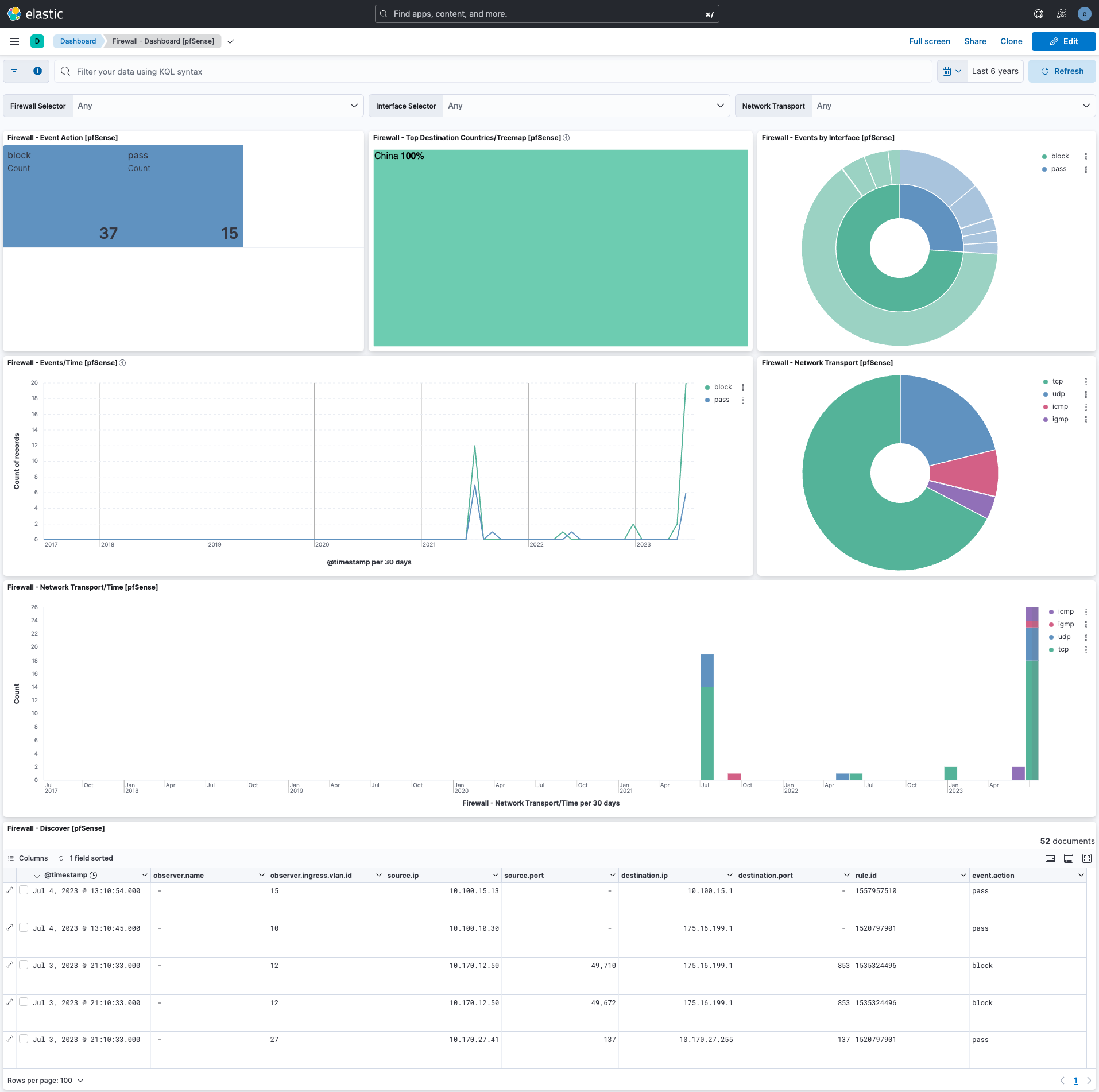
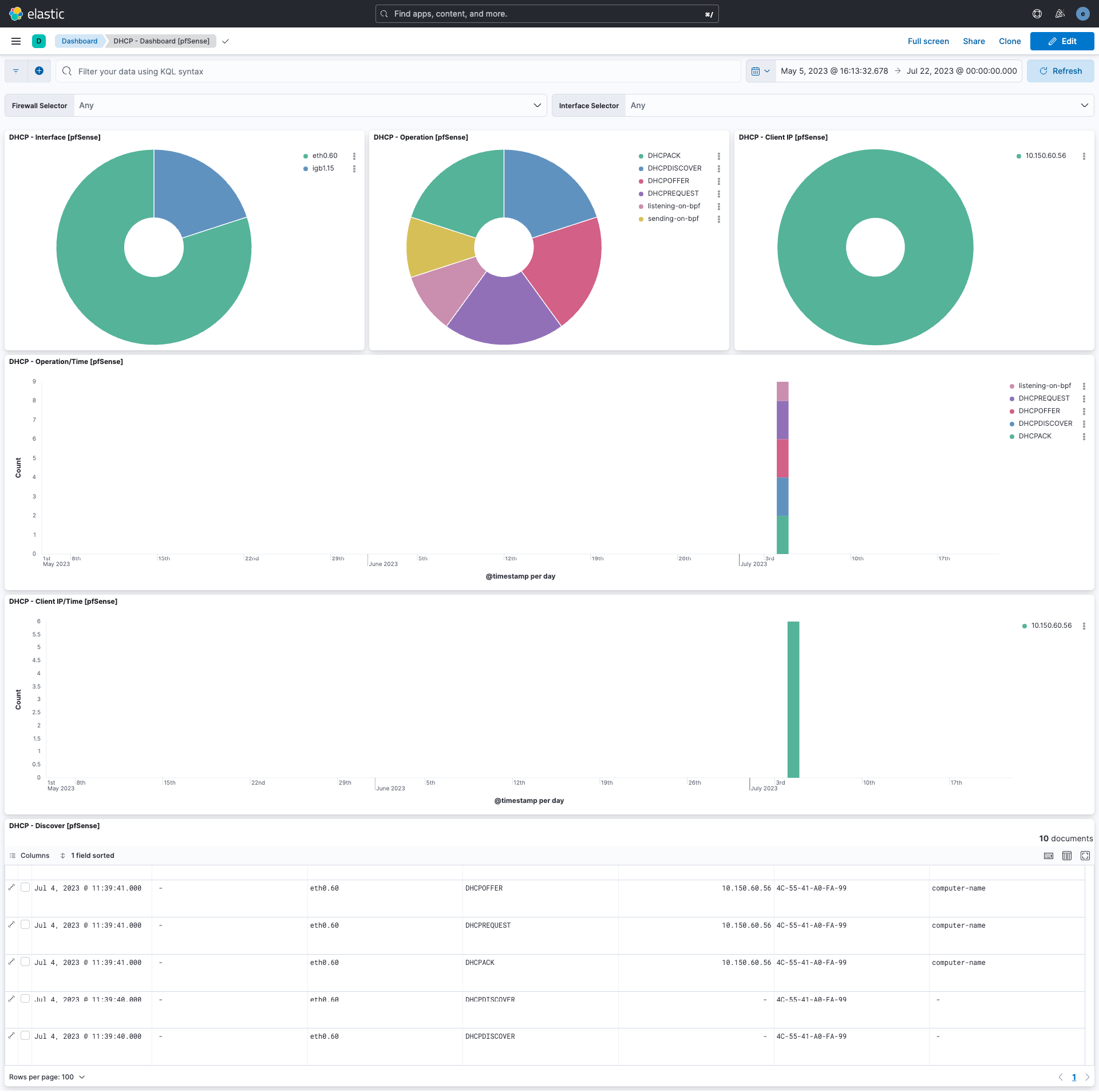
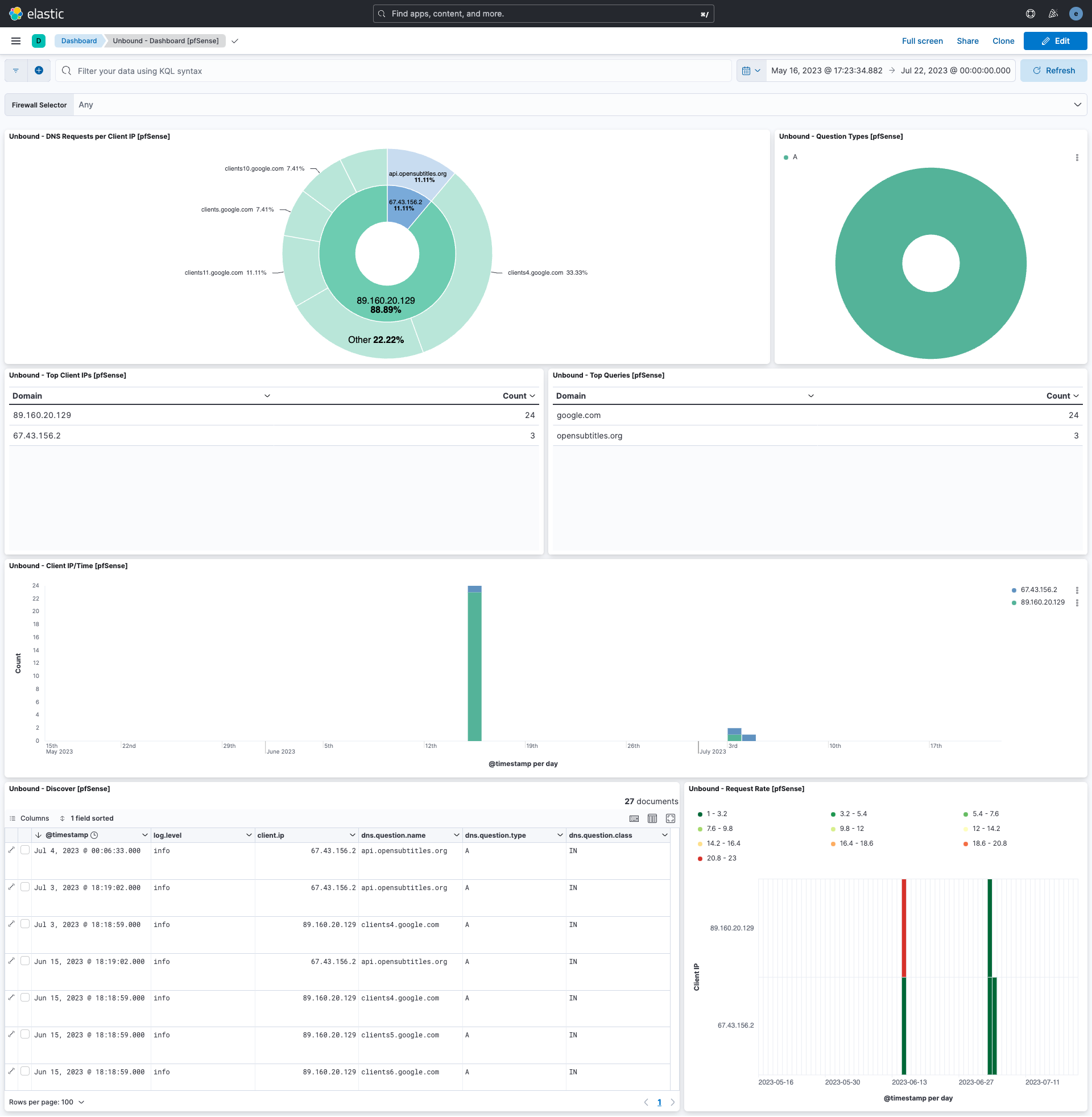
This integration includes one or more Kibana dashboards that visualizes the data collected by the integration. The screenshots below illustrate how the ingested data is displayed.
Changelog
| Version | Details | Minimum Kibana version |
|---|---|---|
| 1.25.0 | Enhancement (View pull request) Update the documentation. |
9.0.0 8.11.0 |
| 1.24.0 | Enhancement (View pull request) Preserve event.original on pipeline error. |
9.0.0 8.11.0 |
| 1.23.2 | Enhancement (View pull request) Generate processor tags and normalize error handler. |
9.0.0 8.11.0 |
| 1.23.1 | Enhancement (View pull request) Changed owners. |
9.0.0 8.11.0 |
| 1.23.0 | Enhancement (View pull request) Allow @custom pipeline access to event.original without setting preserve_original_event. |
9.0.0 8.11.0 |
| 1.22.0 | Enhancement (View pull request) Support stack version 9.0. |
9.0.0 8.7.1 |
| 1.21.1 | Bug fix (View pull request) Updated SSL description to be uniform and to include links to documentation. |
8.7.1 |
| 1.21.0 | Enhancement (View pull request) ECS version updated to 8.17.0. |
8.7.1 |
| 1.20.2 | Bug fix (View pull request) Use triple-brace Mustache templating when referencing variables in ingest pipelines. |
8.7.1 |
| 1.20.1 | Bug fix (View pull request) Use triple-brace Mustache templating when referencing variables in ingest pipelines. |
8.7.1 |
| 1.20.0 | Enhancement (View pull request) Add SNORT log processing |
8.7.1 |
| 1.19.2 | Bug fix (View pull request) Fix firewall ICMPv6 message parsing error |
8.7.1 |
| 1.19.1 | Bug fix (View pull request) Fix ingest pipeline warnings |
8.7.1 |
| 1.19.0 | Enhancement (View pull request) Update package spec to 3.0.3. |
8.7.1 |
| 1.18.0 | Enhancement (View pull request) ECS version updated to 8.11.0. |
8.7.1 |
| 1.17.0 | Enhancement (View pull request) Improve 'event.original' check to avoid errors if set. |
8.7.1 |
| 1.16.0 | Enhancement (View pull request) Set 'community' owner type. |
8.7.1 |
| 1.15.0 | Enhancement (View pull request) Update the package format_version to 3.0.0. |
8.7.1 |
| 1.14.0 | Enhancement (View pull request) Update package to ECS 8.10.0 and align ECS categorization fields. |
8.7.1 |
| 1.13.0 | Enhancement (View pull request) Add tags.yml file so that integration's dashboards and saved searches are tagged with "Security Solution" and displayed in the Security Solution UI. |
8.7.1 |
| 1.12.0 | Enhancement (View pull request) Update package-spec to 2.10.0. |
8.7.1 |
| 1.11.0 | Enhancement (View pull request) Update package to ECS 8.9.0. |
8.7.1 |
| 1.10.1 | Enhancement (View pull request) Convert dashboards to Lens. |
8.7.1 |
| 1.9.1 | Bug fix (View pull request) Fix Procotol ID field mapping. |
8.1.0 |
| 1.9.0 | Enhancement (View pull request) Ensure event.kind is correctly set for pipeline errors. |
8.1.0 |
| 1.8.0 | Enhancement (View pull request) Update package to ECS 8.8.0. |
8.1.0 |
| 1.7.0 | Enhancement (View pull request) Update package to ECS 8.7.0. |
8.1.0 |
| 1.6.4 | Bug fix (View pull request) Fix squid GROK pattern |
8.1.0 |
| 1.6.3 | Enhancement (View pull request) Added categories and/or subcategories. |
8.1.0 |
| 1.6.2 | Bug fix (View pull request) Ensure numeric timezones are correctly interpreted. |
8.1.0 |
| 1.6.1 | Bug fix (View pull request) Fix typo in readme. |
8.1.0 |
| 1.6.0 | Enhancement (View pull request) Update package to ECS 8.6.0. |
8.1.0 |
| 1.5.0 | Enhancement (View pull request) Add udp_options to the UDP input. |
8.1.0 |
| 1.4.2 | Enhancement (View pull request) Migrate the visualizations to by value in dashboards to minimize the saved object clutter and reduce time to load |
8.1.0 |
| 1.4.1 | Bug fix (View pull request) Fix ingest pipeline grok patterns for OPNsense. |
8.0.0 7.15.0 |
| 1.4.0 | Enhancement (View pull request) Update package to ECS 8.5.0. |
8.0.0 7.15.0 |
| 1.3.2 | Enhancement (View pull request) Use ECS geo.location definition. |
8.0.0 7.15.0 |
| 1.3.1 | Enhancement (View pull request) Fix redundant Grok pattern |
8.0.0 7.15.0 |
| 1.3.0 | Enhancement (View pull request) Add DHCPv6 support |
8.0.0 7.15.0 |
| 1.2.0 | Enhancement (View pull request) Update package to ECS 8.4.0 |
8.0.0 7.15.0 |
| 1.1.2 | Enhancement (View pull request) Update package name and description to align with standard wording |
8.0.0 7.15.0 |
| 1.1.1 | Bug fix (View pull request) Fix grok to support new opensense log format |
8.0.0 7.15.0 |
| 1.1.0 | Enhancement (View pull request) Update package to ECS 8.3.0. |
8.0.0 7.15.0 |
| 1.0.3 | Enhancement (View pull request) updated links in the documentation to the vendor documentation |
8.0.0 7.15.0 |
| 1.0.2 | Bug fix (View pull request) Update HAProxy log parsing to handle non HTTPS and TCP logs |
— |
| 1.0.1 | Bug fix (View pull request) Format client.mac as per ECS. |
8.0.0 7.15.0 |
| 1.0.0 | Bug fix (View pull request) Add OPNsense support. Add PHP-FPM log parsing. |
8.0.0 7.15.0 |
| 0.4.0 | Enhancement (View pull request) Update to ECS 8.2 |
— |
| 0.3.1 | Enhancement (View pull request) Add documentation for multi-fields |
— |
| 0.3.0 | Enhancement (View pull request) Update to ECS 8.0 |
— |
| 0.2.2 | Bug fix (View pull request) Regenerate test files using the new GeoIP database |
— |
| 0.2.1 | Bug fix (View pull request) Change test public IPs to the supported subset |
— |
| 0.2.0 | Enhancement (View pull request) Add 8.0.0 version constraint |
— |
| 0.1.3 | Enhancement (View pull request) Uniform with guidelines |
— |
| 0.1.2 | Enhancement (View pull request) Update Title and Description. |
— |
| 0.1.1 | Bug fix (View pull request) Fix logic that checks for the 'forwarded' tag |
— |
| 0.1.0 | Enhancement (View pull request) initial release |
— |