From vector search to powerful REST APIs, Elasticsearch offers developers the most extensive search toolkit. Dive into sample notebooks on GitHub to try something new. You can also start your free trial or run Elasticsearch locally today.
Recently, we introduced our new DiskBBQ format for vector storage and search within Elasticsearch. One of the main advantages of exploring subsets of the vectors from the entire set of data is that we can better manage what’s loaded on heap and needed at query time to satisfy a query. This, of course, leads to the inevitable question: How low can we go? Where do we start to see major drop-offs in performance? For this blog, we’ll consider any performance degradation as a low-memory scenario. Now let’s go see what we can find.
Show me the numbers
Search
In our introductory blog, we talked about some high-level numbers. Let’s look back at the high-level query timings graph and dig a little deeper:
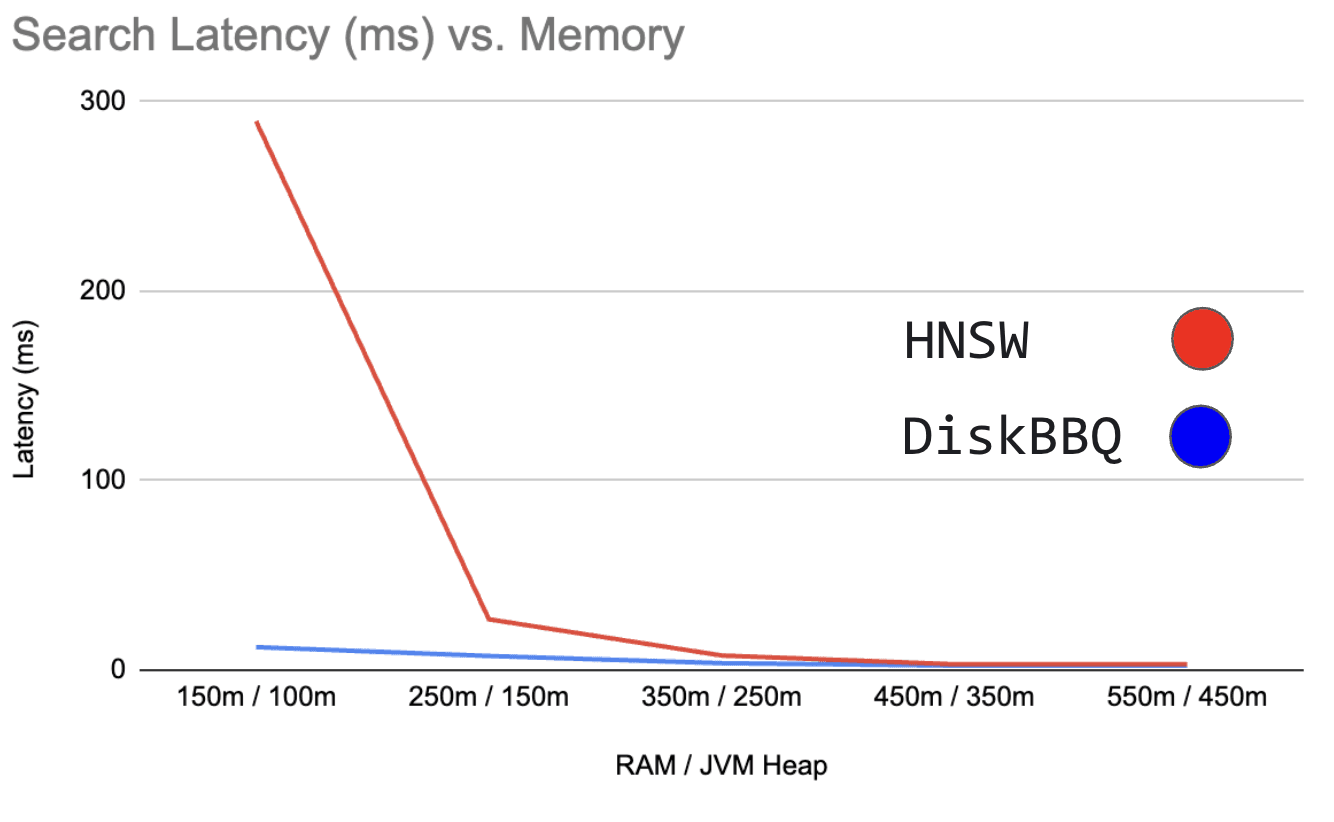
Figure 0: Shows search latency in milliseconds vs RAM / JVM Heap
DiskBBQ degrades in search latency, but is much more well-behaved than HNSW BBQ, which behaves exponentially as memory becomes increasingly restricted. But what does DiskBBQ look at in comparison as we add more memory?
Here’s those actual numbers laid out. And you can better see how DiskBBQ behaves in lower memory states. It definitely benefits from more RAM to better cache more clusters of vectors. Particularly, we rely heavily on off-heap cache, and as that increases, we see better performance until the whole of the quantized vectors are resident.
| Type | Ram / Heap | Latency (ms) |
|---|---|---|
| DiskBBQ | 101m / 10m | 15.83 |
| DiskBBQ | 150m / 100m | 12.13 |
| DiskBBQ | 250m / 150m | 7.46 |
| DiskBBQ | 350m / 250m | 3.65 |
| DiskBBQ | 450m / 350m | 2.38 |
| DiskBBQ | 550m / 450m | 2.41 |
| HNSW BBQ | 101m / 10m | - |
| HNSW BBQ | 150m / 100m | 289.7 |
| HNSW BBQ | 250m / 150m | 26.81 |
| HNSW BBQ | 350m / 250m | 7.7 |
| HNSW BBQ | 450m / 350m | 3.06 |
| HNSW BBQ | 550m / 450m | 3.14 |
Here’s an additional run of 1m vectors only on DiskBBQ. Here, I did less to refine the exact ratios of RAM and Heap, and instead typically set one to half the other. We’ve also run it with up to 10g of RAM here. What’s interesting is to note the inflection point where the algorithm is no longer in a low memory configuration and no longer benefits from additional memory, in this case around 800m/400m.
| RAM / Heap | Latency (ms) |
|---|---|
| 101m / 10m | 18 |
| 150m / 75m | 12.13 |
| 200m / 100m | 11.02 |
| 300m / 150m | 4.26 |
| 400m / 200m | 3.47 |
| 500m / 250m | 3.5 |
| 800m / 400m | 2.73 |
| 1.2g / 600m | 2.76 |
| 1.5g / 750m | 2.74 |
| 3g / 1.5g | 2.83 |
| 5g / 2.5g | 2.78 |
| 8g / 4g | 2.73 |
| 10g / 5g | 2.79 |
Indexing
Let’s also take a look at the indexing performance.
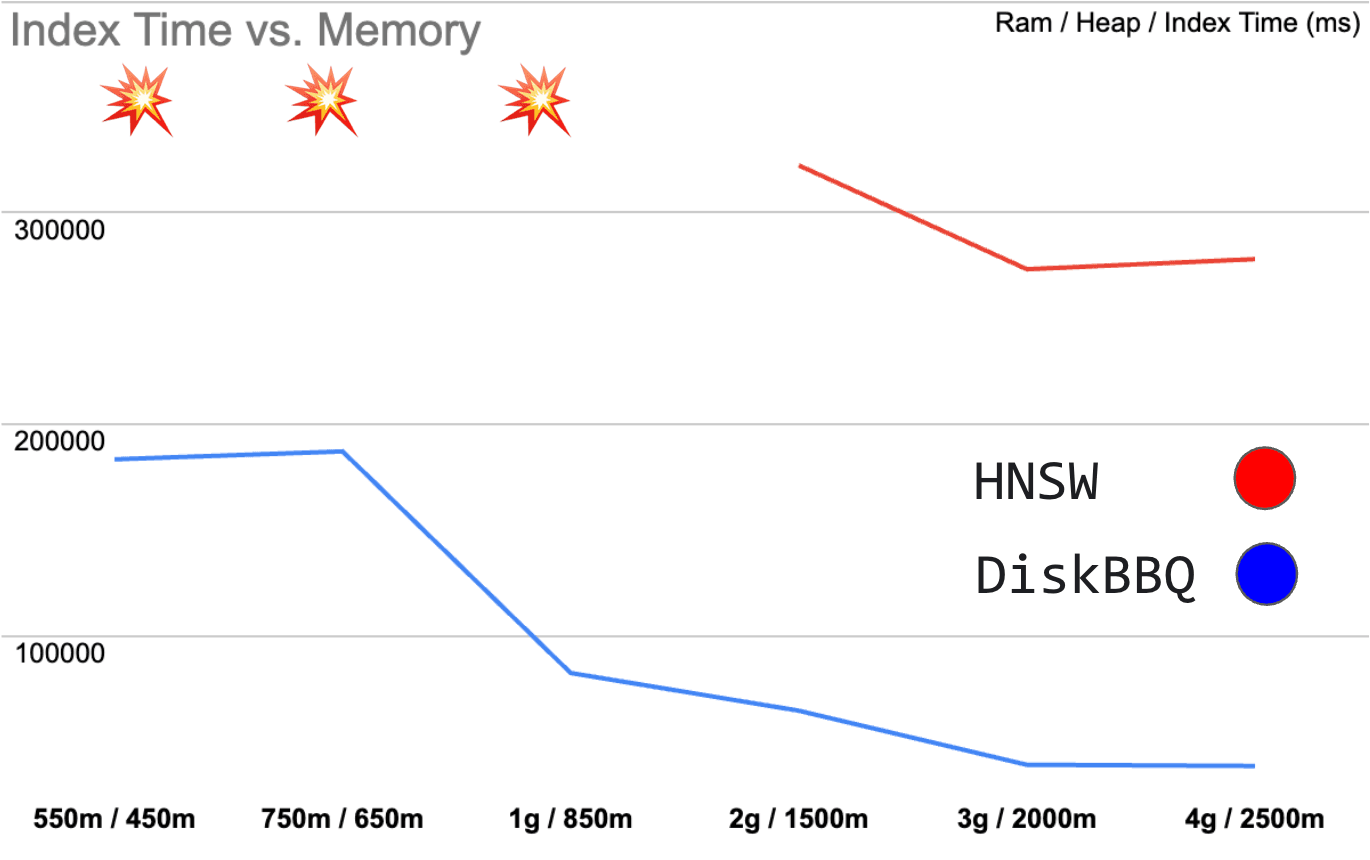
Figure 1: Shows index time in milliseconds vs RAM / JVM Heap
As overall memory reduces, DiskBBQ indexing degrades gracefully. HNSW BBQ, however, simply falls apart once memory gets very restricted. And downright fails in scenarios where DiskBBQ continues to operate. Again, let’s look at the numbers to get a better understanding of what’s happening.
| Type | Ram / Heap | Index Time (ms) |
|---|---|---|
| DiskBBQ | 550m / 450m | 183377 |
| DiskBBQ | 750m / 650m | 187123 |
| DiskBBQ | 1g / 850m | 82397 |
| DiskBBQ | 2g / 1500m | 64567 |
| DiskBBQ | 3g / 2000m | 39002 |
| DiskBBQ | 4g / 2500m | 38448 |
| HNSW BBQ | 550m / 450m | - |
| HNSW BBQ | 750m / 650m | - |
| HNSW BBQ | 1g / 850m | - |
| HNSW BBQ | 2g / 1500m | 322338 322338 |
| HNSW BBQ | 3g / 2000m | 273239 |
| HNSW BBQ | 4g / 2500m | 278005 |
As DiskBBQ can utilize more off heap cache space, larger chunks of particularly the raw vectors stay resident, which is especially useful as we partition the space with hierarchical k-means.
Evaluation methodology
First, we isolate the two algorithms, DiskBBQ and HNSW BBQ, within Elasticsearch and compare them. We’ll focus on some reasonable defaults like the default merge policy within Elasticsearch. For 1m vectors, this gives us about ~12 segments. Not huge, but still interesting in low memory configurations.
To help facilitate this, we have the KnnIndexTester utility in Elasticsearch, which can do evaluations of different KNN algorithms.
Here’s what it looks like to invoke it:
And here’s what that configuration looks like for DiskBBQ:
It’s worth paying particular attention to things like visit_percentage which indicates how much of a segment we explore before giving up. And over_sampling_factor, which will help with recovering quality during rescoring given that we’re using BBQ to reduce the overall size of our indices.
And here’s what that configuration looks like for HNSW:
The configurations are set up to provide roughly the same recall in this case ~0.89. Note that for HNSW, we quantize to a single bit using BBQ just as we did with DiskBBQ.
We can use the KnnIndexTester utility and isolate it from the rest of the system using Docker. We disable swap and control for the total memory allocated to the container for our experiments.
Here’s an example of what that looks like with a simple HelloWorld.java
And here’s what it looks like when invoking the KnnIndexTester QA Utility:
How low can we go?
The most exciting thing that may not be readily apparent is that we measured additional heap settings down to 10MB, and anything less than this, and log4j can’t be initialized in our utility. We’re able to run the entire container in 101MB of memory, and anything less than this, and the OS sends a SIGKILL (exit 137) every time Java attempts to load the utility itself while attempting to load the index files off heap. While it’s somewhat slow, our test framework shows that it’s still pretty fast overall, with a query latency in this configuration taking only ~15ms.
I’m having fun. Let’s poke some more. What if I just want to know what’s the absolute smallest possible heap I can get here? Well, if you create a program called HelloWorld.java and shove a one-line program into it like this:
The smallest JVM you can run that one program on is 2m. As in this will fail:
With this error message:
But what happens when I try to run that program in the smallest possible memory settings we can use with openjdk:24-jdk-slim-bookworm. Here’s the actual smallest environment we can run in:
Anything lower than this and Docker executes a SIGKILL for OOM, presumably for seemingly innocuous tasks such as loading the HelloWorld.java file. We need at least 50MB just to do anything in the openjdk:24-jdk-slim-bookworm container.
So when running the DiskBBQ algorithm, we’re not quite at the bottom, but it does run in just 60MB of RAM. Remember, the JVM heap is taking up about 10MB of that total 101MB mentioned above. And DiskBBQ is likely taking most of the 50MB of off heap RAM in our smallest feasible configuration. That’s a pretty impressive stable configuration, particularly in comparison to HNSW. In HNSW we must load the entire graph of all vectors; otherwise, queries fall off a performance cliff.
Conclusion
With the introduction of the bbq_disk format for vector storage and search within Elasticsearch we now have a more elegant way of handling low memory environments. Previously with HNSW we would see a particularly sharp drop in runtime and indexing performance when memory was not adequate to maintain the entire graph in memory. We've made significant strides in reducing the size of the HNSW graph in memory by introducing more intelligent quantization via (BBQ)[FIXME source], but as more vectors are added, the same problem emerges just at higher scales. DiskBBQ provides a novel approach to bypass some of the inherent flaws in HNSW.
DiskBBQ is available in Elasticsearch Serverless!
Related Content
February 3, 2026
Building automation with Elastic Workflows
A practical introduction to workflow automation in Elastic. Learn what workflows look like, how they work, and how to build one.

February 3, 2026
Skip MLOps: Managed cloud inference for self-managed Elasticsearch with EIS via Cloud Connect
Introducing Elastic Inference Service (EIS) via Cloud Connect, which provides a hybrid architecture for self-managed Elasticsearch users and removes MLOps and CPU hardware barriers for semantic search and RAG.

January 28, 2026
Apache Lucene 2025 wrap-up
2025 was a stellar year for Apache Lucene; here are our highlights.
January 23, 2026
Improve search performance with `best_compression`
While `best_compression` is typically seen as a storage-saving feature for Elastic Observability and Elastic Security use cases, this blog demonstrates its effectiveness as a performance-tuning lever for search.
December 23, 2025
Comparing dense vector search performance with the Profile API in Elasticsearch
Learn how to use the Profile API in Elasticsearch to compare dense vector configurations and tune kNN performance with visual data from Kibana.