Saved Objects
Saved Objects allow Kibana plugins to use Elasticsearch like a primary database. Think of them as an Object Document Mapper for Elasticsearch. Once a plugin has registered one or more Saved Object types, the Saved Objects client can be used to query or perform create, read, update and delete operations on each type.
The Saved Objects service is available on server side. Client side services and APIs have been deprecated for some time and will be removed in the near future.
By using Saved Objects your plugin can take advantage of the following features:
- Migrations can evolve your document’s schema by transforming documents and ensuring that the field mappings on the index are always up to date.
- a HTTP API is automatically exposed for each type (unless
hidden=trueis specified). - a Saved Objects client that can be used from both the server and the browser.
- Users can import or export Saved Objects using the Saved Objects management UI or the Saved Objects import/export API.
- By declaring
references, an object’s entire reference graph will be exported. This makes it easy for users to export e.g. adashboardobject and have all thevisualizationobjects required to display the dashboard included in the export. - When the X-Pack security and spaces plugins are enabled these transparently provide RBAC access control and the ability to organize Saved Objects into spaces.
This document contains developer guidelines and best-practices for plugins wanting to use Saved Objects.
Saved object type definitions should be defined in their own my_plugin/server/saved_objects directory.
The folder should contain a file per type, named after the snake_case name of the type, and an index.ts file exporting all the types.
import { SavedObjectsType } from 'src/core/server';

export const dashboardVisualization: SavedObjectsType = {
  name: 'dashboard_visualization',
  namespaceType: 'multiple-isolated',
  hidden: true,
  modelVersions: {
    1: modelVersion1,
    2: modelVersion2,
  },
  mappings: {
    dynamic: false,
    properties: {
      description: {
        type: 'text',
      },
      hits: {
        type: 'integer',
      },
    },
  },
  // ...other mandatory properties
};
- Since the name of a Saved Object type may form part of the URL path for the public Saved Objects HTTP API, these should follow our API URL path convention and always be written in snake case.
- This field determines "space behavior", whether these objects can exist in one space, multiple spaces, or all spaces. This value means that objects of this type can only exist in a single space. See Sharing Saved Objects for more information.
- This field determines whether repositories have access to the type by default. Hidden types will not be automatically exposed via the Saved Objects Client APIs nor the Saved Objects HTTP APIs.
Hidden types must be listed in
SavedObjectsClientProviderOptions[includedHiddenTypes]to be accessible by the client.
export { dashboardVisualization } from './dashboard_visualization';
export { dashboard } from './dashboard';
import { dashboard, dashboardVisualization } from './saved_objects';

export class MyPlugin implements Plugin {
  setup({ savedObjects }) {
    savedObjects.registerType(dashboard);
    savedObjects.registerType(dashboardVisualization);
  }
}
Each Saved Object type can define it’s own Elasticsearch field mappings. Because multiple Saved Object types can share the same index, mappings defined by a type will be nested under a top-level field that matches the type name.
For example, the mappings defined by the search Saved Object type:
import { SavedObjectsType } from 'src/core/server';
// ... other imports
export function getSavedSearchObjectType: SavedObjectsType = {
  name: 'search',
  hidden: false,
  namespaceType: 'multiple-isolated',
  mappings: {
    dynamic: false,
    properties: {
      title: { type: 'text' },
      description: { type: 'text' },
    },
  },
  modelVersions: { ... },
  // ...other optional properties
};
- Simplification
Will result in the following mappings being applied to the .kibana_analytics index:
{
  "mappings": {
    "dynamic": "strict",
    "properties": {
      ...
      "search": {
        "dynamic": false,
        "properties": {
          "title": {
            "type": "text",
          },
          "description": {
            "type": "text",
          },
        },
      }
    }
  }
}
Do not use field mappings like you would use data types for the columns of a SQL database. Instead, field mappings are analogous to a SQL index. Only specify field mappings for the fields you wish to search on or query. By specifying dynamic: false in any level of your mappings, Elasticsearch will accept and store any other fields even if they are not specified in your mappings.
Never use enabled: false or index: false in your mappings. Elasticsearch does not support toggling these mapping options, so if your plugin ever needs to query the data, you will not be able to do so. Since these fields cannot be queried, they would require migrating to a new field and making associated code changes. Instead, use dynamic: false which provides the same flexibility while maintaining the future ability to query fields if necessary or do not specify a mapping for the field at all -- it will still be stored, just not mapped for search or aggregations.
Here's an example of what NOT to do:
export const dashboardVisualization: SavedObjectsType = {
  name: 'dashboard_visualization',
  ...
  mappings: {
    properties: {
      metadata: {
        enabled: false,
        properties: {
          created_by: { type: 'keyword' }
        }
      },
      description: {
        index: false,
        type: 'text'
      }
    }
  }
};
- ❌ Don't do this
- ❌ Don't do this
Instead, use dynamic: false if you want to persist data which does not need to be queryable.
export const dashboardVisualization: SavedObjectsType = {
  name: 'dashboard_visualization',
  ...
  mappings: {
    properties: {
      dynamic: false,
      metadata: {
        // dynamic: false gets inherited from above
        properties: {
          // `created_by` can now be stored but won't be queryable
        }
      },
      // `description` can now be stored but won't be queryable
    }
  }
};
- ✅ Do this instead
This approach maintains flexibility while ensuring all fields remain queryable if needed in the future.
Since Elasticsearch has a default limit of 1000 fields per index, plugins should carefully consider the fields they add to the mappings. Similarly, Saved Object types should never use dynamic: true as this can cause an arbitrary amount of fields to be added to the .kibana index.
Declare Saved Object references by adding an id, type and name to the references array.
router.get(
  { path: '/some-path', validate: false },
  async (context, req, res) => {
    const object = await context.core.savedObjects.client.create(
      'dashboard',
      {
        title: 'my dashboard',
        panels: [
          { visualization: 'vis1' }, [1]
        ],
        indexPattern: 'indexPattern1'
      },
      { references: [
          { id: '...', type: 'visualization', name: 'vis1' },
          { id: '...', type: 'index_pattern', name: 'indexPattern1' },
        ]
      }
    )
    ...
  }
);
[1] Note how dashboard.panels[0].visualization stores the name property of the reference (not the id directly) to be able to uniquely
identify this reference. This guarantees that the id the reference points to always remains up to date. If a
visualization id was directly stored in dashboard.panels[0].visualization there is a risk that this id gets updated without
updating the reference in the references array.
Saved Objects support changes using modelVersions. The modelVersion API is a new way to define transformations ('migrations') for your savedObject types, and replaces the legacy migration API after Kibana version 8.10.0. The legacy migration API has been deprecated, meaning it is no longer possible to register migrations using the legacy system.
Model versions are decoupled from the stack version and satisfy the requirements for zero downtime and backward-compatibility:
- classic versioning (using the deprecated migrations) is coupled to the stack versioning (migrations are registered per stack version)
- migration functions are not safe in regard to our backwards-compatibility and and zero-downtime upgrade requirements (older versions of Kibana should continue to work as we run migrations)
This API also intend to address minor DX issues of the old migration system, by having a more explicit definition of saved Objects "versions".
With the previous migration system, migrations were defined per stack version, meaning that the "granularity" for defining
migrations was the stack version. You couldn't for example, add 2 consecutive migrations on 8.6.0 (to be executed at different points in time).
It was fine for on-prem distributions, given there is no way to upgrade Kibana to something else than a "fixed" stack version.
For our managed offering however, where we're planning on decoupling deployments and upgrades from stack versions (deploying more often, so more than once per stack release), it would have been an issue, as it wouldn't have been possible to add a new migration in-between 2 stack versions.
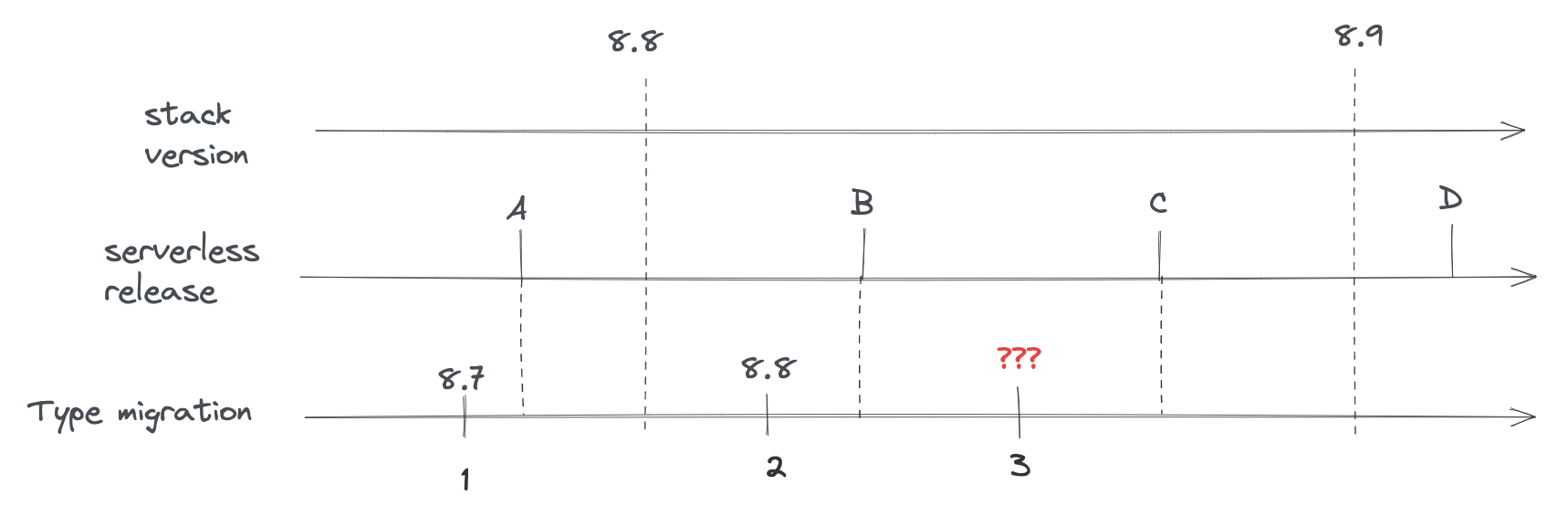
We needed a way to decouple SO versioning from the stack versioning to support this, and model versions do by design.
On traditional deployments (on-prem/non-managed cloud), upgrading Kibana is done with downtime. The upgrade process requires shutting down all the nodes of the prior version before deploying the new one. That way, there is always a single version of Kibana running at a given time, which avoids all risks of data incompatibility between version (e.g the new version introduces a migration that changes the shape of the document in a way that breaks compatibility with the previous version)
For Serverless however, the same process can't be used, as we need to be able to upgrade Kibana without interruption of service. Which means that the old and new version of Kibana will have to cohabitate for a time.
This leads to a lot of constraints regarding what can, or cannot, be done with data transformations (migrations) during an upgrade. And, unsurprisingly, the existing migration API (which allows to register any kind of (doc) => doc transformations) was way too permissive and unsafe given our backward compatibility requirements.
Each Saved Object type may define model versions for its schema and are bound to a given savedObject type. Changes to a saved object type are specified by defining a new model.
As for old migrations, model versions are bound to a given savedObject type
When registering a SO type, a new modelVersions property is available. This attribute is a map of SavedObjectsModelVersion which is the top-level type/container to define model versions.
This map follows a similar { [version number] => version definition } format as the old migration map, however a given SO type’s model version is now identified by a single integer.
The first version must be numbered as version 1, incrementing by one for each new version.
That way:
- SO type versions are decoupled from stack versioning
- SO type versions are independent between types
a valid version numbering:
const myType: SavedObjectsType = {
  name: 'test',
  modelVersions: {
    1: modelVersion1,
    2: modelVersion2,
  },
  // ...other mandatory properties
};
- valid: start with version 1
- valid: no gap between versions
an invalid version numbering:
const myType: SavedObjectsType = {
  name: 'test',
  modelVersions: {
    2: modelVersion2,
    4: modelVersion3,
  },
  // ...other mandatory properties
};
- invalid: first version must be 1
- invalid: skipped version 3
If you are updating a legacy Saved Object (SO) type that lacks a model version, you must first establish a baseline. This requires a two-step PR process to ensure that Serverless environments can be safely rolled back in an emergency.
The first PR must define the current, existing shape of the Saved Object.
- No Mapping Changes: The initial version must not alter any existing mappings; it should only introduce the required schemas.
- Deployment Requirement: This PR must be merged and released in Serverless before you submit a second PR with your desired changes.
While you can use a minimal configuration for the initial version, we recommend defining create and forwardCompatibility schemas that closely reflect your SO’s current structure. This enables full Saved Objects Repository (SOR) validation for both creation and retrieval.
const myType: SavedObjectsType = {
  ...
  modelVersions: {
    1: {
      changes: [],
      schemas: {
        create: schema.object({}, { unknowns: 'allow' }),
        forwardCompatibility: (attrs) => _.pick([
          'knownField1',
          'knownField2',
          ...
          'knownFieldN',
        ]),
      },
    },
  ...
If your Saved Object type was defining schemas: along with the legacy migrations:, you can simply use the latest schema for the initial version.
Model versions are not just functions as the previous migrations were, but structured objects describing how the version behaves and what changed since the last one.
A base example of what a model version can look like:
const myType: SavedObjectsType = {
  name: 'test',
  modelVersions: {
    1: {
      changes: [
        {
          type: 'mappings_addition',
          addedMappings: {
            someNewField: { type: 'text' },
          },
        },
        {
          type: 'data_backfill',
          transform: someBackfillFunction,
        },
      ],
      schemas: {
        forwardCompatibility: fcSchema,
        create: createSchema,
      },
    },
  },
  // ...other mandatory properties
};
Having multiple changes of the same type for a given version is supported by design to allow merging different sources (to prepare for an eventual higher-level API)
This definition would be perfectly valid:
const version1: SavedObjectsModelVersion = {
  changes: [
    {
      type: 'mappings_addition',
      addedMappings: {
        someNewField: { type: 'text' },
      },
    },
    {
      type: 'mappings_addition',
      addedMappings: {
        anotherNewField: { type: 'text' },
      },
    },
  ],
};
It’s currently composed of two main properties:
link to the TS doc for changes
Describes the list of changes applied during this version.
Important: This is the part that replaces the old migration system, and allows defining when a version adds new mapping, mutates the documents, or other type-related changes.
The current types of changes are:
Used to define new mappings introduced in a given version.
Usage example:
const change: SavedObjectsModelMappingsAdditionChange = {
  type: 'mappings_addition',
  addedMappings: {
    newField: { type: 'text' },
    existingNestedField: {
      properties: {
        newNestedProp: { type: 'keyword' },
      },
    },
  },
};
When adding mappings, the root type.mappings must also be updated accordingly (as it was done previously).
Used to flag mappings as no longer being used and ready to be removed.
Usage example:
let change: SavedObjectsModelMappingsDeprecationChange = {
  type: 'mappings_deprecation',
  deprecatedMappings: ['someDeprecatedField', 'someNested.deprecatedField'],
};
It is currently not possible to remove fields from an existing index’s mapping (without reindexing into another index), so the mappings flagged with this change type won’t be deleted for now, but this should still be used to allow our system to clean the mappings once upstream (ES) unblock us.
Used to populate fields (indexed or not) added in the same version.
Usage example:
let change: SavedObjectsModelDataBackfillChange = {
  type: 'data_backfill',
  transform: (document) => {
    return { attributes: { someAddedField: 'defaultValue' } };
  },
};
Even if no check is performed to ensure it, this type of model change should only be used to backfill newly introduced fields.
Used to remove data (unset fields) from all documents of the type.
Usage example:
let change: SavedObjectsModelDataRemovalChange = {
  type: 'data_removal',
  attributePaths: ['someRootAttributes', 'some.nested.attribute'],
};
Due to backward compatibility, field utilization must be stopped in a prior release before actual data removal (in case of rollback). Please refer to the field removal migration example below in this document
Used to execute an arbitrary transformation function.
Usage example:
// Please define your transform function on a separate const.
// Use explicit types for the generic arguments, as shown below.
// This will reduce the chances of introducing bugs.
const transformFn: SavedObjectModelUnsafeTransformFn<BeforeType, AfterType> = (
  doc: SavedObjectModelTransformationDoc<BeforeType>
) => {
  const attributes: AfterType = {
    ...doc.attributes,
    someAddedField: 'defaultValue',
  };

  return { document: { ...doc, attributes } };
};

// this is how you would specify a change in the changes: []
const change: SavedObjectsModelUnsafeTransformChange = {
  type: 'unsafe_transform',
  transformFn: (typeSafeGuard) => typeSafeGuard(transformFn),
};
Using such transformations is potentially unsafe, given the migration system will have no knowledge of which kind of operations will effectively be executed against the documents. Those should only be used when there’s no other way to cover one’s migration needs. Please reach out to the development team if you think you need to use this, as you theoretically shouldn’t.
link to the TS doc for schemas
The schemas associated with this version. Schemas are used to validate or convert SO documents at various stages of their lifecycle.
The currently available schemas are:
This is a new concept introduced by model versions. This schema is used for inter-version compatibility.
When retrieving a savedObject document from an index, if the version of the document is higher than the latest version known of the Kibana instance, the document will go through the forwardCompatibility schema of the associated model version.
Important: These conversion mechanism shouldn’t assert the data itself, and only strip unknown fields to convert the document to the shape of the document at the given version.
Basically, this schema should keep all the known fields of a given version, and remove all the unknown fields, without throwing.
Forward compatibility schema can be implemented in two different ways.
Using
config-schemaExample of schema for a version having two fields: someField and anotherField
const versionSchema = schema.object( { someField: schema.maybe(schema.string()), anotherField: schema.maybe(schema.string()), }, { unknowns: 'ignore' } );ImportantNote the
{ unknowns: 'ignore' }in the schema’s options. This is required when usingconfig-schemabased schemas, as this what will evict the additional fields without throwing an error.Using a plain javascript function
Example of schema for a version having two fields: someField and anotherField
const versionSchema: SavedObjectModelVersionEvictionFn = (attributes) => { const knownFields = ['someField', 'anotherField']; return pick(attributes, knownFields); }NoteStarting with Kibana 9.3.0, all new model versions must include a
forwardCompatibilityschema. This new requirement is designed to ensure that if a Serverless instance needs to be rolled back to an earlier version, the Saved Objects APIs will still deliver data in the original, pre-upgrade format, thereby maintaining API compatibility and safety during the rollback process.
This is a direct replacement for the old SavedObjectType.schemas definition, now directly included in the model version definition.
As a refresher the create schema is a @kbn/config-schema object-type schema, and is used to validate the properties of the document during create and bulkCreate operations.
Implementing this schema is optional, but still recommended, as otherwise there will be no validating when importing objects.
For implementation examples, refer to Use case examples.
These are example of the migration scenario currently supported (out of the box) by the system.
More complex scenarios (e.g field mutation by copy/sync) could already be implemented, but without the proper tooling exposed from Core, most of the work related to sync and compatibility would have to be implemented in the domain layer of the type owners, which is why we’re not documenting them yet.
We are currently in model version 1, and our type has 2 indexed fields defined: foo and bar.
The definition of the type at version 1 would look like:
const myType: SavedObjectsType = {
  name: 'test',
  namespaceType: 'single',
  modelVersions: {
    // initial (and current) model version
    1: {
      changes: [],
      schemas: {
        // FC schema defining the known fields (indexed or not) for this version
        forwardCompatibility: schema.object(
          { foo: schema.string(), bar: schema.string() },
          { unknowns: 'ignore' }
        ),
        // schema that will be used to validate input during `create` and `bulkCreate`
        create:  schema.object(
          { foo: schema.string(), bar: schema.string() },
        )
      },
    },
  },
  mappings: {
    properties: {
      foo: { type: 'text' },
      bar: { type: 'text' },
    },
  },
};
- note the `unknown: ignore` which is how we're evicting the unknown fields
From here, say we want to introduce a new dolly field that is not indexed, and that we don’t need to populate with a default value.
To achieve that, we need to introduce a new model version, with the only thing to do will be to define the associated schemas to include this new field.
The added model version would look like:
// the new model version adding the `dolly` field
let modelVersion2: SavedObjectsModelVersion = {
  // not an indexed field, no data backfill, so changes are actually empty
  changes: [],
  schemas: {
    // the only addition in this model version: taking the new field into account for the schemas
    forwardCompatibility: schema.object(
      { foo: schema.string(), bar: schema.string(), dolly: schema.string() },
      { unknowns: 'ignore' }
    ),
    create:  schema.object(
      { foo: schema.string(), bar: schema.string(), dolly: schema.string() },
    )
  },
};
- note the `unknown: ignore` which is how we're evicting the unknown fields
The full type definition after the addition of the new model version:
const myType: SavedObjectsType = {
  name: 'test',
  namespaceType: 'single',
  modelVersions: {
    1: {
      changes: [],
      schemas: {
        forwardCompatibility: schema.object(
          { foo: schema.string(), bar: schema.string() },
          { unknowns: 'ignore' }
        ),
        create:  schema.object(
          { foo: schema.string(), bar: schema.string() },
        )
      },
    },
    2: {
      changes: [],
      schemas: {
        forwardCompatibility: schema.object(
          { foo: schema.string(), bar: schema.string(), dolly: schema.string() },
          { unknowns: 'ignore' }
        ),
        create:  schema.object(
          { foo: schema.string(), bar: schema.string(), dolly: schema.string() },
        )
      },
    },
  },
  mappings: {
    properties: {
      foo: { type: 'text' },
      bar: { type: 'text' },
    },
  },
};
This scenario is fairly close to the previous one. The difference being that working with an indexed field means adding a mappings_addition change and to also update the root mappings accordingly.
To reuse the previous example, let’s say the dolly field we want to add would need to be indexed instead.
In that case, the new version needs to do the following: - add a mappings_addition type change to define the new mappings - update the root mappings accordingly - add the updated schemas as we did for the previous example
The new version definition would look like:
let modelVersion2: SavedObjectsModelVersion = {
  // add a change defining the mapping for the new field
  changes: [
    {
      type: 'mappings_addition',
      addedMappings: {
        dolly: { type: 'text' },
      },
    },
  ],
  schemas: {
    // adding the new field to the forwardCompatibility schema
    forwardCompatibility: schema.object(
      { foo: schema.string(), bar: schema.string(), dolly: schema.string() },
      { unknowns: 'ignore' }
    ),
    create:  schema.object(
      { foo: schema.string(), bar: schema.string(), dolly: schema.string() },
    )
  },
};
As said, we will also need to update the root mappings definition:
mappings: {
  properties: {
    foo: { type: 'text' },
    bar: { type: 'text' },
    dolly: { type: 'text' },
  },
},
the full type definition after the addition of the model version 2 would be:
const myType: SavedObjectsType = {
  name: 'test',
  namespaceType: 'single',
  modelVersions: {
    1: {
      changes: [
        {
          type: 'mappings_addition',
          addedMappings: {
            foo: { type: 'text' },
            bar: { type: 'text' },
          },
        },
      ],
      schemas: {
        forwardCompatibility: schema.object(
          { foo: schema.string(), bar: schema.string() },
          { unknowns: 'ignore' }
        ),
        create:  schema.object(
          { foo: schema.string(), bar: schema.string() },
        )
      },
    },
    2: {
      changes: [
        {
          type: 'mappings_addition',
          addedMappings: {
            dolly: { type: 'text' },
          },
        },
      ],
      schemas: {
        forwardCompatibility: schema.object(
          { foo: schema.string(), bar: schema.string(), dolly: schema.string() },
          { unknowns: 'ignore' }
        ),
        create:  schema.object(
          { foo: schema.string(), bar: schema.string(), dolly: schema.string() },
        )
      },
    },
  },
  mappings: {
    properties: {
      foo: { type: 'text' },
      bar: { type: 'text' },
      dolly: { type: 'text' },
    },
  },
};
Now a slightly different scenario where we’d like to populate the newly introduced field with a default value.
In that case, we’d need to add an additional data_backfill change to populate the new field’s value (in addition to the mappings_addition one):
let modelVersion2: SavedObjectsModelVersion = {
  changes: [
    // setting the `dolly` field's default value.
    {
      type: 'data_backfill',
      transform: (document) => {
        return { attributes: { dolly: 'default_value' } };
      },
    },
    // define the mappings for the new field
    {
      type: 'mappings_addition',
      addedMappings: {
        dolly: { type: 'text' },
      },
    },
  ],
  schemas: {
    // define `dolly` as an know field in the schema
    forwardCompatibility: schema.object(
      { foo: schema.string(), bar: schema.string(), dolly: schema.string() },
      { unknowns: 'ignore' }
    ),
    create:  schema.object(
      { foo: schema.string(), bar: schema.string(), dolly: schema.string() },
    )
  },
};
The full type definition would look like:
const myType: SavedObjectsType = {
  name: 'test',
  namespaceType: 'single',
  modelVersions: {
    1: {
      changes: [
        {
          type: 'mappings_addition',
          addedMappings: {
            foo: { type: 'text' },
            bar: { type: 'text' },
          },
        },
      ],
      schemas: {
        forwardCompatibility: schema.object(
          { foo: schema.string(), bar: schema.string() },
          { unknowns: 'ignore' }
        ),
        create:  schema.object(
          { foo: schema.string(), bar: schema.string() },
        )
      },
    },
    2: {
      changes: [
        {
          type: 'data_backfill',
          transform: (document) => {
            return { attributes: { dolly: 'default_value' } };
          },
        },
        {
          type: 'mappings_addition',
          addedMappings: {
            dolly: { type: 'text' },
          },
        },
      ],
      schemas: {
        forwardCompatibility: schema.object(
          { foo: schema.string(), bar: schema.string(), dolly: schema.string() },
          { unknowns: 'ignore' }
        ),
        create:  schema.object(
          { foo: schema.string(), bar: schema.string(), dolly: schema.string() },
        )
      },
    },
  },
  mappings: {
    properties: {
      foo: { type: 'text' },
      bar: { type: 'text' },
      dolly: { type: 'text' },
    },
  },
};
If the field was non-indexed, we would just not use the mappings_addition change or update the mappings (as done in example 1)
We are currently in model version 1, and our type has 2 indexed fields defined: kept and removed.
The definition of the type at version 1 would look like:
const myType: SavedObjectsType = {
  name: 'test',
  namespaceType: 'single',
  modelVersions: {
    // initial (and current) model version
    1: {
      changes: [],
      schemas: {
        // FC schema defining the known fields (indexed or not) for this version
        forwardCompatibility: schema.object(
          { kept: schema.string(), removed: schema.string() },
          { unknowns: 'ignore' }
        ),
        // schema that will be used to validate input during `create` and `bulkCreate`
        create:  schema.object(
          { kept: schema.string(), removed: schema.string() },
        )
      },
    },
  },
  mappings: {
    properties: {
      kept: { type: 'text' },
      removed: { type: 'text' },
    },
  },
};
- note the `unknown: ignore` which is how we're evicting the unknown fields
From here, say we want to remove the removed field, as our application doesn’t need it anymore since a recent change.
The first thing to understand here is the impact toward backward compatibility: Say that Kibana version X was still using this field, and that we stopped utilizing the field in version X+1.
We can’t remove the data in version X+1, as we need to be able to rollback to the prior version at any time. If we were to delete the data of this removed field during the upgrade to version X+1, and if then, for any reason, we’d need to rollback to version X, it would cause a data loss, as version X was still using this field, but it would no longer present in our document after the rollback.
Which is why we need to perform any field removal as a 2-step operation: - release X: Kibana still utilize the field - release X+1: Kibana no longer utilize the field, but the data is still present in the documents - release X+2: The data is effectively deleted from the documents.
That way, any prior-version rollback (X+2 to X+1 or X+1 to X is safe in term of data integrity)
The main question then, is what’s the best way of having our application layer simply ignore this removed field during version X+1, as we don’t want this field (now non-utilized) to be returned from the persistence layer, as it could pollute the higher-layers where the field is effectively no longer used or even known.
This can easily be done by introducing a new version and using the forwardCompatibility schema to shallow the field.
The X+1 model version would look like:
// the new model version ignoring the `removed` field
let modelVersion2: SavedObjectsModelVersion = {
  changes: [],
  schemas: {
    forwardCompatibility: schema.object(
      { kept: schema.string() },
      { unknowns: 'ignore' }
    ),
    create:  schema.object(
      { kept: schema.string() },
    )
  },
};
- `removed` is no longer defined here
- `removed` is no longer defined here
The full type definition after the addition of the new model version:
const myType: SavedObjectsType = {
  name: 'test',
  namespaceType: 'single',
  modelVersions: {
    // initial (and current) model version
    1: {
      changes: [],
      schemas: {
        // FC schema defining the known fields (indexed or not) for this version
        forwardCompatibility: schema.object(
          { kept: schema.string(), removed: schema.string() },
          { unknowns: 'ignore' }
        ),
        // schema that will be used to validate input during `create` and `bulkCreate`
        create:  schema.object(
          { kept: schema.string(), removed: schema.string() },
        )
      },
    },
    2: {
      changes: [],
      schemas: {
        forwardCompatibility: schema.object(
          { kept: schema.string() },
          { unknowns: 'ignore' }
        ),
        create:  schema.object(
          { kept: schema.string() },
        )
      },
    }
  },
  mappings: {
    properties: {
      kept: { type: 'text' },
      removed: { type: 'text' },
    },
  },
};
- note the `unknown: ignore` which is how we're evicting the unknown fields
- `removed` is no longer defined here
- `removed` is no longer defined here
then, in a later release, we can then deploy the change that will effectively remove the data from the documents:
// the new model version ignoring the `removed` field
let modelVersion3: SavedObjectsModelVersion = {
  changes: [
    {
      type: 'data_removal',
      removedAttributePaths: ['removed']
    }
  ],
  schemas: {
    forwardCompatibility: schema.object(
      { kept: schema.string() },
      { unknowns: 'ignore' }
    ),
    create:  schema.object(
      { kept: schema.string() },
    )
  },
};
- define a data_removal change to delete the field
The full type definition after the data removal would look like:
const myType: SavedObjectsType = {
  name: 'test',
  namespaceType: 'single',
  modelVersions: {
    // initial (and current) model version
    1: {
      changes: [],
      schemas: {
        // FC schema defining the known fields (indexed or not) for this version
        forwardCompatibility: schema.object(
          { kept: schema.string(), removed: schema.string() },
          { unknowns: 'ignore' }
        ),
        // schema that will be used to validate input during `create` and `bulkCreate`
        create:  schema.object(
          { kept: schema.string(), removed: schema.string() },
        )
      },
    },
    2: {
      changes: [],
      schemas: {
        forwardCompatibility: schema.object(
          { kept: schema.string() },
          { unknowns: 'ignore' }
        ),
        create:  schema.object(
          { kept: schema.string() },
        )
      },
    },
    3: {
      changes: [
        {
          type: 'data_removal',
          removedAttributePaths: ['removed']
        }
      ],
      schemas: {
        forwardCompatibility: schema.object(
          { kept: schema.string() },
          { unknowns: 'ignore' }
        ),
        create:  schema.object(
          { kept: schema.string() },
        )
      },
    }
  },
  mappings: {
    properties: {
      kept: { type: 'text' },
      removed: { type: 'text' },
    },
  },
};
- note the `unknown: ignore` which is how we're evicting the unknown fields
- `removed` is no longer defined here
- `removed` is no longer defined here
- define a data_removal change to delete the field
Model versions definitions are more structured than the legacy migration functions, which makes them harder to test without the proper tooling. This is why a set of testing tools and utilities are exposed from the @kbn/core-test-helpers-model-versions package, to help properly test the logic associated with model version and their associated transformations.
For unit tests, the package exposes utilities to easily test the impact of transforming documents from a model version to another one, either upward or backward.
The createModelVersionTestMigrator helper allows to create a test migrator that can be used to test model version changes between versions, by transforming documents the same way the migration algorithm would during an upgrade.
Example:
import {
  createModelVersionTestMigrator,
  type ModelVersionTestMigrator
} from '@kbn/core-test-helpers-model-versions';

const mySoTypeDefinition = someSoType();

describe('mySoTypeDefinition model version transformations', () => {
  let migrator: ModelVersionTestMigrator;

  beforeEach(() => {
    migrator = createModelVersionTestMigrator({ type: mySoTypeDefinition });
  });

  describe('Model version 2', () => {
    it('properly backfill the expected fields when converting from v1 to v2', () => {
      const obj = createSomeSavedObject();

      const migrated = migrator.migrate({
        document: obj,
        fromVersion: 1,
        toVersion: 2,
      });

      expect(migrated.properties).toEqual(expectedV2Properties);
    });

    it('properly removes the expected fields when converting from v2 to v1', () => {
      const obj = createSomeSavedObject();

      const migrated = migrator.migrate({
        document: obj,
        fromVersion: 2,
        toVersion: 1,
      });

      expect(migrated.properties).toEqual(expectedV1Properties);
    });
  });
});
During integration tests, we can boot a real Elasticsearch cluster, allowing us to manipulate SO documents in a way almost similar to how it would be done on production runtime. With integration tests, we can even simulate the cohabitation of two Kibana instances with different model versions to assert the behavior of their interactions.
The package exposes a createModelVersionTestBed function that can be used to fully setup a test bed for model version integration testing. It can be used to start and stop the ES server, and to initiate the migration between the two versions we’re testing.
Example:
import {
  createModelVersionTestBed,
  type ModelVersionTestKit
} from '@kbn/core-test-helpers-model-versions';

describe('myIntegrationTest', () => {
  const testbed = createModelVersionTestBed();
  let testkit: ModelVersionTestKit;

  beforeAll(async () => {
    await testbed.startES();
  });

  afterAll(async () => {
    await testbed.stopES();
  });

  beforeEach(async () => {
    // prepare the test, preparing the index and performing the SO migration
    testkit = await testbed.prepareTestKit({
      savedObjectDefinitions: [{
        definition: mySoTypeDefinition,
        // the model version that will be used for the "before" version
        modelVersionBefore: 1,
        // the model version that will be used for the "after" version
        modelVersionAfter: 2,
      }]
    })
  });

  afterEach(async () => {
    if(testkit) {
      // delete the indices between each tests to perform a migration again
      await testkit.tearDown();
    }
  });

  it('can be used to test model version cohabitation', async () => {
    // last registered version is `1` (modelVersionBefore)
    const repositoryV1 = testkit.repositoryBefore;
    // last registered version is `2` (modelVersionAfter)
    const repositoryV2 = testkit.repositoryAfter;

    // do something with the two repositories, e.g
    await repositoryV1.create(someAttrs, { id });
    const v2docReadFromV1 = await repositoryV2.get('my-type', id);
    expect(v2docReadFromV1.attributes).toEqual(whatIExpect);
  });
});
Limitations:
Because the test bed is only creating the parts of Core required to instantiate the two SO repositories, and because we’re not able to properly load all plugins (for proper isolation), the integration test bed currently has some limitations:
no extensions are enabled
- no security
- no encryption
- no spaces
all SO types will be using the same SO index
Since Saved Objects are critical to Kibana, any changes to their type definitions must adhere to strict safety criteria to prevent:
- Data corruption.
- Unsupported changes in mappings.
- Rollback issues, should the need arise.
To enforce these criteria, a validation logic has been implemented. This logic automatically identifies changed types and performs a series of checks to confirm the changes are acceptable. It runs automatically in CI during the pull_request and on-merge pipelines, and developers can also run it manually on their workstations.
The checks can be run manually using the following command in your PR branch:
# First, find your current commit ID <lastCommitId>
git log -n 1

# Second, find the merge-base commit (the example assumes you are developing on 'main' branch)
git merge-base -a <lastCommitId> main

# Finally, run the script in your local environment (validating changes with respect to that merge-base commit)
node scripts/check_saved_objects --baseline <mergeBase> --fix
Please refer to the Troubleshooting section if you encounter validation errors.
The following validations are performed to ensure changes to Saved Object types adhere to necessary constraints and maintain compatibility across environments.
Existing model versions/migrations: Once defined, existing model versions and migrations cannot be mutated (changed or deleted).
- Rationale: This prevents discrepancies between environments that have already upgraded and those that have not.
Deleting model versions/migrations: You cannot delete existing model versions; you can only define new ones.
Model version sequence: Defined model versions must be consecutive integers, starting at 1. You cannot skip any version number.
Single model version per PR: A given Pull Request cannot define more than one model version for the same Saved Object type.
- Rationale: If the changes are part of a 2-step rollout, they must be shipped in separate Serverless releases. The
on-mergepipeline will compare changes against current serverless release.
- Rationale: If the changes are part of a 2-step rollout, they must be shipped in separate Serverless releases. The
Legacy migrations: Types cannot define new versions using the legacy
migrations:property, as it is deprecated.
Mapping changes require a new version: If you update the mappings, you must also provide a new model version that accounts for those mapping changes.
Backward compatible mappings: To satisfy migration constraints, updates to mappings must be performed in place and without requiring a reindex. Therefore, all mapping updates must be compatible.
- Note: Elasticsearch has limitations preventing certain breaking changes, such as removing fields or updating the data types of fields (e.g., changing an
integerto atext).
- Note: Elasticsearch has limitations preventing certain breaking changes, such as removing fields or updating the data types of fields (e.g., changing an
Mandatory schemas: New model versions must include the
createandforwardCompatibilityschemas, as these are now mandatory.
To provide guarantees for Serverless rollbacks, the validation script requires type owners to supply data fixtures for any updated Saved Object types.
- These fixtures represent the before-upgrade and after-upgrade states.
- They are crucial for automated testing of the upgrade and rollback processes.
When a Saved Object type is updated, the script performs the following sequence using internal tools:
- Simulate Upgrade → Simulate Rollback → Simulate Second Upgrade.
- At each step, it queries the stored documents via the
SavedObjectsRepository. - The script then validates that the documents' shape precisely matches the corresponding fixture.
While automated rollback testing introduces a new requirement for developers —specifically, providing data fixtures and defining mandatory create and forwardCompatibility schemas for each new model version— this effort is a significant gain. This powerful addition complements the Test Bed, allowing type owners to fully test both migration logic and rollback scenarios simply by supplying the necessary data fixtures.
There are 2 options, depending on the amount of flexibility you need:
For complete control over your HTTP APIs and custom handling, declare your type as hidden, as shown in the example.
The other option that allows you to build your own HTTP APIs and still use the client as-is is to declare your type as hidden from the global saved objects HTTP APIs as hiddenFromHttpApis: true
import { SavedObjectsType } from 'src/core/server';

export const foo: SavedObjectsType = {
  name: 'foo',
  hidden: false, [1]
  hiddenFromHttpApis: true, [2]
  namespaceType: 'multiple-isolated',
  mappings: { ... },
  modelVersions: { ... },
  ...
};
[1] Needs to be false to use the hiddenFromHttpApis option
[2] Set this to true to build your own HTTP API and have complete control over the route handler.
When you need to remove a Saved Object type from your plugin, there are important steps to follow to ensure the type name cannot be accidentally reused in the future.
Once a Saved Object type has been registered and used in production, its name becomes "reserved" for that purpose. If we allowed the same name to be reused for a different type later:
- Migration conflicts: Old documents with the removed type name could interfere with new documents using the same name
- Upgrade failures: Users upgrading from older versions could experience migration failures if type names are reused
To prevent these issues, Kibana maintains a list of all removed type names in packages/kbn-check-saved-objects-cli/removed_types.json. This ensures type names are never reused.
First, remove the type registration from your plugin. Also remove the type definition file and any references to it.
Kibana includes an automated check that detects when types are removed. Run it locally to update the removed_types.json file:
# Get your current commit ID
git log -n 1

# Get the merge-base commit with main
git merge-base -a <currentCommitSha> main

# Run the check with the baseline
node scripts/check_saved_objects --baseline <mergeBase> --fix
Replace <currentCommitSha> with your actual commit SHA from the first command, and <mergeBase> with the merge-base commit SHA from the second command.
This command will:
- Compare the current registered types against the baseline (merge-base with main)
- Detect any types that were removed
- Automatically add the removed type name(s) to
removed_types.json - Exit with an error message indicating which types were added
The error message will look like:
❌ The following SO types are no longer registered: 'my-removed-type'.
Updated 'removed_types.json' to prevent the same names from being reused in the future.
Include both your code changes and the updated removed_types.json file in your commit.
If you prefer to update removed_types.json manually, you can:
- Open
packages/kbn-check-saved-objects-cli/removed_types.json - Add your removed type name to the array in alphabetical order
- Save the file
Once a type name is added to removed_types.json, it cannot be used again for a new Saved Object type. Choose type names carefully when creating new types.
Before removing a type, ensure:
- No references exist: Check that no other Saved Object types reference the type you're removing
- Data migration is complete: If users have documents of this type, ensure they've been migrated to a new type or are no longer needed
- Coordinate with stakeholders: Confirm with your team and any dependent teams that the removal is expected
The Serverless environment, and the fact that upgrade in such environments are performed in a way where, at some point, the old and new version of the application are living in cohabitation, leads to some particularities regarding the way the SO APIs works, and to some limitations / edge case that we need to document
By default, the find API (as any other SO API returning documents) will migrate all documents before returning them, to ensure that documents can be used by both versions during a cohabitation (e.g an old node searching for documents already migrated, or a new node searching for documents not yet migrated).
However, when using the fields option of the find API, the documents can’t be migrated, as some model version changes can’t be applied against a partial set of attributes. For this reason, when the fields option is provided, the documents returned from find will not be migrated.
Which is why, when using this option, the API consumer needs to make sure that all the fields passed to the fields option were already present in the prior model version. Otherwise, it may lead to inconsistencies during upgrades, where newly introduced or backfilled fields may not necessarily appear in the documents returned from the search API when the option is used.
(note: both the previous and next version of Kibana must follow this rule then)
The savedObjects bulkUpdate API will update documents client-side and then reindex the updated documents. These update operations are done in-memory, and cause memory constraint issues when updating many objects with large json blobs stored in some fields. As such, we recommend against using bulkUpdate for savedObjects that: - use arrays (as these tend to be large objects) - store large json blobs in some fields
CI automatically performs some validations on Saved Object type definitions. Whenever a new SO type is added, or a new field is added to an existing type, a CI step will Check changes in saved objects.
Please find your error in the list below, to understand what scenario your PR is falling into:
❌ Modifications have been detected in the '<soType>.migrations'. This property is deprected and no modifications are allowed.
Problem: Migration functions cannot be altered. The migrations property was deprecated in favor of modelVersions, but the existing migrations must be kept in order to allow importing old documents.
Solution: Do not perform any modifications in the migrations property of your SO type. If you haven't modified the field, please check that your PR branch is up-to-date and consider updating.
❌ Some modelVersions have been updated for SO type '<soType>' after they were defined: 5.
Problem: The existing modelVersions cannot be mutated. This would cause inconsistencies between deployments.
Scenario 1: I am not modifying an existing modelVersion, but rather trying to create a new one. Most likely someone else added another modelVersion for the same SO type which then got released in Serverless (baseline for comparison).
Scenario 2: I detected a bug and wanted to modify the modelVersion. Unfortunately, it might already be to late to fix it. Once a modelVersion is defined in a PR, and that PR is merged, it could be released in Serverless anytime (or in a Customer Zero deployment). Thus, some deployments/projects might already updated to that modelVersion. Either you just merged the PR and can guarantee nobody has loaded it, or you'll probably have to create a new model version.
❌ Some model versions have been deleted for SO type '<soType>'.
Problem: For the same reasons as the previous error, modelVersions cannot be deleted. In this scenario, it could happen that your PR stems from a commit that is older than the current Serverless release, and is missing modelVersions for some SO types.
Solution: Rebase your PR to get the latest SO type definitions.
❌ Invalid model version 'five' for SO type '<soType>'. Model versions must be consecutive integer numbers starting at 1.
❌ The '<soType>' SO type is missing model version '4'. Model versions defined: 1,2,3,5.
These errors are pretty obvious. Model versions must be defined as consecutive numeric strings, e.g. '1', '2', '3', ...
❌ The '<soType>' SO type has changes in the mappings, but is missing a modelVersion that defines these changes.
Problem: Whenever we update the mappings for a SO type, we must signal the migration logic that this types' mappings must be updated in the SO index.
Solution: Create a new modelVersion that includes the type: 'mappings_addition', as well as the schemas.forwardCompatibility properties.
❌ The SO type '<soType>' is defining two (or more) new model versions.
Problem: To ensure seamless rollouts, and safe rollbacks, some features need to be rolled out as several incremental changes where each incremental change is guaranteed to be released before the next. For instance, a new property cannot be introduced, backfilled and assumed to be present in the same release.
Scenario 1: I am developing a large feature and including multiple changes in my SO type. If changes are unrelated (in the sense that they don't require a 2-step rollout), you should be able to condense them into a single modelVersion.
Scenario 2: I have only defined 1 new modelVersion. My PR was green before and all of a sudden it started failing :shrug:. The sanity checks on SO changes are performed against 2 baselines:
Your PR merge base commit (or one of its ancestors). This should not change, so likely not the culprit.
The current Serverless release. If a high-severity issue occurs, Serverless might be rolled back to a previous version. This could in turn impact CI pipelines for PRs that would otherwise be fine. In other words, "from the current Serverless standpoint, your PR is not releasable at the moment" . This should only happen exceptionally.
- Scenario 2.1: Kibana has been rolled back. Please wait until the situation goes back to normal, i.e. an emergency release is performed after the rollback, and Kibana gets to a normal release state.
- Scenario 2.2: Kibana has NOT been rolled back. Reach out to the Kibana Core team and we will help you figure out what's going on.
❌ The following SO types are no longer registered: '<soType>'. Please run with --fix to update 'removed_types.json'.
Problem: You removed a Saved Object type but didn't update the removed_types.json file to track the removal.
Solution: Run node scripts/check_saved_objects --baseline <mergeBase> --fix locally to automatically update the removed_types.json file, then commit the changes. See the Removing a Saved Object type section for detailed instructions on how to determine the correct merge-base commit.
❌ Cannot re-register previously removed type(s): <soType>. Please use a different name.
Problem: You're trying to create a new Saved Object type using a name that was previously used and removed. Type names cannot be reused to prevent migration conflicts.
Solution: Choose a different name for your Saved Object type. Once a type name is added to packages/kbn-check-saved-objects-cli/removed_types.json, it's permanently reserved and cannot be reused.