AutoOps for ECE, ECK, and self-managed clusters
For ECE (Elastic Cloud Enterprise), ECK (Elastic Cloud on Kubernetes), and self-managed Elasticsearch clusters, AutoOps can be set up through Cloud Connect.
Cloud Connect enables users of ECE, ECK, and self-managed clusters to use Elastic Cloud services. This means you can take advantage of the simplified cluster monitoring, real-time issue detection, and performance recommendations of AutoOps without having to run and manage the underlying infrastructure.
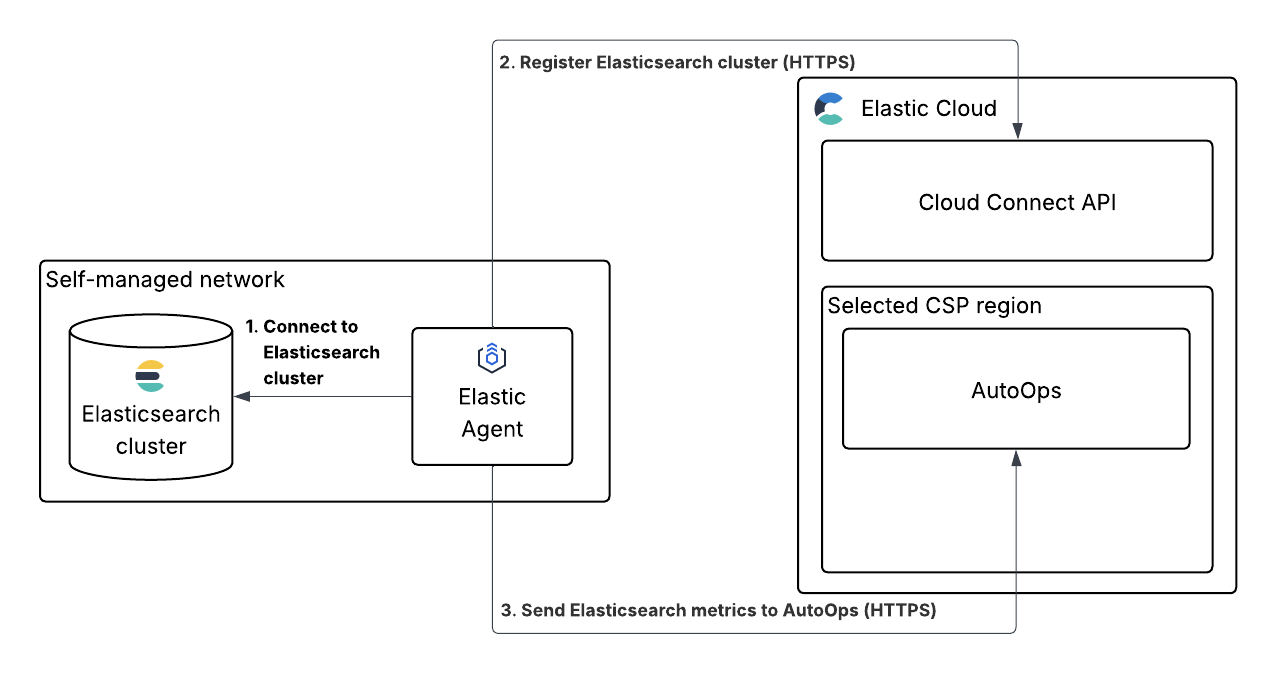
To connect your ECE, ECK, or self-managed cluster to AutoOps, you have to use your Elastic Cloud account to install Elastic Agent. After that, the process can be broken down into three components:
- Elastic Agent connects to your ECE, ECK, or self-managed Elasticsearch cluster.
- The agent registers your cluster with Elastic Cloud using the Cloud Connect API.
- The agent begins to send metrics from your cluster to AutoOps in your selected CSP region.
For instructions on how to get started, refer to Connect your ECE, ECK, or self-managed cluster to AutoOps.
After this setup is complete, you can start using AutoOps to monitor your cluster. Learn more about what you can do with AutoOps in views and events.
In this section, you'll find the following information:
- How to connect your ECE, ECK, or self-managed cluster to AutoOps
- How to connect your local development cluster to AutoOps
- How to manage users of your connected clusters
- A troubleshooting guide to help you with any issues you may encounter
Refer to our FAQ for answers to frequently asked questions about AutoOps for ECE, ECK, or self-managed clusters.