Agent Builder is available now GA. Get started with an Elastic Cloud Trial, and check out the documentation for Agent Builder here.
Context Engineering is becoming increasingly important in building reliable AI Agents and architectures. As models get better and better, their effectiveness and reliability depend less on their trained data and more on how well they’re grounded in the right context. Agents that can retrieve and apply the most relevant information at the right time are much more likely to produce accurate and trustworthy outputs.
In this blog, we’ll use Mastra to build a knowledge agent that remembers what users say and can recall relevant information later, using Elasticsearch as the memory and retrieval backend. You can easily extend this same concept to real-world use cases, think support agents that can remember past conversations and resolutions, allowing them to tailor responses to specific users or surface solutions faster based on prior context.
Follow along here to see how to build it step by step. If you get lost or just want to run a finished example, check out the repo here.
What is Mastra?
Mastra is an open-source TypeScript framework for building AI agents with swappable parts for reasoning, memory, and tools. Its semantic recall feature gives agents the ability to remember and retrieve past interactions by storing messages as embeddings in a vector database. This allows agents to retain long-term conversational context and continuity. Elasticsearch is an excellent vector store to enable this feature, as it supports efficient dense vector search. When semantic recall is triggered, the agent pulls relevant past messages into the model’s context window, allowing the model to use that retrieved context as the basis for its reasoning and responses.
What you need to get started
- Node v18+
- Elasticsearch (version 8.15 or newer)
- Elasticsearch API Key
- OpenAI API Key
Note: You’ll need this because the demo uses the OpenAI provider, but Mastra supports other AI SDKs and community model providers, so you can easily swap it out depending on your setup.
Building a Mastra project
We’ll use Mastra’s built-in CLI to provide the scaffolding for our project. Run the command:
You’ll get a set of prompts, starting with:
1. Give your project a name.

2. We can keep this default; feel free to leave this blank.

3. For this project, we’ll use a model provided by OpenAI.
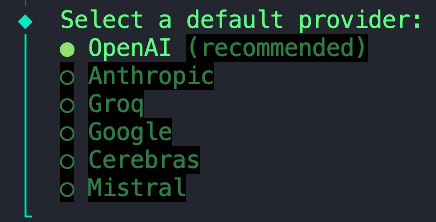
4. Select the “Skip for now” option as we’ll store all our environment variables in an `.env` file we’ll configure at a later step.
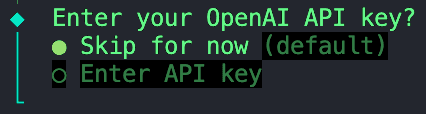
5. We can also skip this option.
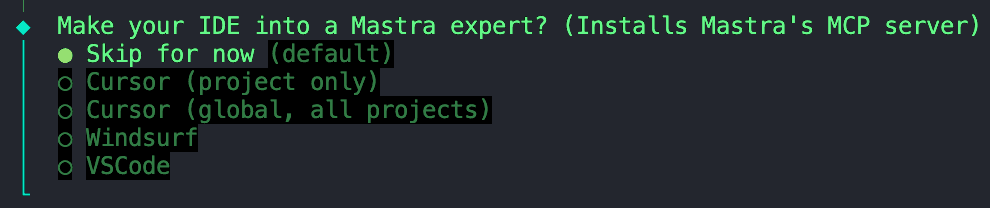
Skipping the installation of Mastra's MCP server
Once that’s finished initializing, we can move to the next step.
Installing dependencies
Next, we need to install a few dependencies:
ai- Core AI SDK package that provides tools for managing AI models, prompts, and workflows in JavaScript/TypeScript. Mastra is built on top of the AI SDK by Vercel, so we need this dependency to enable model interactions with your agent.@ai-sdk/openai- Plugin that connects the AI SDK to OpenAI models (like GPT-4, GPT-4o, etc.), enabling API calls using your OpenAI API key.@elastic/elasticsearch- Official Elasticsearch client for Node.js, used to connect to your Elastic Cloud or local cluster for indexing, searching, and vector operations.dotenv- Loads environment variables from a .env file into process.env, allowing you to securely inject credentials like API keys and Elasticsearch endpoints.
Configuring environment variables
Create a .env file in your project root directory if you don’t already see one. Alternatively, you can copy and rename the example .env I provided in the repo. In this file, we can add the following variables:
That concludes the basic setup. From here, you can already start building and orchestrating agents. We’ll take it a step further and add Elasticsearch as the store and vector search layer.
Adding Elasticsearch as the vector store
Create a new folder called stores and inside, add this file. Before Mastra and Elastic ship an official Elasticsearch vector store integration, Abhi Aiyer(Mastra CTO) shared this early prototype class called ElasticVector. Simply, it connects Mastra’s memory abstraction to Elasticsearch’s dense vector capabilities, so developers can drop in Elasticsearch as the vector database for their agents.
Let’s take a deeper look at the important parts of the integration:
Ingestion of the Elasticsearch client
This section defines the ElasticVector class and sets up the Elasticsearch client connection with support for both standard and serverless deployments.
ElasticVectorConfig extends ClientOptions: This creates a new configuration interface that inherits all Elasticsearch client options (likenode,auth,requestTimeout) and adds our custom properties. This means users can pass any valid Elasticsearch configuration along with our serverless-specific options.extends MastraVector: This allowsElasticVectorto inherit from Mastra’s baseMastraVectorclass, which is a common interface that all vector store integrations conform to. This ensures that Elasticsearch behaves like any other Mastra vector backend from the agent’s perspective.private client: Client: This is a private property that holds an instance of the Elasticsearch JavaScript client. This allows the class to talk directly to your cluster.isServerlessanddeploymentChecked: These properties work together to detect and cache whether we're connected to a serverless or standard Elasticsearch deployment. This detection happens automatically on first use, or can be explicitly configured.constructor(config: ClientOptions): This constructor takes a configuration object (containing your Elasticsearch credentials and optional serverless settings) and uses it to initialize the client in the linethis.client = new Client(config).super(): This calls Mastra’s base constructor, so it inherits logging, validation helpers and other internal hooks.
At this point, Mastra knows that there’s a new vector store called ElasticVector
Detecting deployment type
Before creating indices, the adapter automatically detects whether you're using standard Elasticsearch or Elasticsearch Serverless. This is important because serverless deployments don't allow manual shard configuration.
What’s happening:
- First checks if you explicitly set
isServerlessin the config (skips auto-detection) - Calls Elasticsearch's
info()API to get cluster information - Checks the
build_flavor field(serverless deployments returnserverless) - Falls back to checking the tagline if build flavor isn't available
- Caches the result to avoid repeated API calls
- Defaults to standard deployment if detection fails
Example usage:
Creating the “memory” store in Elasticsearch
The function below sets up an Elasticsearch index for storing embeddings. It checks whether the index already exists. If not, it creates one with the mapping below that contains a dense_vector field to store embeddings and custom similarity metrics.
Some things to note:
- The
dimensionparameter is the length of each embedding vector, which depends on which embedding model you’re using. In our case, we’ll generate embeddings using OpenAI’stext-embedding-3-smallmodel, which outputs vectors of size1536. We’ll use this as our default value. - The
similarityvariable used in the mapping below is defined from the helper function const similarity = this.mapMetricToSimilarity(metric), which takes in the value for themetricparameter and converts it to an Elasticsearch-compatible keyword for the chosen distance metric.- For example: Mastra uses general terms for vector similarity like
cosine,euclidean, anddotproduct. If we were to pass the metriceuclideandirectly into the Elasticsearch mapping, it would throw an error because Elasticsearch expects the keywordl2_normto represent Euclidean distance.
- For example: Mastra uses general terms for vector similarity like
- Serverless compatibility: The code automatically omits shard and replica settings for serverless deployments, as these are managed automatically by Elasticsearch Serverless.
Storing a new memory or note after an interaction
This function takes new embeddings generated after each interaction, along with the metadata, then inserts or updates them into the index using Elastic’s bulk API. The bulk API groups multiple write operations into a single request; this improvement in our indexing performance ensures that updates stay efficient as our agent’s memory keeps growing.
Querying similar vectors for semantic recall
This function is the core of the semantic recall feature. The agent uses vector search to find similar stored embeddings within our index.
Under the hood:
- Runs a kNN (k-nearest neighbors) query using the
knnAPI in Elasticsearch. - Retrieves the top-K similar vectors to the input query vector.
- Optionally applies metadata filters to narrow down results (e.g., only search within a specific category or time range)
- Returns structured results including the document ID, similarity score, and the stored metadata.
Creating the knowledge agent
Now that we’ve seen the connection between Mastra and Elasticsearch through the ElasticVector integration, let’s create the Knowledge Agent itself.
Inside the folder agents, create a file called knowledge-agent.ts. We can start by connecting our environment variables and initializing the Elasticsearch client.
Here, we:
- Use
dotenvto load in our variables from our.envfile. - Check whether the Elasticsearch credentials are being injected correctly, and we can establish a successful connection to the client.
- Pass in the Elasticsearch endpoint and API key into the
ElasticVectorconstructor to create an instance of our vector store that we defined earlier. - Optionally specify
isServerless: trueif you're using Elasticsearch Serverless. This skips the auto-detection step and improves startup time. If omitted, the adapter will automatically detect your deployment type on first use.
Next, we can define the agent using Mastra’s Agent class.
The fields we can define are:
nameandinstructions: Give it an identity and primary function.model: We are using OpenAI’sgpt-4othrough the@ai-sdk/openaipackage.memory:vector: Points to our Elasticsearch store, so embeddings get stored and retrieved from there.embedder: Which model to use for generating embeddingssemanticRecalloptions decide how the recall works:topK: How many semantically similar messages to retrieve.messageRange: How much of the conversation to include with each match.scope: Defines the boundary for memory.
Almost done. We just need to add this newly created agent to our Mastra configuration. In the file called index.ts, import the knowledge agent and insert it into the agents field.
The other fields include:
storage: This is Mastra’s internal data store for run history, observability metrics, scores, and caches. For more information on Mastra storage, visit here.logger: Mastra uses Pino, which is a lightweight structured JSON logger. It captures events like agent start and stops, tool calls and results, errors, and LLM response times.observability: Controls AI tracing and execution visibility for agents. It tracks:- Start/end of each reasoning step.
- Which model or tool was used.
- Inputs and outputs.
- Scores and evaluations
Testing the agent with Mastra Studio
Congrats! If you’ve made it here, you are ready to run this agent and test out its semantic recall abilities. Fortunately, Mastra provides a built-in chat UI so we don't have to build our own.
To start the Mastra dev server, open up a terminal and run the following command:
After the initial bundling and start-up of the server, it should provide you with an address for the Playground.

Paste this address into your browser, and you’ll be greeted with the Mastra Studio.
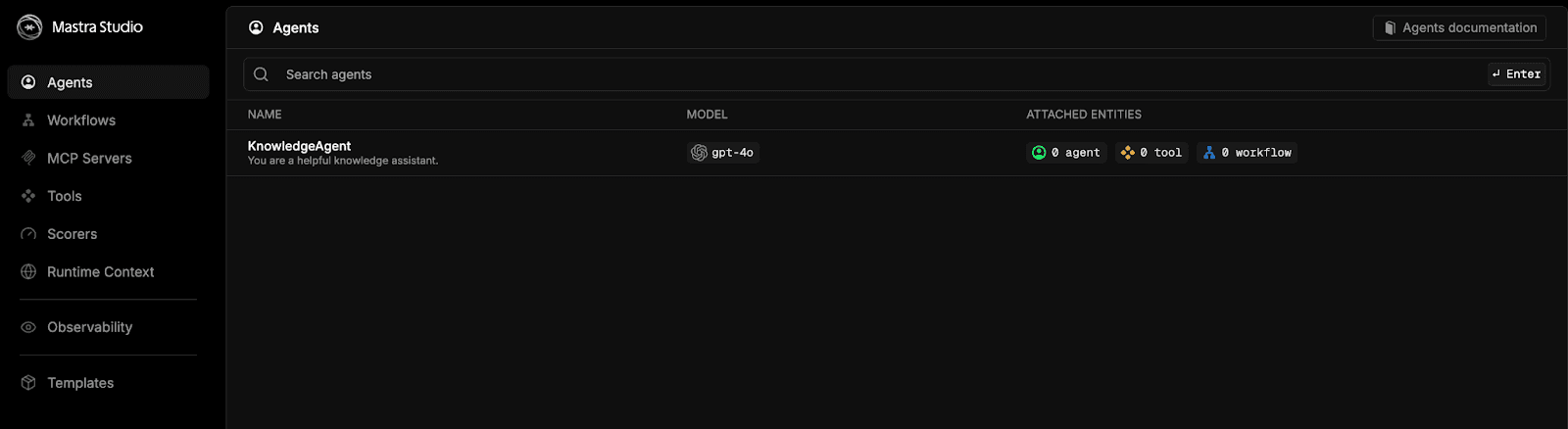
Select the option for knowledgeAgent and chat away.
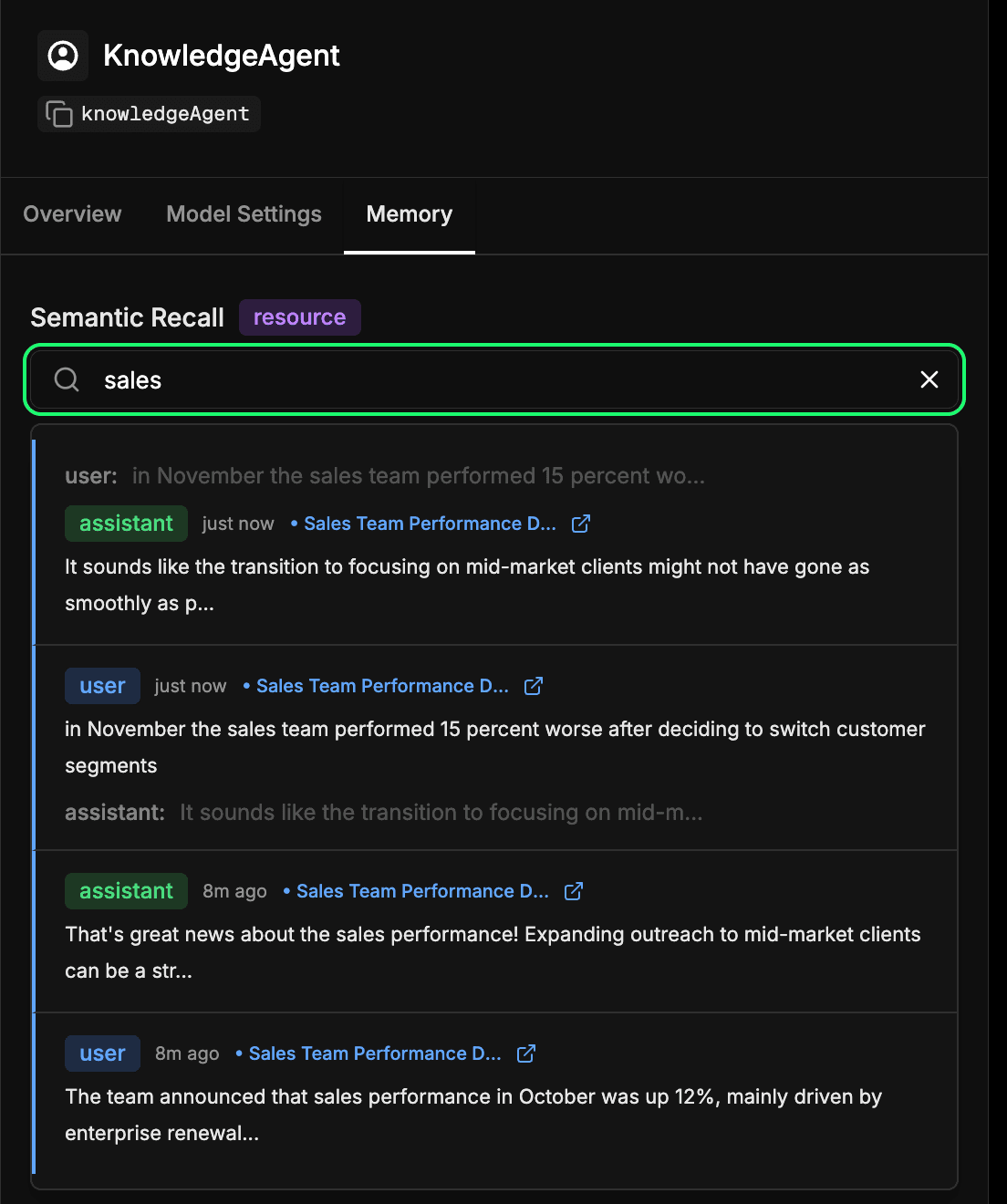
For a quick test to see if everything is wired correctly, give it some information like, “The team announced that sales performance in October was up 12%, mainly driven by enterprise renewals. The next step is to expand outreach to mid-market clients.” Next, start a new chat and ask a question like, “Which customer segment did we say we need to focus on next?” The knowledge agent should be able to recall the information you gave it from the first chat. You should see a response like:

Seeing a response like this means the agent successfully stored our previous message as embeddings in Elasticsearch and retrieved it later using vector search.
Inspecting the agent’s long-term memory store
Head over to the memory tab in your agent’s configuration in the Mastra Studio. This lets you see what your agent has learned over time. Every message, response, and interaction that gets embedded and stored in Elasticsearch becomes part of this long-term memory. You can semantically search through past interactions to quickly find recalled information or context that the agent learned earlier. This is essentially the same mechanism the agent uses during semantic recall, but here you can inspect it directly. In our example below, we’re searching for the term “sales” and getting back every interaction that included something about sales.
Conclusion
By connecting Mastra and Elasticsearch, we can give our agents memory, which is a key layer in context engineering. With semantic recall, agents can build context over time, grounding their responses in what they’ve learned. That means more accurate, reliable, and natural interactions.
This early integration is just the starting point. The same pattern here can enable support agents that remember past tickets, internal bots that retrieve relevant documentation, or AI assistants that can recall customer details mid-conversation. We’re also working towards an official Mastra integration, making this pairing even more seamless in the near future.
We’re excited to see what you build next. Give it a try, explore Mastra and its memory features, and feel free to share what you discover with the community.
Related Content

February 2, 2026
Cookbook for a production-grade generative AI sandbox
Exploring the recipe for a generative AI sandbox, giving developers a secure environment to deploy application prototypes while enabling privacy and innovation.

January 29, 2026
Building human-in-the-loop (HITL) AI agents with LangGraph and Elasticsearch
Learn what human-in-the-loop (HITL) is and how to build an HITL system with LangGraph and Elasticsearch for a flight system.
January 27, 2026
Using Discord and Elastic Agent Builder A2A to build a gaming community support bot
Learn how to connect Discord to Elastic Agent Builder's Agent-to-Agent (A2A) server to create a gaming community support bot.
January 22, 2026
Agent Builder now GA: Ship context-driven agents in minutes
Agent Builder is now GA. Learn how it allows you to quickly develop context-driven AI agents.
January 22, 2026
Building voice agents with Elastic Agent Builder
Exploring how voice agents work and how to build one using Elastic Agent Builder and LiveKit.